What should you look for when choosing?
Two similar creative monitors
A good fit if: you often switch between previews and references on different screens and want a similar look on both.
Trade-off: Two displays need more desk space and connections; both must be set up to suit your project.
Colour-critical primary monitor with a screen for tools
A good fit if: you judge colours on a dedicated preview monitor and mainly use the second screen for your timeline or panels.
Trade-off: Don’t assume colour approvals can be moved to the screen for tools without checking. Include calibration and, if necessary, a measuring device in your plans.
USB-C monitor with a laptop
A good fit if: you want one connection to handle both the video signal and your laptop’s power supply.
Trade-off: USB-C power delivery, DisplayPort output and support for two external displays are separate features, and each must be compatible with your specific computer.
First decide which screen will be used for colour approval, then plan the space and signal path for both displays.
| Criteria |
What to check before buying |
Who should pay particular attention? |
| Space for the preview and timeline |
Try your timeline, preview and text size at the resolution and scaling you plan to use; measure the width and stand depth of both monitors. |
If I want to keep the preview and timeline readable at the same time, usable screen space matters more than diagonal size alone. It’s a priority for around 33 % of consumers. |
| Colours in the preview |
Choose your output format and project colour space; check the colour mode, calibration options and whether you’ll need a measuring device. |
If you approve colours for a specific output format, you need a suitable preview that can be checked. Around 25 % of consumers prioritise colour assessment. |
| Connecting both displays |
Check your computer model and the number of displays it supports; for a daisy-chain setup, look for a compatible DisplayPort output on the first monitor. |
If I want to use two screens with my laptop and possibly charge it via USB-C, the whole connection chain must be compatible. This is the main buying priority for around 25 % of consumers. |
| Desk space and positioning |
Check the total width, stand depth, height adjustment and, where relevant, VESA dimensions of each model against your desk and mounting setup. |
If you need to fit both screens on an existing desk, plan for the monitor housings and stands together. Around 17 % of consumers focus primarily on space and positioning. |
Monitors for animation at Joybuy
The Joybuy products below are aimed at high-resolution animation workstations, where screen space, preview quality and laptop connectivity may all be important.
 No image available
INNOCN 40C1U 40-inch 5K monitor
The stated 40-inch screen size and PIP/PBP may suit a workstation with multiple video sources; check that the format will fit on your desk.
5K resolution of 5120 × 2160 pixels; IPS panel; PIP/PBP; USB-C with 65 W Power Delivery.
Joybuy
 No image available
INNOCN CB27U1 27-inch 4K UHD monitor
Its stated 4K resolution and IPS panel make it an option for detailed previews; check that its connections are compatible with your computer.
3840 × 2160 pixels; 120 Hz; PIP/PBP; USB-C with 90 W Power Delivery; height-adjustable stand.
Joybuy
 No image available
KTC M27P6 27-inch 4K Mini-LED monitor
The stated 4K UHD resolution and colour gamut figures may help you shortlist options; check which picture mode suits your output format.
4K at 160 Hz or FHD at 320 Hz; USB-C with 65 W; KVM; height-adjustable, tiltable and swivel stand.
Joybuy
 No image available
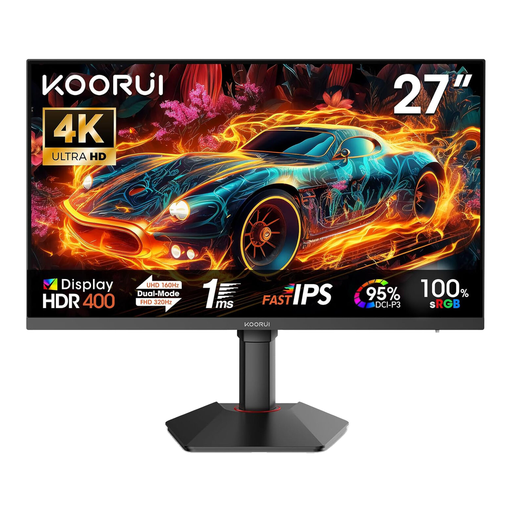
KOORUI G2741L 27-inch 4K UHD monitor
Its stated 4K UHD resolution and Fast IPS panel make it an option for high-resolution previews; colour gamut figures don’t replace checking your own colour workflow.
3840 × 2160 pixels at 160 Hz or FHD at 320 Hz; 2 × HDMI 2.1 and DisplayPort 1.4; height-adjustable, tiltable and with pivot function.
Joybuy
 No image available
MSI MAG 321UPDE QD-OLED 31.5-inch 4K monitor
The 31.5-inch format gives you more screen space than a compact model; check that you have room for it and that it suits your specific colour workflow.
3840 × 2160 pixels; QD-OLED; 10-bit colour depth; DisplayPort 1.4 and HDMI 2.1; height-adjustable with pivot function.
Joybuy
Frequently asked questions about using two monitors for animation
Is one USB-C cable enough for two external monitors?
Not automatically. A daisy-chain setup requires, among other things, a suitable DisplayPort output on the first monitor. You should also check that your computer supports it: according to Apple, the number of external displays supported by a Mac depends on the model, resolution and refresh rate.
How can I keep colour previews consistent across two screens?
First choose your output format and project working colour space, then select suitable display modes. If one screen is your main preview, make sure you check and profile it in particular; don’t use the second screen for tools to approve colours without checking it first.
What else might I need to prepare?
Depending on your setup, you may need a suitable connection method, cables, monitor arms or a calibration process. Check what’s included: LG notes that the Calibration Studio software isn’t supplied with the 27UP850K-W.
What rights apply when buying a monitor from a business seller?
Under EU information, consumer purchases of faulty goods are generally covered by a minimum two-year legal guarantee from the date of receipt; this is separate from a manufacturer’s warranty. Distance purchases generally come with a 14-day right to cancel, subject to the legal requirements and exceptions. Different rules may apply to business purchases.
Does the German workplace regulation apply to every home desk with two monitors?
No. ASR A6 sets out requirements for screen-based workstations in workplaces and teleworking environments, and expressly excludes use in private homes outside such workplaces. It should therefore not be treated as a general purchasing requirement for private buyers.


