What should you look for when choosing?
First, check whether you can read your spreadsheets and reference material at your usual text size. Next, check the connections for both screens, then measure the space you’ll need for the complete setup.
The approximate percentages below group consumers by their main purchase priority for the two-screen use case described here; they do not represent the market as a whole.
| Priority |
What to check before buying |
Who it matters most to |
| A readable workspace |
Open a typical dataset and its codebook at your usual text size. HP Store Germany lists the HP 524pn as a 24-inch monitor with a resolution of 1920 × 1200 pixels; Dell Germany lists the P2725D as a 27-inch monitor with a resolution of 2560 × 1440 pixels. |
When I check values against reference text side by side, I want to read both without constantly zooming in. Around 33% of consumers cite a readable spreadsheet and reference area as their top priority. |
| Connections for both screens |
Check your computer’s or dock’s video outputs, supported video modes, cables and charging requirements. EIZO Germany lists a USB-C output for daisy-chaining on the EV2495; compatibility with your computer needs to be checked separately. |
If I want my laptop to drive two external displays, the connection needs to work with the ports I already have. For around 27% of consumers, connecting both screens is the top priority. |
| Positioning and adjustability |
Measure your desk’s width and depth, including the monitor stands. Also check height adjustment and mounting options; Germany’s Federal Institute for Occupational Safety and Health outlines the scope of ASR A6 for workplaces and home offices. |
When I have two screens on my desk, I need an arrangement that I can position as required while leaving enough room to work. Around 20% of consumers prioritise positioning and adjustability. |
| The cost of the complete setup |
Factor in both devices and any connection accessories you need. The European Commission gives the energy consumption of electronic displays in kWh per 1000 hours; compare the labels for the specific models you’re considering. |
When I use two screens, I want to keep track of both the purchase price and the running costs of the whole setup. For around 20% of consumers, total costs and service life are the main priority. |
Monitors and portable displays at Joybuy
The range spans compact, portable displays and extra-wide workspaces. Before buying, check that your computer and existing monitor support the relevant connection and display type, and that the format will fit on your desk.
 No image available
GIGABYTE G27Q26 27-inch QHD monitor
The larger working view may suit you if you want to display spreadsheets and reference material on a bigger screen.
27 inches; 2560 × 1440 pixels; SuperSpeed IPS; 260 Hz (OC 275 Hz); 1 ms GTG.
View at Joybuy
 No image available
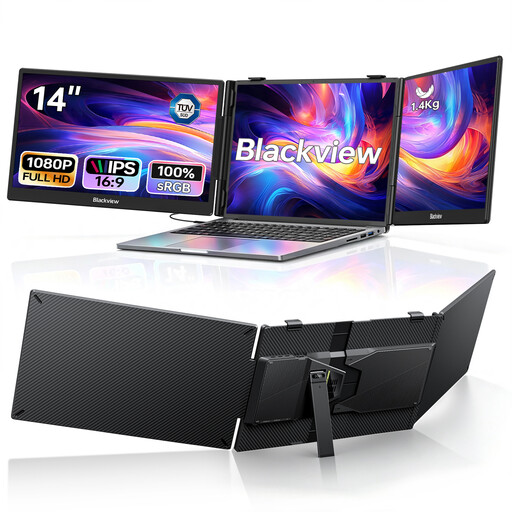
Blackview DCM5 Dual Portable Monitor
These two portable displays are designed for laptop setups when you need extra screen space on the go.
Two 14-inch screens; 1080p; IPS; USB-C; 100 W PD; product name specifies compatibility with laptops from 13 to 17.3 inches.
View at Joybuy
 No image available
INNOCN 40C1U 40-inch monitor
The wide format may suit you if you need a more expansive working view; be sure to factor in the space the monitor will take up.
40 inches; 5120 × 2160 pixels; IPS; 100 Hz; PIP and PBP. Product specifications state a width of 944,1 mm with the stand.
View at Joybuy
 No image available
Dell UltraSharp U4924DW 49-inch monitor
The extra-wide workspace could be a good option for side-by-side content if you have enough room.
49 inches; 5120 × 1440 pixels; 60 Hz; HDMI, DisplayPort and USB-C. Product specifications state a width of 1214,9 mm and a weight of 16,3 kg with the stand.
View at Joybuy
 No image available
Dell P2425HE 24-inch Full HD IPS monitor
The 24-inch format may suit you if you’re looking for a compact screen for a laptop setup.
24 inches; Full HD; IPS; USB-C; 3-year warranty according to the product name.
View at Joybuy
Frequently asked questions
Do I need two ports on my laptop to connect two external monitors?
Not necessarily: according to EIZO Germany, the EIZO EV2495 has a USB-C output for daisy-chaining. Still, check the video specifications of your laptop and monitor, as well as the cable, since the monitor output alone doesn’t confirm compatibility.
How should I position two monitors for extended periods of data checking?
Position the screens to suit your main task, then check readability, reflections and adjustability in your actual workspace. ASR A6, published by Germany’s Federal Institute for Occupational Safety and Health, applies to workplaces and home offices within its stated scope; it does not automatically apply to every home desk.
How do I compare the energy consumption of two monitors?
Compare the energy labels for the specific models. The European Commission gives the energy consumption of electronic displays in kWh per 1000 hours; when you have two devices, both figures matter.
Which energy label applies to monitors in Germany?
The European Commission classifies computer monitors as electronic displays, with an energy efficiency scale from A to G. Check the label for the specific model; ASR A6, by contrast, covers requirements for screen-based workstations within its scope.


