Gamers with a high-refresh-rate monitor
You want to keep viewing the second PC on your monitor at the resolution and frame rate you need. So check passthrough and recording separately; Elgato and AVerMedia each list their own signal modes.


First, choose a capture card based on the monitor mode you want to pass through and the resolution you want to record at: passthrough and recording are separate specifications. Then plan your audio connections and the connection to your recording PC. If you share a bedroom, you should also be clear about when your microphone might pick up other people’s conversations.
You want to keep viewing the second PC on your monitor at the resolution and frame rate you need. So check passthrough and recording separately; Elgato and AVerMedia each list their own signal modes.
You want to route game audio, headphones and your microphone deliberately, so that recording and monitoring work as intended and other people’s conversations aren’t captured by accident. AVerMedia and the OBS Project cover different aspects of audio setup; § 201 StGB concerns the unauthorised recording of privately spoken words.
If your recording PC is a laptop or you don’t want an internal PCIe card, check which USB connection you need, plan the cable route and check which monitor connections are available. Elgato lists USB 3.0 Type-C for the 4K S; an internal card such as the AVerMedia GC570D requires a suitable PCIe slot.
First check the monitor mode you need and the recording specifications separately, then consider the audio setup and connection to your recording PC.
| Buying criterion | What to check before buying | Who is this important to? |
|---|---|---|
| Monitor picture and recording | Compare the HDMI input, passthrough resolution and frame rate, and recording mode separately; only consider HDR or VRR if you need these modes. | I want to keep the monitor mode I need and plan my recording separately. Around 29% of consumers have exactly this priority. |
| Audio and privacy | Decide in advance where your game audio, headphones and microphone will connect; in OBS, check whether the same audio device is being captured twice. | I want to hear game audio through my headphones and record it deliberately, without accidentally capturing conversations in the room. Around 29% of consumers prioritise audio routing and privacy. |
| Connection and setup | Check for a USB connection or a free PCIe slot on your recording PC, and plan the cable route between the second PC, capture card and monitor. | If I’m recording on a laptop or have limited space, the connection needs to suit my existing setup. Around 24% of consumers put connection and setup first. |
| Full HD requirements | Match the recording resolution you need to the monitor mode; if the limit is 1080p60, check whether that is sufficient for both signal paths. | If my setup is designed for 1080p60, I want to cover both recording and monitor passthrough within that limit. Around 18% of consumers prioritise a suitable Full HD signal path. |
According to the manufacturer, the AVerMedia GC570D can pass through a signal of up to 2160p60 HDR, but records at a maximum of 1080p60 from its HDMI inputs.
Compare the recording and monitor output as separate specifications in the product data sheet.
An HDMI picture signal doesn’t automatically determine whether game audio will reach both your headphones and your recording. For certain models, AVerMedia describes an additional analogue audio connection.
Before buying, sketch out the signal path for game audio, headphones and your microphone, then check the connections on the exact model.
Depending on your existing setup, you may need extra audio cables or a different way to route the sound.
AVerMedia’s advertised 4K144 recording for the GC553G2 requires Streaming Center on Windows and MJPEG. Elgato also lists specific host requirements for the 4K S.
Check that the recording mode you want works with your operating system, software and recording PC connection.
In a shared bedroom, an active microphone may pick up other people’s conversations. § 201 (1) StGB concerns the unauthorised recording of privately spoken words.
Check which microphone is selected, listen to a short test recording and avoid accidentally recording other people’s conversations.
The range includes external USB models such as the 4K S and 4K X, as well as the internal 4K Pro. They offer different connection options and signal modes.
According to the manufacturer, the range spans the GC311, which is limited to 1080p60, external HDMI 2.1 options and the internal GC570D with two HDMI inputs.
In a 2022 manufacturer announcement, NZXT described the Signal 4K30 and HD60 as suitable for a two-PC setup too.
According to the manufacturer, the Ripsaw HD is an external capture card for PC or console signals.
This selection includes external USB capture cards with an HDMI input and passthrough for a second PC. Take particular care not to confuse the stated recording resolution with the monitor mode being passed through.
 No image available
For a USB setup where 1080p60 recording is sufficient and you want to pass through a 4K60 signal.
USB 3.0; 5 ports. 4K/60 Hz is listed for input and passthrough; recording is limited to 1080p/60 Hz.
 No image available
For a USB setup where you want to pass through an HDMI signal and record at up to 1080p60.
USB 3.0; 5 ports. The specifications list 4K/60 Hz for input and loop-through, and 1080p/60 Hz for recording.
 No image available
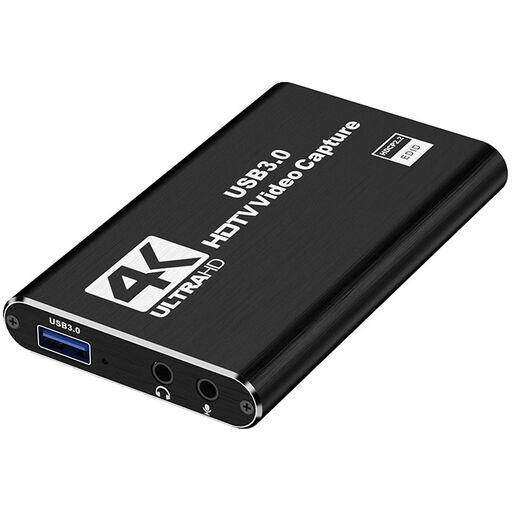
For a USB setup where you want to accept an HDMI signal of up to 4K30 and record at 1080p60.
4K passthrough; 1080p/60 Hz recording. The description also lists a microphone input and a headphone output.
 No image available
For a USB setup where you want to pass through a 4K60 signal but 1080p60 recording is sufficient.
USB 3.0; 5 ports. 4K/60 Hz is listed for input and passthrough, with recording at 1080p/60 Hz.
 No image available
For a USB setup where 4K passthrough and 1080p recording are sufficient.
USB 3.0; the description lists Windows, macOS and Linux. According to the description, performance may be limited when using a USB 2.0 connection.
Connect a suitable HDMI output on the second PC to the capture card’s HDMI input, then connect the card to the recording PC. If you’re using HDMI passthrough, connect the card’s HDMI output to the monitor. In OBS, add a “Video Capture Device” source and select a resolution and frame rate supported by the model; the connections you need depend on the specific model.
Check separately whether the second PC sends audio over HDMI or another output, and where your headphones are connected. The OBS Project warns of echo if the same audio device is captured both globally and as a scene source. AVerMedia also describes a model-specific analogue audio connection for the GC553G2 and GC551G2.
No. According to Elgato, HDCP-protected HDMI signals can’t be recorded using its capture devices. Whether you’re allowed to record or publish specific content is a separate matter.
Not without further consideration: § 201 (1) StGB concerns the unauthorised recording of another person’s privately spoken words. If other people might be audible, discuss the recording with them beforehand and position your microphone to avoid accidentally capturing their conversations.
If a product is faulty, you have statutory rights against the seller, which are separate from any voluntary guarantee. Online purchases generally come with a 14-day right to cancel. The Verbraucherzentrale explained these rules in articles published on 28 September and 13 August 2026; check your specific contract and any possible exceptions.