
Lieferung heute & morgen

Qualitätsgarantie

Willkommens-Angebote freischalten: KOSTENLOSE Lieferung | Bis zu 80 % RABATT | Kostenlose 30-Tage-JoyPlus-Testphase
App herunterladen
The search for the right custom mechanical keyboard can quickly become overwhelming. The market is filled with models that promise high levels of customisation and a premium typing experience. However, not every product advertised as "custom" lives up to this claim. Many users invest in expensive keyboards only to discover later that they fail to meet basic requirements for their regional market or suffer from hidden flaws. This guide will help you identify the crucial features and avoid common purchasing pitfalls.
Before you make a decision, you should be aware of the most common issues that often only become apparent after the purchase.
To make an informed decision, focus on the following technical features. These significantly determine the quality, durability, and user experience of your keyboard.
The case is more than just a shell. While plastic cases are lightweight and budget-friendly, a CNC-milled aluminium keyboard offers superior stability, feel, and durability. Even more important, however, is the mounting system—the way the PCB is secured inside the case. Advanced systems like a Leaf Spring Mount or Gasket Mount decouple the PCB from the case. This is achieved through flexible leaf springs or silicone gaskets that absorb vibrations, creating a significantly softer, quieter, and more consistent typing feel.
The Printed Circuit Board (PCB) is the heart of any custom keyboard. Two features are of central importance here:
Modern workspaces demand flexibility. A wireless mechanical keyboard with Tri-Mode connectivity (Bluetooth, 2.4 GHz wireless, and USB-C cable) offers maximum versatility for use with various devices like PCs, laptops, and tablets. Also, pay attention to the form factor. A 75% ISO-DE keyboard is a popular compromise: it is significantly more compact than a full-size keyboard but retains the dedicated F-keys and arrow keys that are indispensable for many users.
Here are some models tailored to specific user profiles that meet the quality criteria mentioned above.
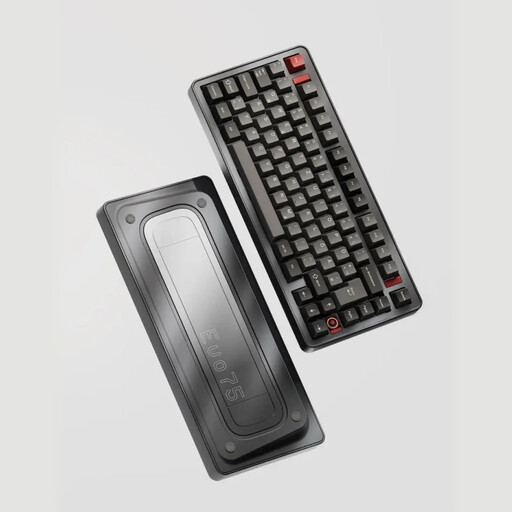
Why This Fits Their Persona: This user wants to control every aspect of their keyboard. The EVO75, with its hot-swap PCB, VIA compatibility, and high-quality leaf-spring mount, provides the ideal platform for in-depth modifications of switches, keycaps, and firmware.
This is a true custom mechanical keyboard, not a deceptive imitation. It features a correct ISO-DE layout and its VIA-compatible keyboard functionality prevents dependency on proprietary software.
The combination of a solid aluminium keyboard case and the flexible Leaf Spring Mount delivers a typing experience rarely found in pre-built keyboards. The Tri-Mode connectivity offers maximum flexibility.
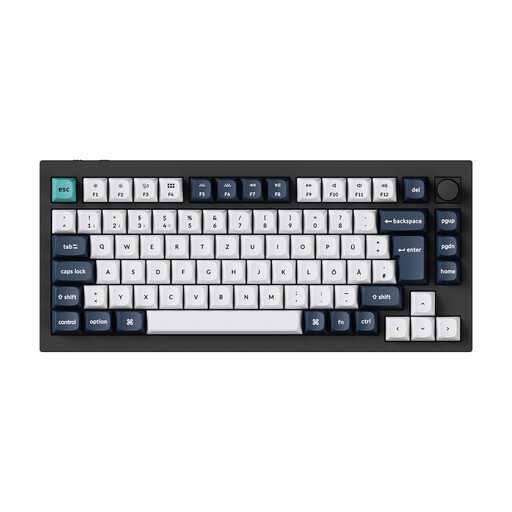
Why This Fits Their Persona: This user appreciates a high-quality, out-of-the-box experience but wants to keep the option for future customisation open. Keychron is an established brand that delivers a mature and reliable product.
This model bypasses the layout trap with a clearly declared ISO QWERTZ German layout. The double-gasket design prevents the harsh typing feel of simple tray-mount keyboards and addresses the issue of hidden structural weaknesses.
Offers a stable wireless connection (2.4 GHz with 1000 Hz polling rate) in a solid 6063 aluminium case. The proven QMK/VIA firmware ensures reliability and easy programming.

Why This Fits Their Persona: This user needs a reliable, high-performance mechanical keyboard for daily work but isn't interested in the hobbyist aspect of modding. Productivity features like multi-device switching and long battery life are the priority.
This model is not a "custom" keyboard in the enthusiast sense, and it doesn't pretend to be. It's an honest, high-quality pre-built keyboard with the correct German mechanical keyboard layout and a quiet, tactile feel for office environments.
Seamless connectivity for up to three devices (Easy-Switch) and smart, adaptive backlighting in a low-profile, professional design. The Logi Bolt technology ensures a secure and stable wireless connection.
We have compiled a complete, up-to-date list of products that fully meet these strict selection criteria and German safety regulations.
The ISO-DE layout is the standard in Germany and Austria. It is characterised by a two-row Enter key, a short left Shift key, and additional keys for umlauts (?, ?, ?) and the ?. The American ANSI layout has a single-row, wide Enter key and a different arrangement of special characters. For typing in German, an ISO-DE layout is essential.
For users who value flexibility, a hot-swap keyboard is a clear recommendation. It allows you to easily change the typing feel by swapping out switches without any technical knowledge (soldering). This increases the keyboard's longevity, as individual faulty switches can be replaced inexpensively instead of having to dispose of the entire keyboard.
An aluminium keyboard is robust but still requires care. A slightly damp microfibre cloth is sufficient for cleaning the surface. Avoid aggressive cleaning agents that could damage the anodisation or paint finish. A brush or compressed air can be used to remove dust and crumbs from between the keys. Always unplug the USB cable and turn off the keyboard before cleaning.