
Lieferung heute & morgen

Qualitätsgarantie

Willkommens-Angebote freischalten: KOSTENLOSE Lieferung | Bis zu 80 % RABATT | Kostenlose 30-Tage-JoyPlus-Testphase
App herunterladen
Choosing the right gaming mouse can be overwhelming, given the countless models and technical specifications available. Many manufacturers advertise with big numbers and marketing buzzwords that often have little practical relevance. This guide will help you understand the crucial criteria and avoid common purchasing traps, so you can make an informed decision for your PC setup.
Before we dive into the technical details, it's important to be aware of three common marketing traps that often lead to buyer's remorse.
To find the right gaming mouse for PC users, you should focus on a few, but decisive, technical features.
The sensor is the heart of every gaming mouse. Models from established manufacturers like PixArt (e.g., the PAW series) or proprietary sensors like the Logitech HERO are considered reliable.
The shape and weight of the mouse must suit your hand and grip style.
The choice between a wired and a wireless mouse, as well as the number of buttons, depends on your personal preferences.
Here are some recommendations tailored to different user profiles and their specific needs.
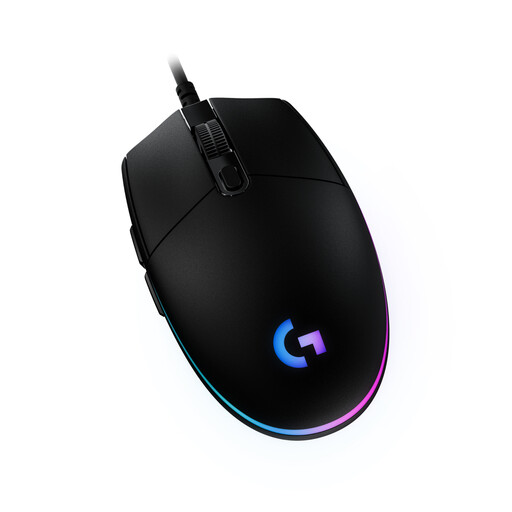
Why it's a great fit: Ideal for gamers seeking a reliable and affordable product. It delivers solid entry-level performance without compromising on fundamental quality.
This model focuses on a proven sensor with up to 8,000 DPI, which is more than sufficient for most use cases. It avoids the DPI myth, offering a stable and durable construction instead.
Offers a classic, comfortable design with 6 programmable buttons and customizable LIGHTSYNC RGB lighting via the Logitech G HUB software.
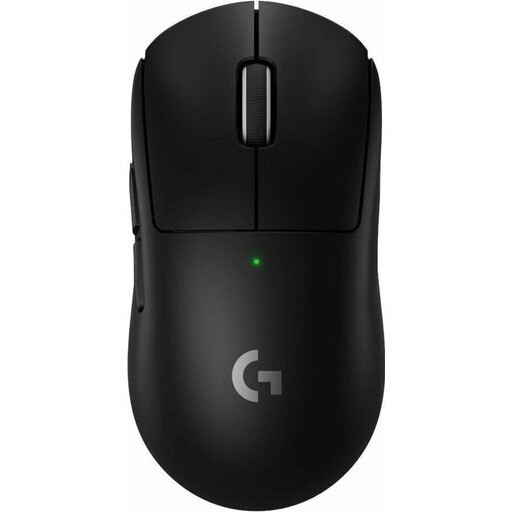
Why it's a great fit: Designed for professional players who demand maximum performance, low weight, and a lag-free wireless connection.
Achieves an extremely low weight of 60g without compromising structural integrity. The focus is on the high-precision HERO 2 sensor and reliable LIGHTSPEED technology, not on pure marketing numbers.
Combines an ultralight design with a professional-grade sensor (up to 44,000 DPI, 8K polling rate) and up to 95 hours of battery life for uninterrupted gaming.
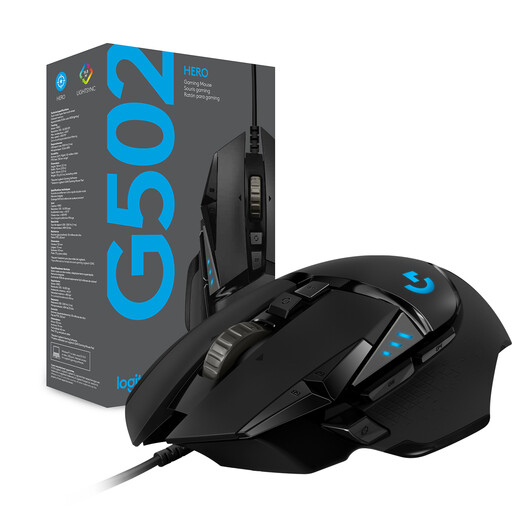
Why it's a great fit: Perfect for gamers who want a versatile mouse with extensive customization options for various games and tasks.
Instead of following the ultralight trend, this model opts for a robust, ergonomic shape and a tunable weight system. The HERO 25K sensor delivers top-tier performance based on precision, not marketing numbers.
Features 11 programmable buttons, a tunable weight system with five 3.6g weights, and a dual-mode hyper-fast scroll wheel for maximum control and comfort.
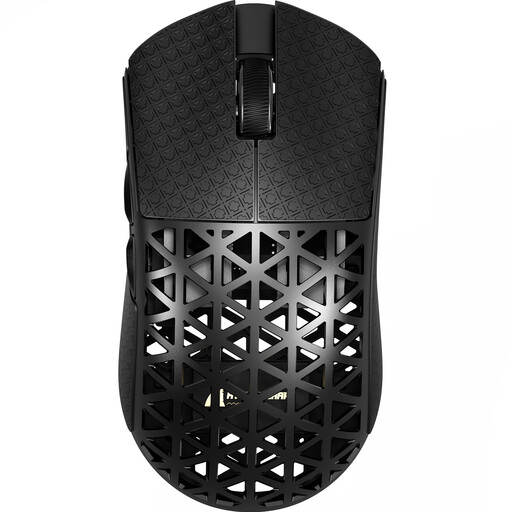
Why it's a great fit: For gamers where every gram counts. This mouse is engineered for maximum speed and minimal inertia, perfect for fast-paced FPS titles.
Despite being extremely light, it uses an injection-molded carbon fiber construction to ensure structural stability, avoiding the trap of a cheap, fragile feel. The high-end sensor ensures performance isn't sacrificed for weight.
Extremely low weight of approx. 42g, combined with an 8000 Hz wireless polling rate and a PAW3950MAX sensor for ultimate precision and responsiveness.
We have compiled a complete, up-to-date list of products that fully meet these strict selection criteria and local regulations.
The lifespan of a gaming mouse depends heavily on the quality of its switches and overall build quality. The durability of the switches is rated in clicks. Entry-level models are often rated for 10–20 million clicks, while high-end mice use mechanical or optical switches certified for 70 to 100 million clicks. With normal use, a good gaming mouse can last for several years.
Yes, modern wireless gaming mice are on par with wired ones in terms of performance. Technologies like low-latency 2.4 GHz wireless connections (e.g., Logitech LIGHTSPEED) provide a 1 ms response time, which is identical to wired mice. The main difference lies in convenience (no cable drag) and the need to recharge the battery.
DPI (Dots Per Inch) is a measure of mouse sensitivity. A higher DPI value means the cursor moves further across the screen with a smaller physical movement of the mouse. Most gamers do not need extremely high DPI values. It is more important that the mouse has an adjustable DPI function, so you can find the sensitivity that best suits your playstyle and screen resolution. Values between 800 and 3,200 DPI are a common and effective range.