If you’re editing long family videos and want to keep an eye on lots of tracks and a longer timeline, an ultrawide monitor could be a good fit. For viewing 4K footage at its native level of detail, a 4K model is the more obvious choice. Your planned output format and colour workflow also matter, as do the resolution, scaling and connections that work with your computer.
Which monitor is right for you?
Editing with multiple tracks
If you want to see your clips, audio tracks and tools all at once, you may prefer a wider workspace. Bear in mind that preview height and desk space matter too. Dell lists the UltraSharp U3425WE as having a 34.1-inch screen and a resolution of 3440 × 1440 pixels.
Family video for SDR output
If you’re judging colours for SDR output, look for a Rec.709 workflow that suits your output format rather than simply choosing a wide colour gamut. BenQ lists 99% Rec.709 for the PD2705U, while Adobe describes separate colour settings for sequences.
Editing on a laptop
If you want to connect your display signal, peripherals and, potentially, power through the monitor, check the USB-C features of both devices. ASUS lists DisplayPort over USB-C and 65 W Power Delivery for the PA279CV. The key is whether these meet your particular laptop’s needs.
What should you look for when buying?
Start by deciding on your output format and the main task you’ll be doing at your editing desk. Then compare the resolution, workspace and connections with your computer and editing software.
| Criterion |
What to check when buying |
Who is it important to? |
| Timeline and multiple tracks |
Aspect ratio, native resolution, desk space and window layout in your editing software. |
If I want to organise lots of clips and audio tracks at once, a timeline that’s easy to see matters to me. Around 33% of consumers put an overview of the timeline first. |
| Colour for your output |
Planned SDR or HDR output, sequence settings and a matching monitor mode. |
If I want to judge colours for planned SDR output, a suitable colour workflow matters more than a wide colour gamut on its own. Around 27% of consumers say colour workflow is their main concern. |
| Preview detail |
Footage resolution, native monitor resolution, preview size and scaling that keeps on-screen controls easy to read. |
If I want to check fine image detail, I look for a suitable native resolution and a preview that’s large enough. Around 20% of consumers put checking detail first. |
| Laptop connectivity |
Your computer’s video output and USB-C features, plus the power delivery and peripheral connections you need. |
If I want to connect my existing laptop to my editing desk, the picture connection and power supply need to meet its requirements. Around 20% of consumers make laptop connectivity their main concern. |
Avoid common misconceptions
-
A wider screen means a native 4K preview
Dell lists the UltraSharp U3425WE as having a resolution of 3440 × 1440 pixels. The 4K models mentioned — the BenQ PD2705U, ASUS PA279CV and EIZO CS2740 — each have a resolution of 3840 × 2160 pixels. A wider workspace alone doesn’t provide the same native image height.
Decide whether a longer timeline or a native view of image detail matters more to you when editing, and factor in window layout and scaling too.
-
A DisplayHDR logo proves a monitor is suitable for colour-critical HDR viewing
LG lists DisplayHDR 400 for the 27UP850K-W. Adobe describes different colour settings for SDR and HDR sequences; the logo alone doesn’t tell you whether the monitor and workflow are suitable for the HDR viewing you want to do.
First decide whether you’ll actually be outputting in HDR, then check the monitor features and setup you’ll need for that workflow.
-
A USB-C port provides enough power for every laptop
These specifications apply to specific models: ASUS lists 65 W Power Delivery for the PA279CV, while EIZO lists up to 60 W over USB-C for the CS2740. Whether that’s enough depends on your laptop.
Check separately whether your laptop’s port supports the video connection you need and whether the listed charging power is sufficient.
Depending on your laptop, you may also need to keep its separate power adapter at your workstation.
Relevant brands at a glance
Dell
The UltraSharp U3425WE is an example of a wide workspace for your timeline.
- Dell lists a 34.1-inch screen and a resolution of 3440 × 1440 pixels for this model.
- Its native image height is below 4K UHD; this doesn’t tell you anything about the colour quality of other Dell models.
BenQ
The PD2705U is a 27-inch 4K example for an SDR workstation geared towards Rec.709.
- BenQ lists 99% Rec.709 and 99% sRGB for this specific model.
- These are manufacturer specifications, not independently measured results.
ASUS
The ProArt PA279CV combines 4K resolution with a Rec.709 specification and USB-C connectivity.
- ASUS lists 100% Rec.709 and DisplayPort over USB-C with 65 W Power Delivery for the PA279CV.
- The charging power needs to suit your laptop; these specifications don’t apply to the entire ProArt range.
EIZO
The ColorEdge CS2740 is designed for workflows that use a 4K preview and hardware calibration.
- EIZO lists a resolution of 3840 × 2160 pixels and hardware calibration for the CS2740.
- The extra benefit of calibration depends on whether you actually incorporate it into your workflow.
LG
The UltraFine 27UP850K-W is a 27-inch 4K option with USB-C and an adjustable stand.
- LG lists 95% DCI-P3 as a typical value and specifies DisplayHDR 400.
- These specifications alone don’t prove that it’s suitable as a colour-critical HDR reference monitor.
Joybuy monitors for checking 4K detail
This Joybuy selection features 4K monitors for checking detail in family videos. Make sure the colour mode, connections and any charging power also suit your output format and computer.
 No image available
TCL 32x3A 32-inch OLED monitor, 4K UHD
For checking detail in video footage; the product name specifies 4K UHD with a resolution of 3840 × 2160 pixels.
View at Joybuy
 No image available
INNOCN CB27U1 27-inch 4K UHD monitor
For checking detail in video footage; the product name specifies IPS and a resolution of 3840 × 2160 pixels.
View at Joybuy
 No image available
KTC M27P6 27-inch Mini LED monitor, 4K UHD
For checking detail in video footage; the product name specifies 4K UHD with a resolution of 3840 × 2160 pixels.
View at Joybuy
 No image available
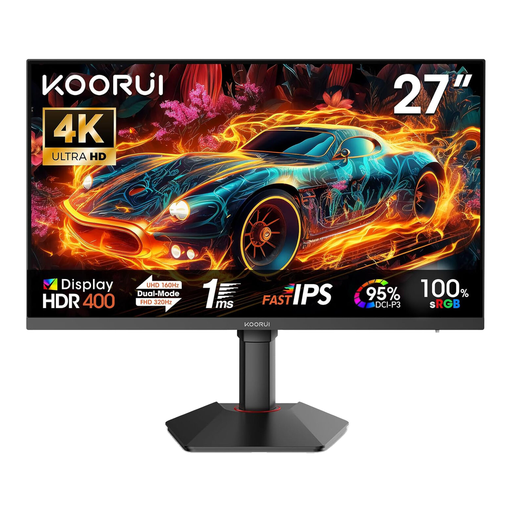
KOORUI G2741L 27-inch 4K UHD monitor
For checking detail in video footage; the product name specifies 4K UHD with a resolution of 3840 × 2160 pixels.
View at Joybuy
 No image available
MSI MAG 321UPDE 31.5-inch QD-OLED monitor, 4K UHD
For checking detail in video footage; the product name specifies a resolution of 3840 × 2160 pixels.
View at Joybuy
Frequently asked questions
Does a monitor for family videos need to be 4K?
Not necessarily. If your main priority is keeping an eye on lots of tracks, a wider workspace may matter more. For viewing 4K footage at its native level of detail, choose a monitor with a resolution of 3840 × 2160 pixels. Remember to consider preview size and scaling too.
How do I match the colours to my output?
First, decide on the output format for your sequence, then choose a suitable monitor mode. Adobe describes different settings for SDR and HDR workflows; a wide colour gamut isn’t a substitute for matching your settings.
Is USB-C enough to connect and charge my editing laptop?
That depends on your laptop’s features and power requirements. ASUS lists 65 W Power Delivery for the PA279CV and EIZO lists up to 60 W for the CS2740. Also check whether your computer’s USB-C port supports the video connection you need.
What should I do if there’s a fault, and how should I dispose of an old monitor?
In Germany, the seller is responsible for resolving faults; the Verbraucherzentrale distinguishes this from a voluntary manufacturer’s warranty. The Umweltbundesamt advises against putting electrical equipment in household waste. Use the designated return or collection services instead.


