For long demonstrations with multiple audio tracks, an ultrawide monitor is the better choice if you want the timeline and waveforms visible side by side; for checking fine detail and working in a defined SDR colour space, a 4K model is more suitable. Your editing software synchronises separately recorded audio tracks. When choosing a monitor, focus on a clear window layout, the right resolution and ports that are compatible with your laptop.
Which monitor is right for you?
Editing with multiple audio tracks
When editing longer demonstrations, you’ll want to keep the footage, timeline and separately recorded audio in view. Adobe explains how to synchronise separately recorded audio and video clips in Premiere, while Blackmagic Design describes waveforms as a visual aid when editing.
Checking picture quality and colour
If you need to inspect fine detail or work to a defined SDR output colour space, weigh up the resolution and suitable colour modes. Manufacturers’ information about colour spaces and presets applies to the specific models in question.
Editing on a laptop
If you edit on a laptop, the video output and power supply need to suit your particular computer. Check the ports and the stated USB-C power delivery of the monitor model you’re considering.
What to look for in an editing setup
First decide whether you need more room for your timeline and audio tracks or want to inspect the preview in greater detail. Then check that the laptop connection and monitor setup will work at your editing desk.
| What matters to you |
What to check before buying |
Who is it important for? |
| Timeline and audio tracks |
Aspect ratio, horizontal and vertical resolution, desk space and a clear window layout. |
If I edit long demonstrations, I want to see waveforms alongside the preview and editing panels. Around 40% of consumers say an overview of the timeline is their top priority. |
| Picture detail and colour mode |
Resolution, a suitable SDR colour mode and, if needed, the calibration process. |
If I’m checking picture detail or a defined SDR output, I want to choose a resolution and colour mode that suit my project. Around 30% of consumers prioritise picture and colour checking. |
| Connecting a laptop |
Video output, required charging power, cables and ports on the exact monitor variant. |
If I edit on a laptop, I want the monitor to connect to my computer for both the picture signal and power. Around 20% of consumers consider laptop connectivity their main priority. |
| Ergonomics and readability |
Desk space, scaling, and the height and tilt adjustment available on the specific model. |
If I need to keep the preview, waveforms and controls in view for long periods, a clear, well-positioned workspace matters to me. Around 10% of consumers name ergonomics as their top priority. |
Common monitor-buying mistakes
-
Assuming a wider timeline means a full-height 4K preview
The ultrawide examples documented by Lenovo PSREF and LG Deutschland offer 3440 × 1440 pixels; the UHD models considered here have 3840 × 2160 pixels. The wider format gives you a different workspace layout, but fewer vertical pixels.
Choose based on whether you value more room side by side or more vertical pixels for the preview.
-
Confusing colour gamut coverage with a correctly configured workflow
BenQ lists model-specific sRGB and Rec.709 specifications for the PD2705U; ASUS lists a Rec.709 mode, among others, for the PA279CRV. These specifications don’t automatically confirm that your project is set up correctly or that every individual unit is accurate.
Check the output colour space, selected monitor mode and calibration process separately, if needed.
-
Assuming USB-C guarantees one-cable compatibility
A USB-C port alone doesn’t tell you whether your laptop can output a video signal through it or receive enough power to charge.
Check your laptop’s video output and charging requirements against the specifications for the exact monitor variant.
Key brands to consider
Lenovo
The ThinkVision P34WD-40 is a 34-inch example of a wide 21:9 editing layout.
- Lenovo PSREF lists a 3440 × 1440 resolution and 3800R curvature for this model.
- Its resolution has fewer vertical pixels than the 4K models considered here; this doesn’t mean the same is true of all ThinkVision monitors.
LG
The UltraWide 34WR55QC-B is an example of a monitor with room for a wide timeline and USB-C connectivity.
- LG lists a 3440 × 1440 resolution, 21:9 aspect ratio, height adjustment and 65 W USB-C power delivery for this model.
- LG Deutschland marks the 34WR55QC-B as “No longer available”, so its specifications are useful for comparing formats, but this model isn’t a current buying recommendation.
BenQ
The DesignVue PD2705U is a 27-inch 4K example with sRGB and Rec.709 specifications.
- BenQ lists 99% sRGB and Rec.709 coverage, as well as Delta E ≤ 3, for this model.
- These are manufacturer specifications, not an independent measurement of an individual unit. The 16:9 format offers less horizontal space than 21:9.
ASUS
The ProArt PA279CRV is a 27-inch 4K example with selectable colour modes and USB-C.
- ASUS lists a Rec.709 mode, 96 W USB-C Power Delivery and height adjustment, among other features.
- Check the colour specifications and whether the connection suits your particular laptop separately.
EIZO
The ColorEdge CS2740 is a 4K option for buyers who use a hardware calibration workflow.
- EIZO documents a 3840 × 2160 resolution and hardware calibration with ColorNavigator for the CS2740.
- This feature doesn’t solve any specific problem if all you need to do is synchronise audio recordings.
Joybuy monitors for editing and picture checking
This selection includes ultrawide models for a wider timeline and 4K monitors for checking picture quality, including USB-C options for laptop-based editing setups.
 No image available
INNOCN 40C1U, 40 inches, 21:9
The 21:9 format and stated resolution suit an editing setup where you want a wide layout for your timeline and preview.
5120 × 2160 pixels; USB-C with 65 W Power Delivery; 99% sRGB; PIP/PBP; height-adjustable.
View at Joybuy
 No image available
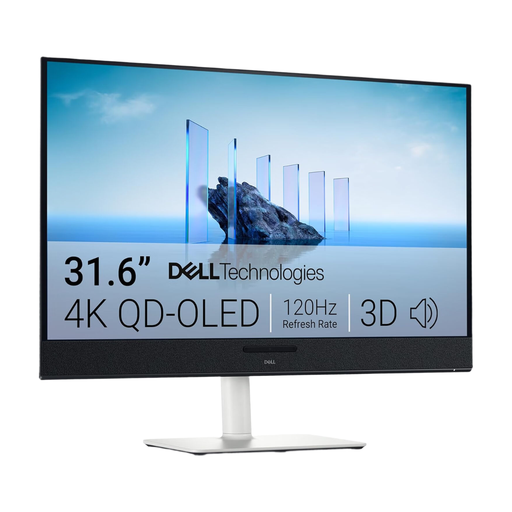
Dell Plus S3225QC, 31.6 inches, 4K
The stated 4K resolution suits an editing setup where checking fine picture detail is important.
3840 × 2160 pixels; QD-OLED; USB-C with 90 W Power Delivery; height-adjustable.
View at Joybuy
 No image available
MSI PRO MP273UPDE E6, 27 inches, 4K
The 4K resolution and sRGB picture preset suit an editing setup where you want to check picture detail and an SDR mode.
3840 × 2160 pixels; 16:9; 60 Hz; 10-bit colour depth; height-adjustable stand.
View at Joybuy
 No image available
INNOCN CB27U1, 27 inches, 4K UHD
The stated 4K resolution is suited to checking fine picture detail. USB-C may be useful for a laptop-based editing setup, provided it’s compatible with your computer and charging needs.
3840 × 2160 pixels; IPS; 120 Hz; USB-C with 90 W Power Delivery; height-adjustable.
View at Joybuy
 No image available
ASUS ROG Swift OLED PG32UCDMR, 32 inches, 4K
The stated 4K resolution suits an editing setup focused on checking detail. Check separately that the USB-C connection works with your laptop.
3840 × 2160 pixels; 16:9; QD-OLED; USB-C with 90 W Power Delivery; height-adjustable.
View at Joybuy
Monitor FAQs for video editing
Can a special monitor synchronise camera footage with external audio?
No, that’s the job of your editing software. Adobe explains how to combine separately recorded audio and video clips in Premiere; Blackmagic Design describes synchronisation in DaVinci Resolve using methods such as timecode or audio waveforms. Choose your monitor for its workspace and connections, not as a replacement for these features.
How should I set up my screen for audio editing?
Show the audio tracks and waveforms you need in your editing software, then check that the timeline, preview and controls are easy to read at your chosen scaling. Blackmagic Design describes waveforms as a visual aid for locating sections of speech.
What ongoing costs and rights should I consider when buying in Germany?
For monitors that require an energy label, compare the EU energy label and product information sheet rather than estimating power consumption from screen size alone. When buying as a consumer, distinguish your statutory rights against the seller from a voluntary guarantee. Verbraucherzentrale explains your rights when new goods are faulty within two years of receipt.


