Designers with lots of windows open
You want to keep your design, browser preview and references in view at the same time, so your first checks are usable width and readability.


For landing page design at a shared desk, an ultrawide monitor is a good fit if its width suits the available desk space and your viewing distance. Start by prioritising a workspace that’s easy to read. If you regularly switch between laptops, also check video output, KVM and charging power. For reliable colour matching, look at specific colour gamut figures and check the display in your own workflow rather than relying on an HDR label alone.
You want to keep your design, browser preview and references in view at the same time, so your first checks are usable width and readability.
You share peripherals or switch between laptops. The right connections, KVM and enough charging power can make it easier to switch between devices.
For web graphics, you want to understand the stated colour gamut and check how colours appear in your own workflow.
Start with usable workspace and readability. Then check your computer’s connections and colour requirements, and finally make sure the monitor will fit the shared desk.
| What matters when buying | What to check | Who is it most important for? |
|---|---|---|
| Space for your design, preview and references | Check the native resolution and make sure the scaling is easy to read on your computer. BenQ and LG list 3440 × 1440 pixels for the PD3420Q and 34U650A-B respectively. | If you need room for your design, preview and references side by side, usable width is your priority. Around 31% of consumers are also likely to consider workspace their most important buying priority. |
| Switching between laptops and peripherals | Check video output, the charging power you need, USB connections and KVM for the exact model. EIZO lists KVM for the EV3451X; BenQ lists up to 65 W, Dell up to 90 W and EIZO up to 94 W of USB-C charging power for their respective models. | If you switch between laptops and shared devices at your desk, you’ll want to avoid unnecessary plugging and unplugging. Around 25% of consumers are likely to put switching between computers first. |
| Consistent colours for web graphics | Compare the exact model’s stated colour gamut with your workflow, and check how colours look. BenQ lists 100% sRGB and 98% DCI-P3 for the PD3420Q; LG typically lists 99% sRGB for the 34U650A-B. | If you need to match colours precisely for web graphics, clear specifications and checking the display in your own workflow are important. Around 25% of consumers are likely to consider colour reproduction their top buying priority. |
| Adjusting the monitor to suit different users and desk space | Check the stand’s dimensions, height adjustment range and available desk space. BenQ lists 150 mm of height adjustment for the PD3420Q. For display screen workstations covered by ASR A6, you should also consider the task and viewing distance. | If the monitor needs to suit different seating positions at a shared desk, footprint and adjustability matter. Around 19% of consumers are likely to prioritise ergonomics and space requirements. |
The monitor’s charging power needs to match your laptop’s requirements. Both devices must also support video output.
Check the connections and power requirements of every laptop you plan to use against the specifications for the exact monitor model.
If the charging power isn’t enough, you may still need a separate power adapter or docking solution.
Colour gamut figures are manufacturer specifications for a particular model, not a measurement of the individual monitor at your desk.
Check the right colour mode and how the display looks in your own workflow. If needed, plan a documented calibration process.
The stand takes up extra depth, which you may also need for input devices and other users at a shared desk.
Compare the full footprint, including the stand, and its adjustment range with the space available at your workstation.
If the monitor and your input devices won’t fit on the desk together, you may need to arrange them differently.
The DesignVue PD3420Q is aimed at people who want a spacious workspace alongside documented colour gamut specifications.
The FlexScan EV3451X is an office-focused option for people who switch between computers.
The UltraSharp U3425WE combines a spacious workspace with an integrated hub.
According to the manufacturer, the UltraWide 34U650A-B offers a spacious workspace and a stated sRGB figure.
The 34B2U6603CH/01 business model is designed for shared workstations that need a range of connections and integrated features.
These options offer spacious workspaces for designs, previews and references. Check the resolution, aspect ratio and footprint against your shared desk.
 Image unavailable
The stated resolution gives you plenty of room to work across several views.
The product title lists a 1500R curve and 100% sRGB. It also states that the model has no speakers.
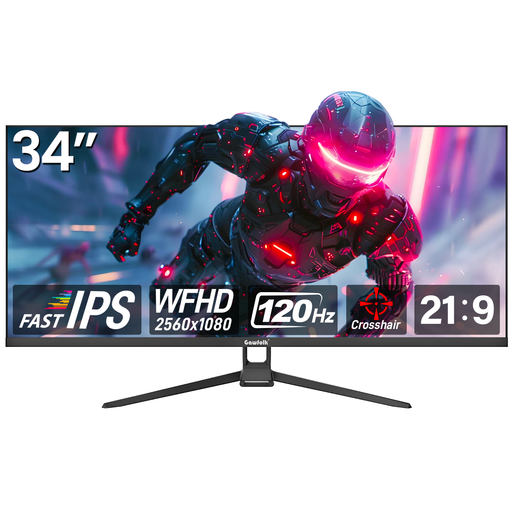 Image unavailable
This flat 34-inch display is described as an ultrawide monitor for viewing several work windows side by side.
The product title lists 120 Hz, while the product description specifies a 21:9 aspect ratio.
 Image unavailable
The stated UWQHD resolution gives you plenty of room for design work and previews.
The product title lists 165 Hz, a VA panel and a 1500R curve, as well as VESA 75 × 75 mm.
 Image unavailable
The 21:9 aspect ratio and stated resolution provide a spacious workspace.
The product title lists a 1500R curve and VESA 75 × 75 mm. Check that the setup suits your desk.
 Image unavailable
This 49-inch 32:9 display is designed for an especially wide workspace. Check that you have enough desk space before buying.
The product title lists 165 Hz, a height-adjustable stand, a 1500R curve and 120% sRGB.
Compare the dimensions, including the stand, with the available desk space, and check the adjustment range for the people who will use it. For workplace display screen workstations covered by ASR A6, the display should suit the task and viewing distance. The German Federal Institute for Occupational Safety and Health does not set a blanket minimum ultrawide size for every purchase.
Not necessarily. Check that both laptops support the required video output and charging power, and that the monitor has the connections needed for KVM. BenQ lists up to 65 W of USB-C power for the PD3420Q, while EIZO lists up to 94 W for the EV3451X. The manufacturers’ specifications still need to be checked against your devices.
Choose the colour mode that suits your project and check how the display looks in your own workflow. A factory calibration report listed for the BenQ PD3420Q documents its initial settings, but not every condition at your workstation over time.
If the space is a display screen workstation covered by German workplace regulations, ASR A6 sets out more detailed requirements for its design. Whether a particular shared desk is covered depends on how it is actually used at work. These rules are not assumed to apply to a desk used purely at home.
With a private online purchase, you generally have a 14-day right to cancel. The consumer advice centre says the period starts from the conclusion of the contract or receipt of the goods. Your statutory rights if a product is faulty are against the seller and are separate from any voluntary manufacturer’s warranty. Consumer rights do not necessarily apply in the same way to business purchases.