Who these monitors are for

Students working with colour-critical textures

When comparing transitions between UV islands with how they look on a 3D model, consider the right working colour space, potential display issues and whether calibration is needed. EIZO Germany explains that a colour gamut that is too small and panel uniformity issues cannot simply be calibrated away.

Students with limited desk space

If you want to keep your image view and tools open side by side, you’ll need to fit both the screen and its stand into the available space. The LG ultrawides compared here differ in size and resolution, so check the dimensions and usable screen height of the specific model.

Students connecting a laptop

If you switch between working on the go and using a fixed workstation, your laptop, cable and monitor all need to support the video connection you want to use. Dell lists USB-C power delivery of up to 90 W for the P3425WE; whether that suits your laptop depends on its port and power requirements.

What to look for when buying

Buying priority What to look for Who it matters most to
Colours and seam details Check the model’s specifications against your project’s colour space; consider calibration needs and display uniformity. If I need to assess subtle colour and seam differences, I don’t want to rely on a colour gamut figure alone. Around 33% of consumers put colour reproduction first.
Two views side by side Check how your own window layout works at the native resolution and your preferred scaling. If I want to see the UV texture, 3D model and tools at the same time, usable screen space matters to me. Around 27% of consumers have this as their main priority.
Desk space Measure the available width and depth, then compare them with the dimensions of the specific model, including its stand. If space is tight on my student room desk, the monitor and stand need to fit. Around 20% of consumers put available desk space first.
Laptop connection Make sure the video output, monitor input, cable and required charging power are compatible. If I also want to use the monitor with my laptop, I need a suitable video connection and, if necessary, enough charging power. For around 20% of consumers, laptop connectivity is their top buying priority.

Avoid common misconceptions

  • A 34-inch screen automatically gives you enough room for images and tools

    Ultrawide models can have different vertical resolutions. The stand and scaling also affect how much desk space is left and how much content you can read at once.

    Compare the native resolution with your window layout, and measure the space needed for the specific model and its stand.

  • A wide colour gamut guarantees accurate seam checks

    A stated colour gamut coverage figure does not, on its own, confirm that the monitor is set up correctly or displays colours evenly across the whole panel.

    Compare your project’s colour space with the model’s specifications, and consider calibration needs and display uniformity for colour-critical work.

    Calibration and checking the specific display may involve extra work.

  • USB-C on a monitor guarantees a one-cable connection

    A monitor’s charging power alone doesn’t tell you whether your laptop’s USB-C port can also output the video signal you need.

    Check your laptop’s port, supported video mode, cable and power requirements against the specifications for your devices.

An overview of relevant models from leading brands

ASUS

The ProArt PA348CGV is a 34-inch IPS ultrawide with a resolution of 3440 × 1440 pixels, for buyers who want to check documented colour specifications.

  • ASUS lists 100% sRGB, 98% DCI-P3 and ΔE < 2 for this model. These are manufacturer specifications, not an independent measurement of the device on offer.
  • Check that the available desk space, including room for the stand, and the ports suit your setup.

BenQ

The DesignVue PD3420Q is a 34-inch IPS ultrawide designed for creative workflows.

  • BenQ lists 100% sRGB, 98% DCI-P3 and a calibration report included in the box for this model.
  • These specifications do not independently confirm colour uniformity or suitability for every project colour space.

LG

The 34U650A-B and 29U511A-B come in different sizes and resolutions, so you can weigh up the options according to your space and preferred screen height.

  • LG lists a resolution of 3440 × 1440 pixels and a typical value of 99% sRGB for the 34U650A-B; the model is described as colour-calibrated at the factory.
  • The 29-inch 29U511A-B model reviewed has a resolution of 2560 × 1080 pixels. Specifications for one model do not automatically apply to the other.

Dell

The Pro P3425WE is a 34-inch work monitor for anyone considering laptop connectivity as well as screen space.

  • Dell lists USB-C power delivery of up to 90 W and an RJ45 port for this model.
  • This does not mean it is compatible with every laptop, or that it is proven suitable for colour-critical texture work.

AOC

The Pro-Line CU34P3CV is a 34-inch ultrawide with a curved VA panel, and could be an option if connectivity is a priority.

  • AOC describes this model as having a resolution of 3440 × 1440 pixels and a VA panel.
  • Check the regional specifications of the specific listing and assess the display for yourself before choosing it for colour-critical seam checks.

Ultrawide monitors at Joybuy

The following Joybuy models offer wide workspaces for viewing multiple windows. They differ in areas such as resolution, panel specifications and connectivity, so check which option suits your space and workflow.
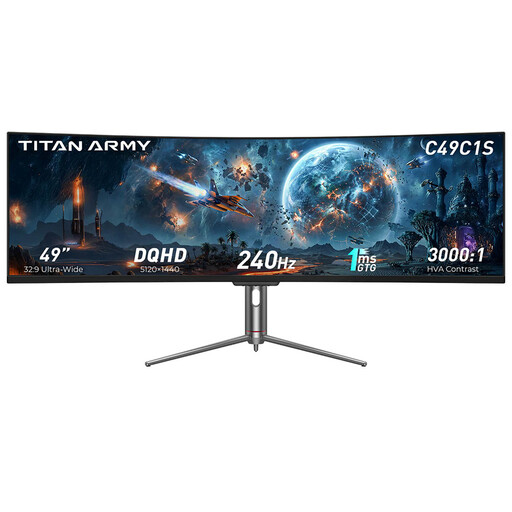
TITAN ARMY C49C1S 49-inch ultrawide monitor

TITAN ARMY C49C1S 49-inch ultrawide monitor

The 32:9 format may suit two work views side by side; measure your available space first.

Listed features include a resolution of 5120 × 1440 pixels, an HVA panel, 1800R and 240 Hz. The product description also lists factory calibration with ΔE < 3, as well as PIP/PBP and KVM; these are product specifications, not an independent measurement of the specific device.

View at Joybuy

CRUA 49-inch DQHD ultrawide monitor

CRUA 49-inch DQHD ultrawide monitor

The wide display may work well for multiple windows side by side; compare the monitor’s dimensions with your desk.

The product specifications list a resolution of 5120 × 1440 pixels, a 32:9 format, a VA panel, 165 Hz and 1500R. 120% sRGB is also listed; this figure alone does not confirm how your project’s colour space will look or provide an independent measurement.

View at Joybuy

INNOCN E34A1R 34-inch ultrawide monitor

INNOCN E34A1R 34-inch ultrawide monitor

The listed resolution may suit multiple work views; check that windows and tools remain easy to read at your chosen scaling.

The product specifications list a resolution of 3440 × 1440 pixels, a VA panel, a 21:9 format, PIP/PBP, HDMI and DisplayPort.

View at Joybuy

INNOCN 40C1U 40-inch IPS ultrawide monitor

INNOCN 40C1U 40-inch IPS ultrawide monitor

The high listed resolution may suit multiple work views; even with a large display, measure how much space you’ll need.

The model is listed with a resolution of 5120 × 2160 pixels, an IPS panel, PIP/PBP and USB-C with 65 W power delivery. The title and product description also list ΔE < 2 and a calibration report; these are product specifications, not an independent assessment of the device on offer.

View at Joybuy

MSI Modern MD342CQPWDE 34-inch ultrawide monitor

MSI Modern MD342CQPWDE 34-inch ultrawide monitor

The 21:9 format may suit work views open side by side; check the screen size against your desk.

The product specifications list a resolution of 3440 × 1440 pixels, a curved VA panel and 120 Hz.

View at Joybuy

Frequently asked questions

How do I check a texture seam on an ultrawide monitor?

Compare the texture in the image or UV view with how it looks on the model in the 3D view. The Blender Foundation documents both views for Texture Paint; whether they’re easy to read side by side depends on your window layout and scaling.

Do sRGB or DCI-P3 specifications mean I don’t need to calibrate?

No. Compare the colour space you need for your project with the specifications of the specific model, and consider its settings and uniformity for colour-critical work. EIZO Germany points out that a colour gamut that is too small or panel uniformity issues cannot simply be calibrated away.

Is one USB-C cable enough to connect and charge my laptop?

Only if your laptop’s USB-C port supports video output and the cable and monitor are suitable for the connection. Dell lists power delivery of up to 90 W for the P3425WE; compare this with your laptop’s power requirements.

How can I compare monitors’ energy consumption?

Compare the energy label and consumption figures for the exact model being offered. The European Commission describes an A to G scale for computer monitors covered by EU energy labelling rules; day-to-day consumption also depends on how you use the monitor and its settings.

What are my rights when buying online in Germany if I change my mind or find a fault?

For an online consumer purchase, you generally have a 14-day right to cancel, which you need to exercise with the retailer. Your statutory rights if goods are faulty are against the seller and are separate from any voluntary manufacturer’s warranty; the Verbraucherzentrale generally states two years for newly purchased goods.