Who is an ultrawide monitor for?

Checking UVs and previews

If you compare texture seams in the UV view and on the 3D model, having windows side by side can make your workflow easier. The Blender Manual explains how to display a textured object in the 3D Viewport, while TÜV SÜD suggests an UltraWide screen as a way to keep several windows in view at once. What matters is whether both views are large enough in your layout.

Working with colour-critical content

If you’re assessing colour and brightness transitions as well as seams, choose colour modes to suit your output and distinguish manufacturer claims from measurements of a specific unit. BenQ and ASUS list colour modes for certain models; in 2022, PRAD described the display on its tested BenQ PD3420Q as neutral and uniform. This is a historical measurement of one unit, not proof that every example performs the same way.

Working quietly and making the most of your space

If you work in a quiet room or have limited space, check how noisy the specific monitor is and measure the space it will occupy, including the stand. If you’re using a laptop, its video output and charging requirements must also be compatible with the monitor and computer. A spec sheet alone can’t guarantee silent operation.

What should you look for when buying?

What to consider What to check Who it matters most to
Room for two views Check the native resolution and how windows actually fit on screen. Make sure the UV view and 3D preview remain clear at the size you need. If I want to compare both views at once, I need enough width for each workspace without making the preview too small. Around 36% of consumers put space for a UV view and 3D preview first.
Colour and brightness transitions Match the colour mode and gamut to your output. Don’t mistake manufacturer claims for an independent measurement of screen uniformity. If I need to judge colour or brightness differences along a seam, how the specific screen displays them matters more than an extra refresh rate. Around 29% of consumers prioritise colour assessment.
A quiet workspace Look for reliable information about operating noise for the exact model, and take different brightness settings into account when testing it. If I work in a quiet room, I don’t want to discover avoidable noise after setting everything up. Around 21% of consumers put a quiet workspace first.
Desk space and connections Compare the available desk width and depth with the monitor’s dimensions. Check video output and the laptop’s charging requirements separately. If my desk is small or I want to connect a laptop, the stand and connections need to suit my setup. Around 14% of consumers prioritise desk space and computer connectivity.

Buying pitfalls

  • Assuming gamut coverage guarantees accurate seam rendering

    A stated colour gamut tells you nothing by itself about how evenly colours and brightness are displayed across the whole screen. Manufacturer figures and measurements of a single test unit are not the same thing either.

    Match the colour mode to your output and check whether independent measurements of screen uniformity are available for the exact model.

  • Assuming the specifications mean silent operation

    Resolution, connections and refresh rate don’t tell you how noisy a particular unit is when it’s running.

    If quiet operation is essential, look for reliable noise information about the exact model on offer rather than assuming it will be silent.

  • Choosing OLED without considering long periods of static content

    Samsung warns that its OLED monitors may suffer burn-in if a static image is displayed for a long time. Guidance and protective features can vary by model year, and this warning shouldn’t be applied across the board to the LCD models mentioned here.

    If you’re considering an OLED monitor, check the care features and warranty terms for the specific model, and think about how you use toolbars that stay on screen for long periods.

Useful brands to consider

BenQ

The DesignVue range includes the flat PD3420Q, an ultrawide model designed for creative workflows.

  • BenQ lists a resolution of 3.440 × 1.440 pixels, sRGB and Rec.709 modes, and Uniformity Technology for the PD3420Q.
  • In 2022, PRAD described the display on its tested unit as neutral and uniform. This measurement of one unit doesn’t prove that every model sold has the same characteristics.

ASUS

The ProArt range includes the flat PA348CGV, a 34-inch ultrawide monitor for creative work.

  • ASUS lists a resolution of 3.440 × 1.440 pixels, colour modes, 90 W USB-C Power Delivery and a refresh rate of up to 120 Hz for this model.
  • The colour accuracy figures come from the manufacturer; ASUS notes that specifications may vary by region.

Dell

The curved UltraSharp U3425WE combines a wide workspace with Thunderbolt hub features.

  • Dell lists a resolution of 3.440 × 1.440 pixels at 120 Hz and 90 W power delivery for this model.
  • These specifications don’t prove independently measured screen uniformity or silent operation.

Samsung

The ViewFinity S65UC is a curved 34-inch monitor with USB-C for work and everyday use.

  • Samsung lists a 21:9 aspect ratio, 1000R curvature and 100 Hz for model LS34C652UAUXEN.
  • These product details aren’t an independent measurement of colour uniformity for colour-critical texture seams.

LG

The UltraWide product range includes the curved IPS monitor 34U650A-B, a 34-inch alternative.

  • LG lists a resolution of 3.440 × 1.440 pixels for this model.
  • The resolution alone tells you nothing about the specific unit’s colour uniformity or operating noise.

Joybuy products

The monitors below include ultrawide models that provide a workspace where the UV view and 3D preview can sit side by side. Resolution and aspect ratio are no substitute for separately checking colour uniformity or operating noise.

CRUA CR340QA-H 34-inch ultrawide monitor

CRUA CR340QA-H 34-inch ultrawide monitor

The 21:9 aspect ratio provides a wide workspace for windows arranged side by side.

34 inches; 3.440 × 1.440 pixels; 1500R curvature; 165 Hz.

Joybuy

INNOCN 40C1U 40-inch ultrawide monitor

INNOCN 40C1U 40-inch ultrawide monitor

The wide 21:9 display may suit a setup with the UV view and 3D preview side by side.

40 inches; 5.120 × 2.160 pixels; IPS; 100 Hz; flat display; USB-C with 65 W Power Delivery.

Joybuy

MSI MAG 341CQPDE QD-OLED 34-inch ultrawide monitor

MSI MAG 341CQPDE QD-OLED 34-inch ultrawide monitor

The 21:9 aspect ratio gives you room for several workspaces; assess its suitability for your specific colour-checking needs separately.

34 inches; 3.440 × 1.440 pixels; 1800R curvature; 175 Hz. The listing mentions care cycles and advises against displaying static images at maximum brightness for long periods.

Joybuy
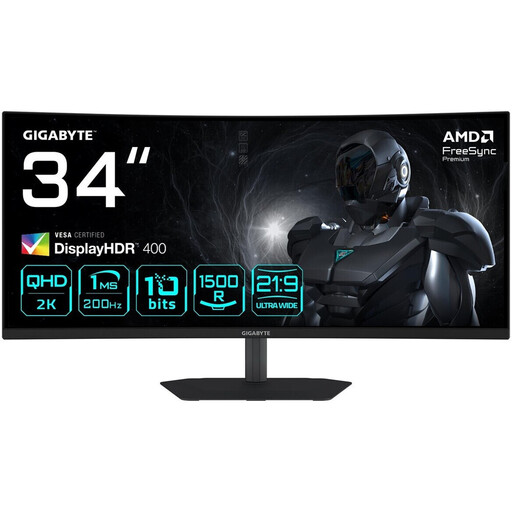
Gigabyte G34WQC2 34-inch ultrawide monitor

Gigabyte G34WQC2 34-inch ultrawide monitor

The 21:9 aspect ratio gives you a wide workspace for the UV view and 3D preview.

3.440 × 1.440 pixels; VA panel; 1500R curvature; 200 Hz.

Joybuy

ASUS TUF Gaming VG34VQ3B 34-inch ultrawide monitor

ASUS TUF Gaming VG34VQ3B 34-inch ultrawide monitor

The curved 21:9 display is an option for a workspace with several views arranged side by side.

3.440 × 1.440 pixels; VA panel; 1500R curvature; integrated USB hub.

Joybuy

Frequently asked questions

Will a larger monitor get rid of texture seams?

No. More screen space can make it easier to view the UV layout and 3D model at the same time, but it won’t fix a seam. The Blender Manual describes “Seam Bleed” as a feature that extends colour beyond the boundaries of a UV island to help prevent visible artefacts.

Will one USB-C cable handle both my laptop’s display and charging?

Only if your laptop’s video output and charging requirements are compatible with the port and power delivery of the specific monitor. BenQ lists DisplayPort Alt Mode and 65 W for the PD3420Q; ASUS lists 90 W for the PA348CGV. Check your computer’s requirements before choosing.

How can I compare a monitor’s energy consumption?

Compare the energy information on each model’s EU energy label on the same basis. The European Commission explains that the figure is given in kWh per 1,000 hours of use; your actual consumption also depends on how you use the monitor and its settings.

What rights apply when buying online in Germany?

For an ordinary consumer purchase made at a distance, you generally have a statutory right to cancel. Under section 355 of the German Civil Code (BGB), the cancellation period is 14 days, although exceptions and the start of the period should be taken into account. The Federal Ministry of Justice and the Federal Office of Justice set out the relevant provisions in sections 312g and 355 of the BGB. Your statutory rights against the seller are separate from any voluntary manufacturer’s warranty.