What should you look for when buying?
First, define your output requirements and colour workflow. Then check the connections needed for every computer, and finally make sure the screen and stand will fit your shared workspace.
| Buying criterion |
What to look for |
Who is it important to? |
| Colour assessment |
Check that the target colour space, document colour mode and colour management for your workflow all work together. |
When we sign off designs for different output requirements, we don’t want to mistake colour space specifications for completed print approval. This matters to around 31% of consumers whose main concern is reliable colour assessment. |
| Switching between computers |
Check the video and USB data connections for each computer. For laptops, also check the required charging power and compatibility. |
When we share a workspace between several computers, we want to switch the video signal and connected input devices as needed. This matters to around 25% of consumers who prioritise switching between computers. |
| Workspace |
Compare the native resolution and window layout, as well as the monitor and stand dimensions, with your desk’s width and depth. |
When we review designs, tools and references side by side, we need enough width without losing space for input devices. This matters to around 25% of consumers whose main concern is working with multiple artboards side by side. |
| Adjusting your workspace |
Check the adjustment options and reflections, and make sure you can position the screen for different seating positions. |
When we share a desk, we want to be able to adjust the screen to suit whoever is sitting there. This matters to around 19% of consumers who prioritise an adjustable workspace. |
Joybuy products for a wider workspace
This selection includes ultrawide monitors in a range of screen sizes, formats and connectivity options for wider workspaces. Colour space specifications can help you narrow down your choices, but they don’t replace matching a monitor to your specific review and output workflow.
 No image available
CRUA 49″ DQHD ultrawide monitor
The 32:9 format gives you plenty of room to arrange designs and references side by side.
Specifications include a 49-inch screen, 5120 × 1440 pixels, 1500R curvature and 165 Hz; HDMI 2.1 and DisplayPort 1.4 are also listed.
The 120% sRGB specification doesn’t replace aligning your colour workflow with your output requirements.
An adjustable stand with height and tilt adjustment is described.
View at Joybuy
 No image available
INNOCN 40C1U 40-inch monitor
The flat 21:9 display with 5120 × 2160 pixels is well suited to arranging artboards and references across a wide workspace.
Specifications include an IPS panel, USB-C with 65 W Power Delivery and PIP/PBP.
The product specifications list 99% sRGB, Adobe RGB at 87% (1931) or 91% (1976), and a calibration report. You should still align the settings with your specific workflow.
Height adjustment, swivel and tilt are described.
View at Joybuy
 No image available
MSI MAG 341CQPDE QD-OLED 34-inch monitor
The curved 21:9 display gives you a wide workspace, while KVM and USB-C are useful when switching between compatible computers.
Specifications include 3440 × 1440 pixels, 99.3% DCI-P3 and 10-bit colour depth. These figures don’t replace aligning colour management with your specific assessment requirements.
The product description recommends avoiding static images at maximum brightness for long periods and using the OLED care features.
View at Joybuy
 No image available
Philips 49B2U6900CH 49-inch monitor
The 32:9 format and 5120 × 1440 resolution can display several windows side by side across a wide workspace.
Specifications include SmartKVM and USB-C docking with up to 100 W Power Delivery. The product information lists a VA panel and a 75 Hz refresh rate.
The 119% sRGB and Delta E < 2 specifications don’t amount to general print approval; check that the model suits your intended colour workflow.
With the stand, the dimensions are listed as 1193 × 268 × 583 mm and the weight as 15,21 kg. The product description recommends two people for installation and transport.
View at Joybuy
 No image available
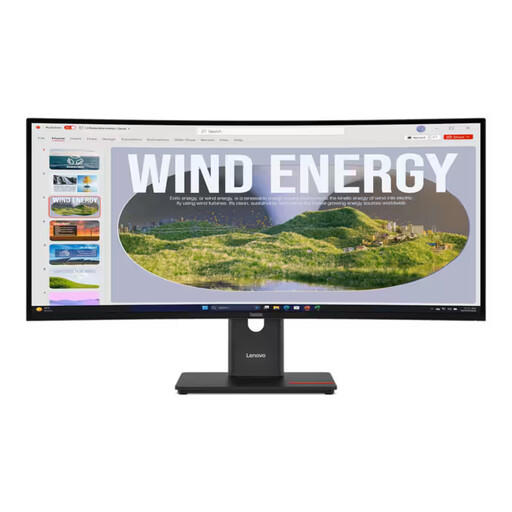
Lenovo ThinkVision T34WD-40 34-inch monitor
The 21:9 display with 3440 × 1440 pixels gives you room for windows side by side; check that the screen shape works from your intended seating position.
Specifications include a VA panel, 1500R curvature, USB-C with up to 100 W Power Delivery and a USB hub.
The product specifications list 99% sRGB and 99% BT.709. These figures alone don’t guarantee a match with every colour workflow.
The product information states that the stand can be adjusted by up to 155 mm in height, as well as tilted and swivelled.
View at Joybuy
Frequently asked questions
Are 100% sRGB or HDR400 enough for formal print approval?
No, these specifications alone don’t prove that. Define your output requirements and document colour mode, then align colour management for the display and print. Adobe distinguishes between RGB for digital screens and CMYK for print in Illustrator.
How do I set up a monitor for two computers?
Check the video and USB data connections separately for each computer. KVM can switch connected USB devices as intended only if the connections are compatible with the specific model. If you’re using a laptop, also check the charging power you need.
What should I consider when sharing a desk with a screen?
Check whether you can position the screen for different seating positions and whether reflections could be a problem. For screen-based workstations covered by the German Workplace Ordinance, its requirements are also relevant; the annex and ASR A6 set out the rules for their respective areas of application.
How can I compare energy use and service when buying?
Compare the energy label and product data sheet for the specific model rather than estimating energy use from screen size. For a consumer purchase in Germany, statutory rights against the seller are separate from any additional manufacturer’s warranty; the purchase date and warranty terms are relevant.
How should I dispose of an old monitor?
Take an old monitor to a separate collection point for waste electrical equipment; don’t put it in household rubbish. The German Environment Agency provides information on how to dispose of electrical equipment correctly.


