What should you look for when buying?
The key is whether your preferred window layout works at your chosen text size. Then compare conference features, laptop connectivity and the space you have available.
| Priority |
What to check when buying |
Who is this important to? |
| Reading a script and following a conversation |
Plan your side-by-side windows at your preferred text size; check the model’s resolution and overall width. |
If I want to read my script and follow a call at the same time, text size matters more to me than screen diagonal alone. Consumers with this as their main priority are likely to account for around 36%. |
| Choosing a camera and audio setup |
Check the webcam, microphone and speakers individually in the specifications; consider camera positioning and audio output. |
If I don’t already have suitable conference equipment, I want to choose a camera and audio setup that works with my requirements. Consumers who prioritise integrated conference technology are likely to account for around 29%. |
| Connecting a laptop |
Check the computer’s video output, supported resolution and required charging power against the monitor’s specifications. |
If my laptop is regularly left on my desk, I need a suitable connection for both video and power. Consumers whose main priority is docking are likely to account for around 21%. |
| Space and positioning |
Measure the width and depth, including the stand; check the height and tilt at the intended location. |
If my desk has limited space or I need to position the screen carefully, I look at its dimensions and adjustability first. Consumers with this as their main priority are likely to account for around 14%. |
Joybuy products at a glance
The Joybuy products below include ultrawide monitors in a range of sizes and resolutions, designed for side-by-side windows. Before choosing, pay particular attention to your preferred text size, the space available on your desk and the features listed.
 No image available
CRUA 49-inch DQHD curved ultrawide monitor, 32:9
Could be worth considering for two side-by-side windows; the 49-inch format needs plenty of desk space.
32:9, 5,120 × 1,440 pixels, 165 Hz and height-adjustable stand, according to the product specifications.
View at Joybuy
 No image available
INNOCN E34A1R 34-inch curved monitor
The listed wide display could be worth considering for viewing a script and a conversation side by side.
21:9, 3,440 × 1,440 pixels, height-adjustable stand, and PIP and PBP modes, according to the product specifications.
View at Joybuy
 No image available
INNOCN 40C1U 40-inch ultrawide monitor
The listed resolution and screen size could be useful for a wide workspace; check the dimensions against your desk.
21:9, 5,120 × 2,160 pixels, 65 W USB-C Power Delivery, height-adjustable stand, and PIP and PBP modes, according to the product specifications.
The stated dimensions with the stand are 944.1 × 573.5 × 241.1 mm.
View at Joybuy
 No image available
MSI MAG 341CQPDE QD-OLED 34-inch monitor
The 34-inch display and listed 21:9 format could be useful for side-by-side script and call windows.
3,440 × 1,440 pixels and 175 Hz, according to the product specifications; the product description says the stand can be adjusted for height, tilt and swivel.
View at Joybuy
 No image available
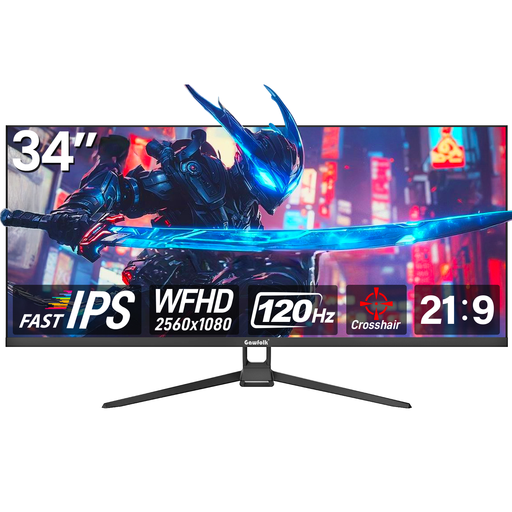
Gawfolk GF340H 34-inch ultrawide monitor
Could be worth considering for two windows on a wide display; check whether the listed resolution suits your preferred text size.
21:9, WFHD at 2,560 × 1,080 pixels, 120 Hz and Fast IPS, according to the product specifications; HDMI and DisplayPort are listed.
View at Joybuy
Frequently asked questions
How should I arrange my script and conversation windows?
First choose a text size you find easy to read, then check whether both windows remain usable side by side. The extra horizontal space of an ultrawide monitor makes this layout possible, but doesn’t guarantee that your applications will be readable at a particular size.
Do I need a built-in webcam for video calls?
No. Dell doesn’t list an integrated webcam or speakers for the P3425WE; according to LG, the 34BA85QE-B has integrated conference features. What matters is which camera and audio devices you already have or want to use.
Can I connect and charge my laptop with a USB-C cable?
Only if the computer sends a suitable video signal through the connection and its charging requirements are within the monitor’s power delivery capabilities. Dell specifies up to 90 W for the P3425WE; this is a monitor specification, not a guarantee of compatibility with every laptop.
What applies in Germany to online purchases, faulty goods and energy labels?
According to the Verbraucherzentrale, consumers generally have a 14-day right to cancel online purchases; statutory rights relating to faulty goods are separate. The European Commission includes electronic displays such as computer monitors in the EU energy labelling scheme. Check the label for the specific model.
Does my personal monitor have to meet specific workstation dimensions?
The Federal Institute for Occupational Safety and Health (BAuA) describes requirements for display screen workstations and teleworking in ASR A6, within its scope. According to the rules, it does not apply generally to screen use in the home; having a quiet home office alone does not mean that it qualifies as a workplace for teleworking.


