Students with their own photos
You want to select and perhaps edit photos for an on-screen gallery. The key considerations are how you’ll use the images, colour profiles, and whether you can comfortably view both the photos and your tools.


An ultrawide monitor can display your digital photo gallery alongside your editing tools. Whether a 34-inch model will fit depends on your desk space and the stand. First, decide whether you’ll only view photos on screen or want to assess prints too. If you’re using a laptop, check that its video output and charging requirements match the monitor’s connections.
You want to select and perhaps edit photos for an on-screen gallery. The key considerations are how you’ll use the images, colour profiles, and whether you can comfortably view both the photos and your tools.
You want to display or edit your gallery in your room, but need to fit the monitor and stand alongside your other study essentials.
You use the same space for photos and studying, and want to check that video and charging will work with your existing connections.
First decide how you’ll use the images, then measure the space available. Only after that should you work out which resolution and connections you actually need.
| What you need | What to check before buying | Who should pay particular attention |
|---|---|---|
| Colour reproduction | Check the colour modes and stated colour gamut coverage. Decide whether you’ll view the photos on screen only or print them too. | If I want to assess photo colours or print them later, the output method matters. Around 27% of consumers prioritise colour and photo output. |
| Desk space | Measure the available desk width and depth, then compare them with the monitor’s full dimensions, including the stand. | If my desk is short on space, the monitor and stand need to fit before the screen’s width can be an advantage. Around 27% of consumers say available space is their main concern. |
| Photo views and tools | Check the resolution and window layout, and make sure the content will remain easy for you to read. | If I want to see thumbnails, a selected photo and my tools at the same time, usable screen space matters. Around 20% of consumers prioritise viewing several photos side by side. |
| Laptop connection | Check your laptop’s video output and charging requirements against the monitor’s explicitly stated connections. | If my laptop is used for both studying and my photo gallery, I want to know whether the planned connection will carry a picture signal and supply power. Around 13% of consumers prioritise connecting a laptop. |
| Extended display and use | If you’ll leave the screen on for long periods, check the panel technology, protective features and sleep mode. Also compare the EU energy labels for specific models: the European Commission rates electronic displays from A to G. | If my gallery is often on display for long periods, I consider how the monitor handles static images and its energy consumption. Around 13% of consumers prioritise extended display and use. |
BenQ lists the PD3420Q as 825.8 mm wide and 244.3 mm deep with the stand. A 34-inch monitor can therefore take up more desk space than its screen size alone suggests.
Before buying, compare the full dimensions of the specific model with the space available on your desk.
Depending on your setup, you may also need a suitable mount or to find another place for it.
A display’s specifications alone don’t describe the complete colour-management workflow for prints.
Decide whether your gallery will stay digital or you’ll want to assess prints, then choose your colour-checking process accordingly.
Charging power varies by model. Your laptop must also be able to output a compatible video signal through the connection you plan to use.
Check your laptop’s video output and charging requirements, as well as the monitor’s stated capabilities.
Depending on your laptop, you may still need a separate power adapter.
BenQ advises against displaying the same images at high brightness for extended periods on OLED screens.
If you’re considering OLED, check the specific model’s sleep mode and protective features, and follow the manufacturer’s usage guidance.
The DesignVue range includes models for creative work. The PD3420Q is a 34-inch option with documented colour modes.
The 34U650A-B is a 34-inch ultrawide model for viewing photos across a wide screen and general work.
The Pro P3425WE is a 34-inch option to consider if you need laptop docking for your studies.
The ViewFinity S5 range includes the S50GC, an ultrawide option for viewing images or using multiple signal sources.
The FlexScan EV3450XC is an ultrawide office option if video calls and docking are important alongside your gallery.
The Joybuy products below are ultrawide monitors for viewing photos and working across a wide screen. Pay particular attention to the space they need, their resolution and which connections your laptop actually supports.
 No image available
For viewing photos across a wide screen with a high stated resolution. Check first that the large stand will fit on your desk.
This model is listed as 21:9, 5120 × 2160 pixels, IPS and USB-C with 65 W.
With the stand, it measures 944.1 mm wide and 241.1 mm deep.
 No image available
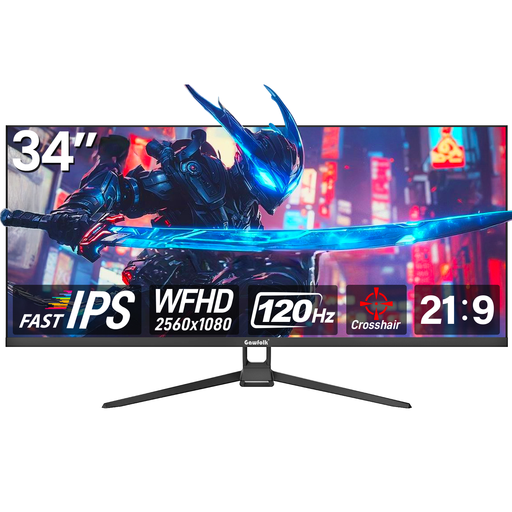
A 34-inch option for viewing photos across a wide screen. Check that the resolution and connections suit the way you plan to work.
The product name lists a 21:9 aspect ratio, 2560 × 1080 pixels, Fast IPS and 120 Hz.
HDMI and DisplayPort are also listed.
 No image available
For viewing photos and working across an exceptionally wide screen. Measure your available space carefully before choosing a monitor of this size.
This model is listed as 32:9, 5120 × 1440 pixels and 60 Hz.
HDMI, DisplayPort and USB-C are listed in the product name. The stated dimensions are 1214.9 × 365.95 × 520.57 mm.
 No image available
A 34-inch option for viewing photos and working across a wide screen. Check that its size and connections suit your desk and laptop.
This model is listed as 3440 × 1440 pixels, 21:9, VA and 100 Hz.
USB-C with up to 65 W, KVM and RJ45 are listed in the product name.
No. An sRGB rating alone doesn’t confirm that your print workflow is properly calibrated. Adobe describes sRGB as a colour space for online viewing and covers colour management for printing separately. So, decide how you’ll use the images before choosing a display for print-related decisions.
Only if your laptop can output a compatible video signal through that connection and the monitor’s power delivery meets its charging needs. BenQ lists DisplayPort Alt Mode and 65 W for the PD3420Q; Dell lists up to 90 W of USB-C power delivery for the P3425WE.
For OLED monitors, BenQ advises against displaying the same image at high brightness for extended periods. Check the specific model’s sleep mode and available protective features, and follow the manufacturer’s usage guidance.
Start by comparing the energy information for specific models on the EU energy label. To estimate your own costs, you’ll also need comparable power-consumption figures, how long you use the monitor and your actual electricity rate. Without this information, it isn’t possible to calculate a reliable cost in euros.
For a standard online purchase from a business, you generally have 14 days from delivery to withdraw from the contract; exceptions and specific return conditions may apply. Your Europe explains the right to withdraw from a purchase of goods, while Verbraucherzentrale points out that the statutory warranty is different from a voluntary guarantee.