Panorama explorers
If you want more continuous width on a single display, check that your specific game presents your chosen widescreen format well.


For a panoramic view on a single monitor, 21:9 is a sensible place to start. Consider 32:9 if your game, PC and desk can accommodate the extra width. What matters most is whether the specific game supports the format, what resolution and refresh rate your system can achieve, and which connection is suitable. If you’re considering OLED, also take panel care and the terms for the specific model into account.
If you want more continuous width on a single display, check that your specific game presents your chosen widescreen format well.
If dark scenes are particularly important to you, compare OLED models with other options, and factor the care guidance and warranty terms into your decision.
If desk space, graphics hardware or connections limit your choice, consider these alongside resolution and refresh rate rather than focusing only on the highest refresh-rate figure.
A good fit if: You want a panoramic view on a single screen and OLED care isn’t right for the way you use your monitor, particularly if static elements stay visible for long periods.
Consider: Check that your PC and connection can deliver your desired resolution and refresh rate. An MPRT response-time figure isn’t directly comparable with GtG values.
A good fit if: The way dark scenes look is especially important to you and you’re happy to follow the care guidance for the specific model.
Consider: Check the panel care guidance and warranty terms for your chosen model. A high advertised refresh rate requires a suitable signal chain.
A good fit if: You want an especially wide, continuous view on one display and have enough space for it.
Consider: Check in advance that your game supports 32:9 and your desk has enough room. Extra width alone doesn’t guarantee a wider field of view.
A good fit if: Your chosen ultrawide format doesn’t work in the game, or you don’t have the space or graphics performance for a wide display.
Consider: Compared with the 21:9 and 32:9 formats covered here, 16:9 offers less horizontal screen space.
| Priority | What to check before buying | Who it matters most to |
|---|---|---|
| Panoramic view on one monitor | Check the game supports the format, and compare the aspect ratio and resolution of the specific model. | If I want to see as much of the game world as possible on one display, I first want to know whether my game presents the format properly. Around 28 % of consumers put a continuous panorama first. |
| Dark scenes and panel care | Check the panel type, care guidance and warranty terms for the specific model. | If the way dark space scenes look is particularly important to me, I want to weigh image quality against the panel’s care guidance. Around 22 % of consumers prioritise dark scenes. |
| Refresh rate with your own hardware | Check that your PC output, cable and monitor input support your desired resolution and refresh rate. | If I want smooth visuals, my system needs to be able to output the resolution and refresh-rate combination I’m after. Around 22 % of consumers focus on the refresh rate they can actually use. |
| Space and connections | Check the dimensions, including the stand, and the inputs you need on the specific model. | If my desk has limited space or I need specific connections, the monitor has to fit my existing setup. Around 17 % of consumers prioritise desk space and connections. |
| Running costs and support | Consider the EU energy label separately from voluntary warranty terms and statutory rights. | If running costs and post-purchase support matter to me, I want to be able to understand the energy information and warranty terms. Around 11 % of consumers prioritise running costs and support. |
For the Dell AW3423DWF, Dell specifies up to 165 Hz at 3440 × 1440 via DisplayPort and 100 Hz via HDMI. So the input you use can affect the refresh rate you can achieve.
For the specific model, check the resolution, refresh rate and monitor input you want to use, as well as your PC’s output.
Whether a game makes good use of a 32:9 display, and whether the monitor fits on your desk, depends on the game and your setup.
Check game support and available space before choosing a format. Depending on these factors, 21:9 or 16:9 may also be suitable.
Care features and a manufacturer’s warranty don’t guarantee that burn-in is impossible. A warranty and statutory rights are two different things.
Follow the care guidance and read the warranty terms for the specific model. Treat this voluntary cover separately from your statutory rights against the seller.
The G34WQi is a specific example of a 21:9 LCD monitor with 180 Hz, according to Xiaomi.
The UltraGear 34GS95QE-B is a 34-inch example of a 21:9 OLED monitor with 240 Hz.
The Odyssey G9 G91F offers an especially wide 32:9 format on a 49-inch display.
The AW3426DW is a specific 34-inch example of a 21:9 QD-OLED monitor.
The MAG 341CQPDE QD-OLED is a 34-inch OLED example where panel care and warranty terms are part of the decision.
This selection includes 21:9 and 32:9 gaming monitors for a wider view on a single screen.
 No image available
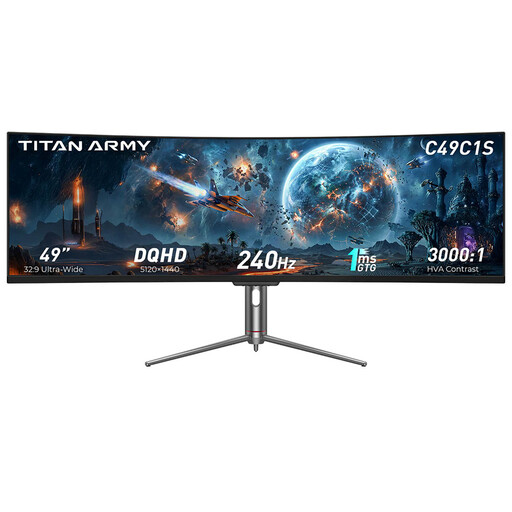
The 32:9 format is an option if you’re looking for an especially wide gaming view on a single monitor.
49 inches; 32:9; DQHD, 5120 × 1440; 240 Hz; 1800R.
Before buying, check that your game displays 32:9 well and that you have enough desk space.
 No image available
The 21:9 format is worth considering if you want a wider gaming view and your game supports this aspect ratio.
34 inches; 21:9; 3440 × 1440; 165 Hz; VA panel; 1500R; DisplayPort.
Before buying, check that your specific game displays 21:9 well.
 No image available
The 21:9 format is one way to get a wider gaming view, provided your specific game supports it.
34 inches; 21:9; 3440 × 1440; 165 Hz; 1500R; 1 ms MPRT.
The stated response time refers to MPRT. Check that your game supports 21:9.
 No image available
The 32:9 format can give you an especially wide view on a single screen, if your game and available space are suitable.
49 inches; 32:9; 5120 × 1440; 165 Hz; 1500R; HDMI 2.1; DP 1.4.
Before buying, check that your game supports 32:9 and the monitor fits on your desk.
 No image available
The 21:9 format is an option for a wider gaming view if your specific game supports it.
34 inches; 21:9; 3440 × 1440; 200 Hz; VA panel; 1500R; DisplayPort.
Before buying, check that your game displays 21:9 well.
No, the aspect ratio alone doesn’t guarantee that. Check the resolution and display format settings in your specific game before choosing 21:9 or 32:9.
Your input, resolution and PC output all affect the refresh rate you can use. For the AW3423DWF at 3440 × 1440, Dell specifies up to 165 Hz via DisplayPort and 100 Hz via HDMI. Check the specifications for your chosen model and connection.
Follow the care guidance for the specific model. For the MAG 341CQPDE QD-OLED, MSI describes automatic panel refresh in standby or after switching off and lists OLED Care 2.0 to help reduce the risk. This doesn’t guarantee that burn-in is impossible.
According to the European Commission, computer monitors are covered by the EU energy labelling scheme for electronic displays. The label ranks them from A to G and includes consumption information, including for HDR viewing.
No. If a product is faulty, statutory rights apply against the seller; a manufacturer’s warranty is an additional voluntary service subject to its terms. The Verbraucherzentrale states that new goods are generally covered by a two-year statutory warranty period.