Editing long takes
When you’re reviewing extended walking footage, a wide workspace can help you arrange the timeline, preview and tools side by side. Adobe describes customisable timeline display options in Premiere.


For long videos of walks along the Rhine, an ultrawide monitor is a sensible choice if you need room for your timeline, preview and tools all at once. If you want to inspect 4K footage in greater detail or assess colours for a defined SDR output, a 27-inch 4K monitor with a suitable colour mode may be a better fit. The trade-off is a narrower horizontal workspace. Also check the specific model’s connections, calibration options and energy label.
When you’re reviewing extended walking footage, a wide workspace can help you arrange the timeline, preview and tools side by side. Adobe describes customisable timeline display options in Premiere.
If you’re matching footage shot in changing light, your colour mode should suit the intended output. Adobe identifies Rec.709 as the standard for new sequences in the SDR Premiere workflow described.
If you’re assessing the sharpness and image detail of your 4K sources, the monitor’s native resolution matters. Weigh it against the extra horizontal workspace offered by a wide-format display.
| Buying priority | What to check | Who is this important to? |
|---|---|---|
| Room for the timeline | Compare the aspect ratio, native resolution, desk space and window layout in your editing software. LG lists 21:9 and 3440 × 1440 pixels for the 34U650A-B. | When I’m editing long walking sequences, I want to see the timeline, preview and panels side by side. Around 36% of consumers put timeline space first. |
| Controllable colour display | Decide whether your planned output is SDR or HDR, then check the colour mode and calibration options on the specific model. BenQ and ASUS list Rec.709 specifications for certain models. | When I’m matching footage shot in changing light, I want the colour mode to suit my output. Around 29% of consumers prioritise colour control. |
| Checking 4K details | Check the resolution of your source footage and the preview size you want. BenQ, ASUS and EIZO list 3840 × 2160 pixels for the models featured. | When I’m checking details in 4K sources, native resolution matters more to me than extra width for the timeline. Around 21% of consumers make this their priority. |
| Connections and running costs | Check the computer’s video output, the USB-C power delivery you need, the cables included and the monitor’s adjustability. The European Commission includes monitors in its energy labelling system for electronic displays. | When I want to add a monitor to my existing workspace, its connections and operating characteristics need to be a good fit. Around 14% of consumers rank these as their main concern. |
The ability to process an HDR signal alone doesn’t tell you whether a monitor is suitable for your planned HDR assessment.
First decide whether your output will be SDR or HDR. For HDR, check the requirements of your entire preview and colour workflow.
LG’s 34-inch ultrawide model has a resolution of 3440 × 1440 pixels, while the 27-inch 4K models featured here have 3840 × 2160 pixels. So extra horizontal space doesn’t replace the additional vertical resolution of the 4K models.
Choose according to your main task: more room for the timeline and panels, or more native pixels for checking your footage.
The video signal and charging power need to be compatible with your computer, and USB-C features vary by model.
Before buying, check the video output, charging requirements and what’s included with the specific monitor variant.
The 34U650A-B is a wide 34-inch ultrawide option.
The PD2705U is a 27-inch 4K option with SDR colour modes.
The ProArt PA279CRV combines a 27-inch 4K screen with several colour modes and USB-C.
The ColorEdge CG2700X is designed for workflows that use hardware calibration and an integrated sensor.
The UltraSharp U2723QE is a 27-inch 4K option with a USB-C hub.
This selection includes wide ultrawide monitors for timeline space, as well as 27-inch 4K models for checking details. Choose one to suit your output format, connections and colour workflow.
 Image unavailable
This wide model is worth considering for long takes where you need room for the timeline and other windows side by side.
40 inches, 21:9, 5120 × 2160 pixels, IPS, 100 Hz and USB-C with 65 W Power Delivery.
 Image unavailable
The wide 32:9 format could be a good fit if you want the timeline and several other work areas visible at the same time.
5120 × 1440 pixels, 5K Dual QHD, 60 Hz and USB-C. Its vertical resolution is 1440 pixels, below the 2160 pixels of a 4K resolution.
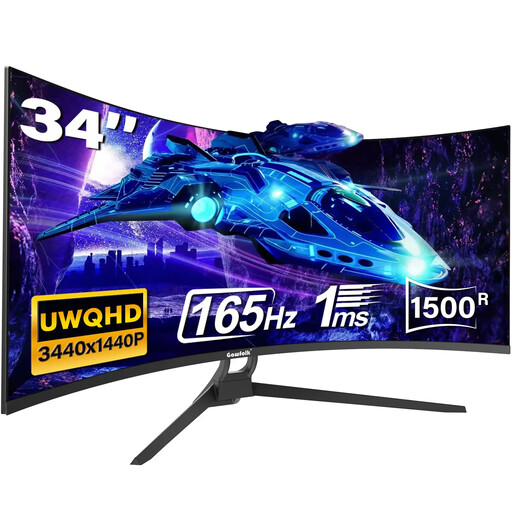 Image unavailable
The 21:9 format is an option if you’d like more horizontal space for the timeline when working with long recordings.
34 inches, 1500R curvature, 165 Hz and HDR10. Check the resolution and connections on the specific variant to make sure it suits your editing setup.
 Image unavailable
If checking details in your source footage matters more than extra timeline width, this 27-inch 4K model could be a good fit.
4K UHD, IPS, 60 Hz and HDR Ready.
 Image unavailable
This model is worth considering if checking 4K detail matters more to you than the extra horizontal workspace of an ultrawide monitor.
3840 × 2160 pixels, IPS, 120 Hz and USB-C with 90 W Power Delivery.
No. If you mainly need a clearer view of your timeline, first check the display options in your editing software. Adobe describes adjustable track heights and the option to show clip information in Premiere, among other features. A wide monitor is another way to gain more horizontal workspace.
Base your checks on the colour space intended for your output. Adobe identifies Rec.709 as the standard for new sequences in the SDR Premiere workflow described. For other outputs, particularly HDR, your sequence and monitor settings need to be compatible.
Choose a mode that suits your output and consider whether you need objective colour checking. Adobe recommends using a colorimeter for objective colour accuracy; you should also take the lighting in your workspace into account.
Compare the EU energy label for the specific models. The European Commission describes an efficiency scale from A to G for electronic displays, along with information about HDR content.