For supervised demonstrations that don’t require your own control software, the Unitree G1 Base may be enough. If you’re developing your own applications, the G1 EDU, which the manufacturer has designed for secondary development, is a more suitable starting point. Choose additional joint or gripper options to suit the specific trial you have in mind. Ask the seller to confirm development access, what’s included and the documentation required for the configuration on offer.
Who is the G1 for?
Teams developing their own robot software
You need controllable interfaces and a clear route from simulation and ROS 2 to testing on the robot. Unitree publishes development resources, but you’ll still need to confirm access rights and interfaces for the specific unit being supplied.
Movement and grasping research labs
Choose the joint and hand configuration to suit your test set-up, rather than relying solely on the stated number of degrees of freedom. reichelt elektronik describes the equipment included with each variant in its listings.
Teaching teams running supervised demonstrations
You want to demonstrate humanoid movement in an engaging way and need a predictable, supervised operating set-up; developing your own control software doesn’t have to be part of the learning objectives. Aalen University describes using a G1 for research and teaching.
What should you consider when choosing?
G1 Base for demonstrations
Suitable if: You want to demonstrate existing functions under supervision and don’t plan to develop your own robot control software.
Trade-off: The manufacturer does not specify support for secondary development on the standard G1. Before buying, check which functions you’ll actually be able to use in your demonstration.
G1 EDU for your own trials
Suitable if: Your team wants to test its own control, ROS 2 or AI applications.
Trade-off: Published SDK, ROS 2 and simulation resources don’t automatically guarantee access or confirm everything included with a specific retailer’s configuration.
Start with a demonstration or rental
Suitable if: You first want to assess the space required, supervised operation or the movements available for demonstration.
Trade-off: An advertised G1 rental doesn’t in itself confirm EDU specifications or access rights for your own software or sensor testing.
| What you need |
What to check |
Who is it important to? |
| Development access |
Ask the seller to confirm the variant identifier, as well as the SDK/API functions, ROS 2 interfaces and sensor access available on the specific unit. |
If your team wants to integrate its own control or AI software, access to the robot is a priority. Around 33% of consumers put development access first. |
| Range of movement |
Check that the arm and waist movements you need are supported by the joint configuration and relevant models. Don’t assume a simulation has been validated for transfer to the robot. |
For movement trials, what matters is whether the set-up includes the joints you need. Around 25% of consumers prioritise movement trials. |
| Gripping hardware |
Ask the seller to confirm the type and specification of both supplied hands, along with the available control and data access. |
If your trial involves grasping or tactile sensing, the hands need to suit your set-up. Around 25% of consumers put grasping trials first. |
| Supervised testing |
Agree the scope of the demonstration or rental, operating permissions and any supervision required before the appointment. |
If you’re planning a teaching demonstration or product assessment, it’s important to arrange a suitable supervised session. Around 17% of consumers prioritise a demonstration or trial before buying. |
Common selection mistakes
-
Assuming the Base sensors mean open development access
The fact that sensors are listed in a manufacturer comparison of the G1 and EDU doesn’t prove that the standard G1 supports secondary development. Unitree explicitly states that the standard G1 does not support it.
If developing your own control software is part of your teaching or research goals, first check the permissions and interfaces available with the specific EDU configuration.
-
Assuming every EDU has the same hands and joints
Retailer listings show that variants differ in their joints and hands. U3 is described as having Dex3-1 three-finger hands without tactile sensors, while U4 has Dex3-1 hands with tactile sensors.
Check that the variant identifier suits your trial and ask the seller to specify the type and equipment of both hands in the quotation.
-
Treating a rental demonstration as an SDK or safety test
A rental offer that includes installation and training doesn’t automatically confirm EDU specifications or access rights for your own development trials.
Agree the test configuration, your access rights and the safety arrangements before the appointment.
Relevant brand
Unitree
For the G1 options considered here, the main differences between the standard model and EDU configurations are their intended support for secondary development and their hardware specifications.
- Unitree publishes SDK, model and simulation resources, including tools related to ROS 2.
- Published resources don’t confirm that a specific delivery in Germany will provide the access rights or interfaces you need. Retailer listings also differ in their joints, hands and availability.
Joybuy products
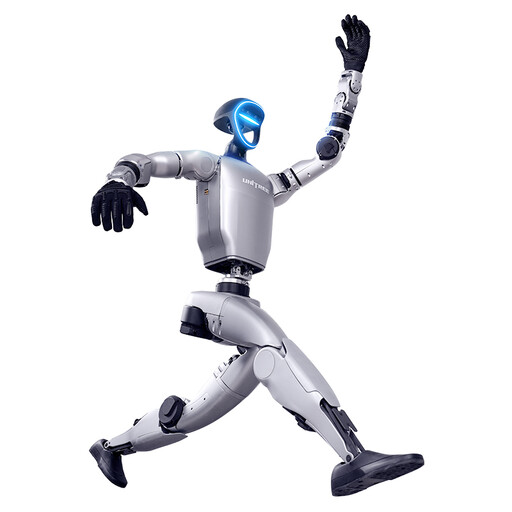
The product shown here is a Unitree G1 for grasping trials, with force-controlled gripper hands. The product title states that SDK/API is currently unavailable, so this configuration isn’t suitable for projects involving your own software development.
 No image available
Unitree G1 with force-controlled gripper hands
For grasping trials that require force-controlled gripper hands.
The product title states that SDK/API is currently unavailable, so don’t plan to use this for your own software development trials.
View on Joybuy
Frequently asked questions
Does a published ROS 2 driver mean my G1 is ready to use for ROS 2 projects straight away?
No. A published driver doesn’t automatically confirm access on the specific unit being supplied. Check the access rights, development environment, supported messages and sensor data paths for the EDU configuration you’ve ordered. Unitree explicitly excludes secondary development on the standard G1.
What should I prepare before running my own movement trials?
First, check that the variant identifier and available robot model are suitable for your test set-up. The BAuA guidance on the German Ordinance on Industrial Safety and Health recommends starting the risk assessment before selecting and procuring work equipment, and taking the equipment, working environment and test items into account.
Which machinery rules apply when placing a product on the market in Germany?
According to the BAuA, the Machinery Directive 2006/42/EC continues to apply to machinery until and including 19 January 2027; from 20 January 2027, Regulation (EU) 2023/1230 applies. You’ll need to check the documentation for the specific configuration to confirm that it meets the requirements for its delivery route and timing.


