If you want to demonstrate pre-programmed movements without developing your own low-level hardware code, a basic or demonstration model may be sufficient. For your own motor or movement control, a clearly specified EDU configuration is a better fit. Unitree Robotics documents SDK interfaces for motor and movement control, but the model name alone does not confirm that they are available on the unit being offered. For gripping trials, the hand model and interfaces must be compatible with your chosen configuration. If the robot will be used at work, your risk assessment in Germany should begin before you select and purchase it.
Who is the Unitree G1 suitable for?
Teams working on their own control projects
If you want to develop movement control or other applications, check that the development access available on the specific G1 configuration meets your teaching objectives. Unitree Robotics documents SDK interfaces for motor and movement control.
Teaching teams running demonstration practicals
If the focus is on pre-programmed movements and operation, check that the model on offer meets your demonstration objectives without requiring your own low-level hardware programming. reichelt elektronik describes the G1 Basic as a model for applications that do not require programming.
Those responsible for supervised lab trials
Plan its use as work equipment, staff training and the test area around the specific movement and risk profile. The German Federal Institute for Occupational Safety and Health explains in TRBS 1111 that risk assessment should begin before selection and purchase.
What should you consider when choosing?
Basic or demonstration model
Suitable if: You want to demonstrate pre-programmed movements during a course and do not plan to develop your own low-level hardware code.
Bear in mind: A successful demonstration does not prove that SDK or API access is available. Check the model designation and operating functions of the specific unit on offer.
EDU development model
Suitable if: Students are expected to develop their own motor or movement control.
Bear in mind: Documented SDK functions do not confirm the specification of every retailer configuration or the contents of the package for specific hands.
If you’re choosing a Unitree G1 for teaching or a university lab, your priorities will depend on the project you have in mind and how the robot will be used.
| Priority |
What to check before buying |
Who it matters most to |
| Development access |
Check the full configuration code and confirm that the motor and movement control available are suitable for your trial. |
If I want students to develop their own control software, I need the right development access for the specific configuration. Around 29 % of consumers prioritise developing their own control software. |
| Demonstration use |
Check the pre-programmed movement and operating functions, as well as the level of supervision planned for the course. |
For a course that demonstrates pre-programmed movements without programming custom controls, ease of use is key. Around 21 % of consumers prioritise teaching through demonstrations without developing their own controls. |
| Gripping and perception trials |
Ask for details of the hand model, any optional tactile sensors and the interfaces required for the specific configuration. |
If my project looks at gripping or perception, the hands and sensors need to suit the trial. Around 21 % of consumers prioritise this specialist trial equipment. |
| Lab use |
Plan the risk assessment, movement area, protective setup, responsibilities and training for the specific trial. |
If you use the robot at work as work equipment, you need to plan the trial procedure and supervision too. Around 29 % of consumers say that being able to plan safe lab use is a key priority. |
Common selection mistakes
-
Assuming a movement demonstration means you can use the SDK freely
A demonstration of pre-programmed movements does not tell you whether students can run their own control software on the version being offered. reichelt elektronik distinguishes between the G1 Basic, which does not require programming, and programmable EDU configurations.
Before ordering, ask the seller to confirm the full configuration code and the development access required for your teaching trial.
-
Assuming features listed for the whole range are included
Hands and other components vary between configurations. A feature described for the G1 range as a whole is therefore no guarantee that it is included in the configuration on offer.
Check the hand model, sensors and interfaces individually against your planned trial and the specific part number.
-
Confusing the transport dimensions with the space needed for a trial
The folded dimensions do not indicate the movement area or danger zone during a live trial. In TRBS 1111, the German Federal Institute for Occupational Safety and Health puts task-specific risk assessment at the heart of the process.
Assess the area based on the planned movements and the people in the danger zone. Do not assume a standard safe distance based on the transport dimensions.
Relevant brands to guide your choice
Unitree
For this topic, the focus is on G1 Basic and EDU configurations, along with compatible development tools. This brand reference relates to these product lines and does not indicate that a particular offer is available.
- Unitree Robotics documents SDK interfaces for basic motor control and more advanced movement control.
- The manufacturer’s documentation does not confirm that every G1 configuration on offer includes the same components or development access. Check the exact configuration and package contents.
Joybuy product selection
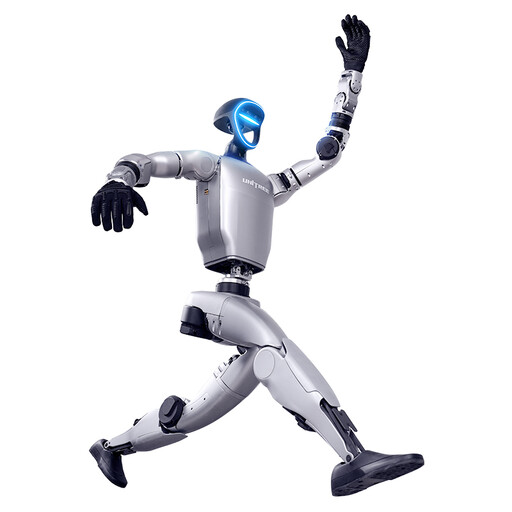
This selection covers the Unitree G1, with a focus on gripping demonstrations. According to the product information, this version does not have SDK/API access.
 No image available
Unitree G1 humanoid robot with force-controlled dexterous hands (SDK/API not available)
For teaching demonstrations focused on gripping; the product title specifies force-controlled dexterous hands.
According to the product information, this version does not have SDK/API access. It is therefore not a confirmed choice for your own development projects using these interfaces.
According to the product information, this product is not suitable for children under 14. Bear this in mind if using it in environments with children.
View at Joybuy
Frequently asked questions
When do I need an EDU model for a G1 course?
If students are expected to develop their own control applications, look for an EDU configuration offered for that purpose, with the interfaces you need. reichelt elektronik describes the G1 Basic as a model that does not require programming; Unitree Robotics documents SDK interfaces for motor and movement control. The G1 name alone does not confirm that these interfaces are available with the specific offer.
How should I plan start-up, protective equipment and training in the lab?
For a suspended start, Unitree Robotics describes using a protective frame and recommends a safety bar for demonstrations or secondary development. For employees using the robot at work as work equipment, TRBS 1116 from the German Federal Institute for Occupational Safety and Health sets out requirements for qualifications and training. Assess the actual test setup and danger zone separately.
Is CE marking alone enough for use in a university lab?
When equipment is used at work, a product feature does not replace an assessment of the risks involved in its actual use. The German Federal Institute for Occupational Safety and Health explains the requirements for risk assessment in TRBS 1111. The protective measures needed will depend on the specific trial and how it is organised.


