Who is this decision relevant to?

Teachers giving robotics demonstrations

You want to show movement and sensor views clearly, without asking learners to develop their own control application. Unitree distinguishes between app features and access to secondary development across the Go2 variants. This is key to deciding whether the Pro suits your planned activities.

Teams developing their own robot software

If your activities require custom code, a ROS2/DDS connection or processing robot data, check in advance that the EDU configuration is suitable and that the required interfaces are actually available. Unitree describes development access for EDU and higher variants, but not for the Pro.

Providers running one-off workshops

For a one-off session, operation, guidance and supervision may matter more than owning the robot. A German rental provider describes a Go2 Pro package with an operator and introductory guidance. Agree the scope and permitted use for your specific session.

What should you consider when buying?

Go2 Pro for demonstrations

A good fit if: you want to demonstrate movement, app controls or graphical programming without developing your own robot software.

Bear in mind: Unitree says the Pro does not provide access to the secondary development interface.

Go2 EDU for development activities

A good fit if: learners will build their own applications, set up ROS2/DDS connections or process sensor data on the robot.

Bear in mind: Before buying, confirm that the specific EDU configuration includes the interfaces and equipment your project requires.

Supervised workshop or rental

A good fit if: you are planning a one-off demonstration or want to try the robot with an operator first.

Bear in mind: Supervision does not automatically mean unrestricted development access or an unsupervised trial.

What you need What to check before buying Who is this important to?
An engaging demonstration Check the features of the specific variant and its app; don’t confuse graphical workflows with SDK development. For an introductory lesson, I want to show movements and sensor views without first developing my own software. Around 29% of consumers say a clear demonstration is their main priority.
Custom programming and sensor access Get written confirmation of SDK, ROS2/DDS, LiDAR and data export permissions for the specific variant. If learners need to run their own code or process sensor data, the robot must allow those exact types of access. Around 36% of consumers prioritise the ability to develop their own applications.
Support for one-off sessions Confirm who will operate the robot, what participants can control themselves, and whether introductory guidance and technical support are included. For a one-off workshop, I want to plan operation and support in advance rather than invest in a development platform for the long term. Around 21% of consumers prioritise supervised use for individual sessions.
Safe, predictable operation Plan the operating area and supervision; check privacy arrangements for recordings, product documentation and any agreed service provision. When using the robot with learners, I want to organise supervision and the session to suit the activity. Around 14% of consumers prioritise safe use that can be reliably supervised.

Common misconceptions

  • Confusing graphical app programming with an open SDK

    Creating graphical workflows in the Go2 app is not the same as running your own code on the robot. Unitree lists EDU and higher variants for secondary development; according to the manufacturer, Pro and Air do not provide access to this interface.

    Before choosing a variant, specify which software and interfaces your activities actually require.

    If you plan to run development activities, choosing a Pro that is unsuitable for them could mean having to buy another model.

  • Assuming that built-in LiDAR means sensor data can be freely exported

    A point-cloud display in an app does not prove that you can access the data for your own applications. Without the required access, sensor activities may not go to plan.

    Ask for confirmation that the specific variant provides access to every type of data you need.

  • Assuming a supervised rental is an unrestricted trial

    A German rental provider describes a Go2 Pro package with an operator and introductory guidance. This does not mean participants can use the robot without supervision or run their own software.

    Before the session, agree what participants can try for themselves and which learning objectives the session should cover.

    You may need to spend extra time agreeing the session, supervision and permitted use.

Relevant brand at a glance

Unitree Robotics

Manufacturer of the Go2 Pro and Go2 EDU variants. The distinction between app controls and access to secondary development is particularly relevant to educational projects.

  • Unitree documents graphical app workflows as well as development approaches using the SDK and ROS2/DDS for the relevant variants.
  • According to Unitree, Pro and Air do not provide access to the secondary development interface. EDU documentation does not automatically confirm that every specific offer includes the same equipment.

Go2 Pro for demonstrations

The selection below focuses on the Unitree Go2 Pro for supervised demonstrations using app controls and graphical workflows.
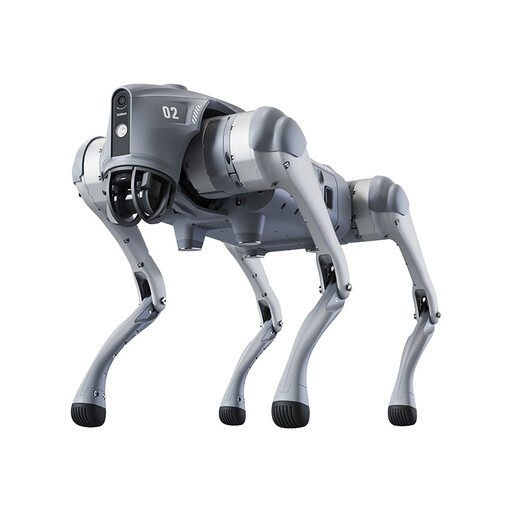
Unitree Go2 Pro

Unitree Go2 Pro

The product description lists app controls and graphical programming as features for demonstrations that don’t require your own robot software.

It also lists voice control and LiDAR-based obstacle avoidance.

According to Unitree, the Go2 Pro does not provide access to the secondary development interface. Don’t plan activities that require your own code or developer access around this model.

The product description states that the device is not suitable for anyone under 14 and that particular care should be taken around children.

View at Joybuy

Frequently asked questions

Can a class use the SDK or ROS2 to programme the Go2 Pro themselves?

According to Unitree’s FAQ, the Go2 Pro does not provide access to the secondary development interface; its development documentation lists EDU for this access. Graphical programming in the Go2 app is a separate feature. For a specific EDU offer, ask for confirmation of the SDK, ROS2 and data permissions you need.

What should you prepare before a classroom demonstration?

For the activity in question, decide who will operate the robot, define its operating area and arrange supervision. The German Social Accident Insurance (DGUV) offers schools guidance on carrying out educational risk assessments. Unitree also says that the Go2 should be in its starting position when switched on, and should not be switched on while suspended.

Are introductory guidance, a warranty and training always included with offers from German providers?

No, what’s included depends on the specific offer. A German EDU retailer lists a manufacturer’s warranty and implementation advice; staff training and a maintenance contract depend on the package or can be booked at extra cost. A German Pro rental provider describes an operator and introductory guidance as part of its rental offer. Compare the written terms from each provider.

Does a CE mark prove that the Go2 is safe in every teaching situation?

No. According to information from the European Union, CE marking applies to products for which applicable EU harmonised rules explicitly require it. It does not replace checking the product documentation or planning a safe school activity. Use the documentation to confirm which rules apply to the specific configuration.

Can recordings from the camera or app featuring participants be used without further checks?

There is no blanket answer. If people are recognisable in recordings or their data is processed in another way, the organisation must check the purpose and legal basis for the specific use. The Data Protection Conference’s guidance on video surveillance is not blanket permission to record in lessons.