For uploading a photo album from another floor, a wireless repeater is a good option if it can still get a strong connection to your router at the planned location. If the wireless signal between floors is too weak, a wired access point connected via Ethernet is a more targeted solution. Powerline is worth considering if you don’t have an Ethernet cable and the connection works at the sockets you plan to use. Also check your broadband upload speed: a repeater won’t fix a slow internet connection.
Which solution is right for you?
Uploading photos with a weak signal between floors
If you want to upload an album from a distant floor, check whether a repeater can still get a usable connection to the router there. A wired access point is another option if you have an Ethernet cable.
Homes with several Wi-Fi dead spots
If you need Wi-Fi on several floors, plan where to place your Wi-Fi points and check that your router and extensions support the mesh system you need.
Homes with existing Ethernet cabling
If an Ethernet cable reaches the distant floor, you can connect an access point there without relying on an additional wireless link between the router and the extension.
What to look for when buying
First check that your broadband connection has a fast enough upload speed. Then choose how to connect your router to the place you’ll be uploading from: wirelessly, via Ethernet or, where suitable, using Powerline.
| What you need |
What to check before buying |
Who it matters most to |
| Connection between floors |
Signal at the planned repeater location; if you have cabling, check for Ethernet or access point mode. |
If I want to upload a large album from a distant floor, the extension also needs to be able to connect back to the router. Around 36% of consumers prioritise a reliable connection between floors. |
| Wi-Fi in several locations |
Identify where you’ll upload from and where the Wi-Fi points could go; with mesh, check the connection to each point. |
If I want to upload from several floors, I check that the Wi-Fi points can reach the areas I need. Around 29% of consumers prioritise Wi-Fi coverage in several locations. |
| Compatibility with your router |
Check your router model and the mesh system it supports, as well as repeater or access point mode. |
If I want to keep using my existing router, I need to be sure it’s compatible with the extension mode I want. Around 21% of consumers prioritise compatibility with their router. |
| Cause of slow uploads |
Measure upload speed near the router or over Ethernet, then compare it with the speed at the planned upload location. |
If I first want to find out whether the broadband connection or home network is slowing down my upload, I measure both locations separately. Around 14% of consumers prioritise identifying the cause before buying. |
Avoiding common buying mistakes
-
Confusing Wi-Fi data rates with internet upload speed
Advertised wireless speeds don’t tell you what upload speed you’ll actually get where you plan to use the device. Your broadband speed also affects uploads.
Measure your broadband speed and upload speed at the planned location separately before comparing device specifications.
-
Placing a wireless repeater directly in a dead spot
A repeater needs a usable connection to your existing network so that it can send data back to the router.
Check the connection indicator at possible locations. If the wireless signal isn’t strong enough, consider a wired connection instead.
-
Assuming ‘mesh’ guarantees that any devices will work together
The mesh features available depend on the specific router and extension.
Before buying, check your router model against the devices and mesh modes explicitly listed as supported.
-
Choosing Powerline without testing the sockets
Speeds can be low at some sockets, and electrical appliances can also affect the connection. devolo highlights these limitations.
Test the adapters at the sockets you plan to use and check the connection there before relying on Powerline.
Brands to consider
FRITZ!
The FRITZ!Repeater 1200 AX and 3000 AX are worth considering for a compatible FRITZ! home network or a wired connection.
- FRITZ! lists one Gigabit LAN port for the 1200 AX and two for the 3000 AX. The manufacturer also specifies three wireless units for the 3000 AX.
- The device specifications alone don’t tell you whether you’ll get faster uploads in a particular location across multiple floors. Check the connection where you plan to use it.
TP-Link
The RE705X is a repeater option with Gigabit Ethernet and an access point mode described by the manufacturer.
- According to TP-Link, the RE705X can extend an existing Wi-Fi network and can also be used as an access point.
- TP-Link says that EasyMesh requires an EasyMesh-compatible router. Advertised wireless data rates aren’t a measure of the upload speed you’ll get at home.
Telekom
Speed Home WLAN is an option for households looking for an extension that may be suitable for use with a Speedport router.
- Telekom lists the Speedport Smart 3 and 4 among its compatible routers, and describes Wi-Fi and Ethernet as connection options.
- Using the same brand doesn’t guarantee compatibility. Check the exact Speedport model number against the device specifications.
devolo
devolo offers both a wireless repeater that can be placed wherever you need it and Powerline with Wi-Fi, providing different ways to connect between floors.
- The Magic 2 WiFi 6 next Starter Kit uses Powerline with Wi-Fi and is worth considering if there’s no Ethernet cable reaching the floor you need.
- devolo warns that speeds may be low at some sockets and can be affected by electrical appliances. Check the connection at the sockets you plan to use.
Joybuy products for Wi-Fi across floors
The products below include wired Wi-Fi access points as well as wireless and mesh extensions. For wireless use, the device still needs a usable connection to the router at its chosen location. If you’re buying a wireless device offered in Germany, also check its EU conformity and CE marking against the specific product label and manufacturer documentation.
 No image available
Ubiquiti UniFi U6+ WiFi 6 Access Point
A good choice as a wired Wi-Fi access point if an Ethernet cable reaches the distant floor.
The product specifications list a 1-GbE port and PoE (802.3af). According to the description, you may need a PoE injector if you don’t have a compatible PoE switch.
View at Joybuy
 No image available
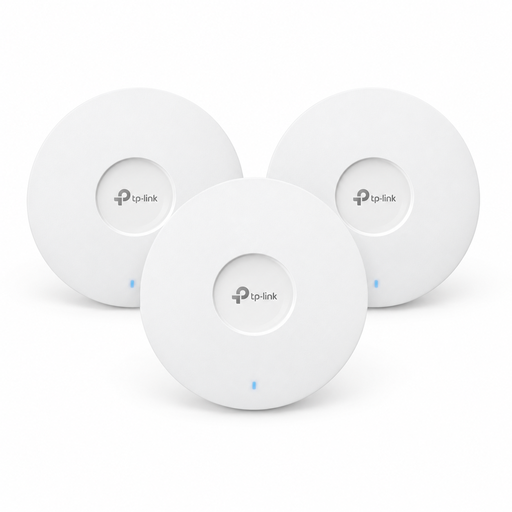
TP-Link Omada EAP653 AX3000 Wi-Fi 6 Access Point, 3-pack
This 3-pack is designed for setting up several wired Wi-Fi access points, provided you have suitable locations and connections.
The product specifications list Wi-Fi 6, AX3000 and PoE+ (802.3at). You’ll need a compatible power supply for the PoE+ setup described; according to the description, a 12-V-DC adapter is sold separately.
View at Joybuy
 No image available
TP-Link Deco M4 Mesh WiFi System AC1200, 1-Pack
This mesh unit is worth considering if you want to extend a compatible Deco network.
The product specifications list two Gigabit Ethernet ports, as well as router and access point modes. Ethernet backhaul requires network cabling.
View at Joybuy
 No image available
MERCUSYS ME80X Wi-Fi 6 Range Extender AX3000
Repeater and access point modes give you a choice between wireless extension and a wired connection, provided you have the right setup.
The product title lists a Gigabit port and access point mode. For wireless use, the device needs to be within range of your existing Wi-Fi network; access point mode requires an Ethernet cable.
View at Joybuy
 No image available
TP-Link RE235BE BE3600 Dual-Band Wi-Fi 7 Range Extender
This wireless extension is worth considering if it can still connect to the router from the location you have in mind.
The product title lists Wi-Fi 7, a 2.5-GbE port and EasyMesh compatibility. EasyMesh requires a compatible router.
View at Joybuy
Frequently asked questions
Will a repeater help if my photo album uploads slowly even right next to the router?
No. A repeater won’t fix a slow internet connection. First measure your broadband speed, then compare the upload speed with the result at the place you plan to upload from. The Federal Network Agency provides a broadband measurement tool to help you find out the actual speed of your internet connection.
Where should I place a wireless repeater?
Place it somewhere it can still get a usable connection to the router or the mesh point you’re using, rather than directly in a dead spot. Telekom recommends moving Speed Home WLAN closer to the Speedport or other Wi-Fi boosters if the connection is weak.
Can I use a repeater as an access point with existing network cabling?
Yes, if the specific model supports access point mode. TP-Link describes this mode for the RE705X; FRITZ! describes connecting the FRITZ!Repeater 1200 AX to a FRITZ!Box via Ethernet.
What other equipment or information should I check before buying?
Check whether your chosen solution requires an Ethernet cable, additional Wi-Fi points or a Powerline starter kit. Also check the warranty and update information for the specific model. The number of floors alone won’t tell you what equipment you need.
What requirements apply to wireless devices sold in Germany?
Wireless equipment made available in Germany must meet the requirements of the German Radio Equipment Act on EU conformity and CE marking. The Federal Network Agency also lists product identification, manufacturer details, instructions in German and a declaration of conformity as checks to make. Check the documentation for the specific product; a CE mark doesn’t tell you how good the reception will be in your home.


