If you want your NAS to shut down safely during a power cut, choose a UPS that supports communication with your specific NAS and make sure the response is configured; Synology and QNAP outline the relevant checks and setup steps. If you also want to keep your router or switch running, consider their combined wattage, the number of battery-backed outlets and the runtime under that load. A pure sine wave is only a deciding factor if the requirements of the connected power supplies call for one.
Who needs a UPS for their NAS?
NAS owners who need a safe shutdown
If you want your NAS to switch itself to a safe state during a prolonged power cut, you’ll need UPS communication that it supports, along with the right NAS settings. Synology and QNAP outline the necessary checks and setup steps.
Home offices with a NAS and networking equipment
If you also want to keep your router or switch running, factor in their power consumption and the number of battery-backed outlets you’ll need. Synology recommends considering the total power draw of the connected devices and the available runtime.
Users with specific power-supply requirements
If you’re connecting other devices to the same UPS, check whether their power supplies require a particular output waveform. CyberPower identifies the CP900EPFCLCD as a pure sine wave model.
What should you look for when buying?
| What you need |
What to check before buying |
Who should consider it? |
| Automatic NAS response |
Check that your specific NAS supports the UPS connection and that you can configure safe mode or shutdown. |
If you want your NAS to respond automatically to a power cut, compatible communication is essential. Around 36% of consumers would make an automatic NAS response their top priority. |
| Power and runtime |
Add up the wattage of the connected devices and check the runtime quoted for a comparable load. |
If you need enough time to keep things running and shut down as planned, check the runtime for your total load. Around 29% of consumers would consider sufficient runtime their top priority. |
| Powering a router or switch too |
Count the battery-backed outlets you’ll need and check whether Schuko or IEC connections are suitable. |
If you want to keep networking equipment running as well as your NAS, there must be enough outlets and capacity for all your devices. Around 21% of consumers would prioritise keeping their networking equipment powered. |
| Battery replacement and disposal |
Check whether the battery is replaceable in the specific model and which replacement part it requires. |
If you want to use your UPS for longer, consider whether its battery can be replaced and how it should be disposed of separately at the end of its life. Around 14% of consumers would make battery replacement and disposal a top priority. |
Avoid common selection mistakes
-
Focusing on VA instead of watts and runtime
What matters is whether the UPS can power the total connected load and provide enough runtime for the planned shutdown process.
Check the wattage limit and the manufacturer’s runtime figures for a load as close as possible to your setup.
-
Assuming every outlet is battery-backed
According to Eaton, four Schuko outlets on the Eaton 3S700D are battery-backed; the other four provide surge protection only.
Connect your NAS and any networking equipment you need to keep running to outlets explicitly marked as having battery backup.
-
Assuming a USB connection guarantees NAS compatibility
A USB connection alone doesn’t confirm that a particular NAS will recognise the UPS and respond to it. Synology notes that entries in its compatibility list do not guarantee compatibility.
Check compatibility between your NAS model and the UPS, then test the configured response in a controlled way.
-
Overlooking battery replacement and disposal
Whether the battery can be replaced depends on the specific model. In Germany, electrical and electronic waste must not be put in household rubbish; the German Environment Agency recommends taking removable used batteries to a separate battery collection point.
Check the replacement part details and the device manual. Find a suitable collection point before disposing of the device.
Key brands at a glance
Eaton
The 3S Gen2 range includes the 3S700D, a Schuko version with USB HID that can serve as a useful example to check for a compact home-office setup.
- Eaton lists the 3S700D as offering 700 VA, 420 W, four battery-backed Schuko outlets, four outlets with surge protection only and a replaceable battery.
- Eaton’s quoted runtime of two minutes applies at full load. It does not confirm the runtime for a particular NAS load or compatibility with a specific NAS.
APC by Schneider Electric
The Back-UPS BX950MI-GR is a Schuko UPS with automatic voltage regulation that may be suitable for home-office devices.
- Schneider Electric lists four outlets with battery backup and surge protection, as well as AVR, for this model.
- The listed product features do not confirm communication with a specific NAS. Check support for your device model separately.
CyberPower
The European CP900EPFCLCD from the PFC Sinewave range may be worth considering if a pure sine wave meets the requirements of your connected devices.
- CyberPower lists 900 VA, 540 W, AVR and six battery-backed Schuko outlets. Its quoted runtime of seven minutes applies at half load.
- The manufacturer’s specifications do not show that every NAS needs a pure sine wave or can communicate with this model. The runtime at half load cannot be directly applied to a different combination of devices.
Suitable products at Joybuy
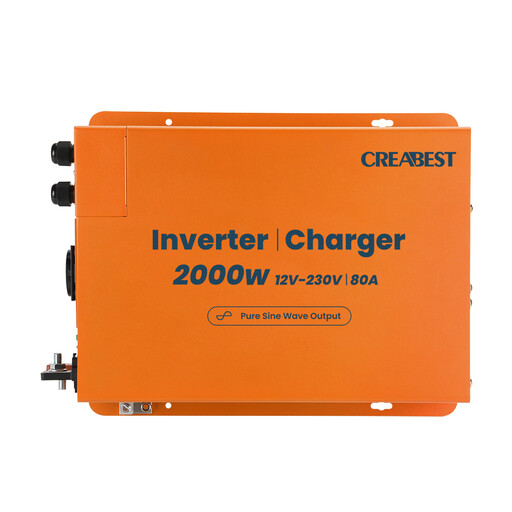
The following product lists a UPS function and a pure sine wave. Before buying, check that the 12 V battery input, connections and NAS communication are suitable for your specific setup.
 No image available
2000 W Pure Sine Wave Power Inverter, 12 V to 240 V
The product title lists a UPS function and a pure sine wave; this does not confirm compatibility with a specific NAS.
12 V battery input; 2000 W; 80 A charger; RCD Breaker; Mains Priority Mode; R10; 2X DC Cable 35mm².
View at Joybuy
Frequently asked questions
How do I work out what size UPS I need?
Add up the power consumption of all the devices you want to keep running from battery-backed outlets. Compare this load with the UPS’s rated wattage and check the runtime at a suitable load. Synology recommends considering the output power, battery capacity and available runtime.
How do I set up my NAS once it’s connected?
Enable UPS support and configure the response for your specific NAS. Depending on the connection, supported QNAP configurations can use USB, SNMP or a network connection; Synology also explains how to set up the response to a power cut. Then test the setup in a controlled way to make sure it responds as intended.
What should I bear in mind when replacing the battery?
Whether the battery is replaceable depends on the model; Eaton, for example, specifies that the 3S700D’s battery can be replaced. Check the replacement part number and the manual for your specific device. A removed used battery must not go in household rubbish.
How do I dispose of an old UPS in Germany?
Electrical and electronic waste must be disposed of separately from household rubbish. The German Environment Agency lists recycling centres and suitable retailer take-back points. If the battery can be removed easily, it should be taken separately to a used-battery collection point.


