
Lieferung heute & morgen

Qualitätsgarantie

Willkommens-Angebote freischalten: KOSTENLOSE Lieferung | Bis zu 80 % RABATT | Kostenlose 30-Tage-JoyPlus-Testphase
App herunterladen
Modern laptops and smartphones rely almost exclusively on USB-C. While this is a positive development in principle, it often leads to a practical problem: none of your tried-and-true monitors, USB drives, or memory cards will fit anymore. The market for USB-C accessories is vast and confusing. Many products promise functionality that they fail to deliver in practice, leading to frustration and unnecessary expenses.
This guide will help you identify the typical pitfalls and find the right accessories for your needs. We focus on the technical facts that truly matter, cutting through the empty marketing promises.
Before you spend any money, you should be aware of these three common problems that occur with low-quality accessories:
To avoid these traps, you should check three core technical aspects. These determine whether an accessory will be useful to you or not.
Besides data transfer, the most important function is often charging. Pay attention to the maximum charging power, specified in watts (W).
A USB-C charger or a USB-C docking station must be able to supply the power required by the end device. Likewise, the USB-C cable used must be rated for this wattage. A 100W charger is of little use if the cable can only transmit 60W.
Not all USB-C ports are equally fast. The speed is critical for the intended use case:
For video output via a multiport adapter, your laptop's USB-C port must support DisplayPort Alternate Mode (DP Alt Mode). For smooth visuals on 4K monitors, a 60 Hz refresh rate is the standard to aim for.
Consider which ports you truly need and where you will be using the accessory.
Here are some product recommendations tailored to specific use cases that meet the criteria mentioned above.
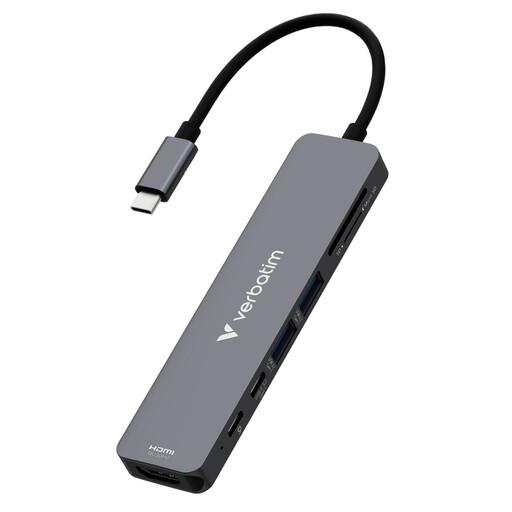
Why This Fits Their Persona: Ideal for users who are frequently on the go and need a lightweight yet versatile solution. With HDMI for presentations, SD card readers for quick photo transfers, and USB-A ports for peripherals, this hub covers the most critical mobile use cases.
The hub offers 100W Power Delivery pass-through charging, which is sufficient to reliably charge even high-performance laptops while in use. The video specification is clearly stated as 4K@30Hz, which is suitable for its intended purpose (presentations).
Very lightweight (59g) and compact. With SD and microSD slots, it provides a key feature for creatives that is missing from many other compact hubs.
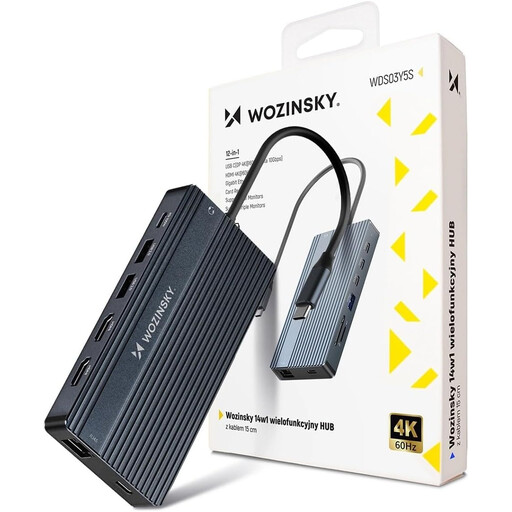
Why This Fits Their Persona: For users who want to turn their laptop into a full-fledged desktop workstation. This adapter allows for the connection of up to three monitors, a wired network connection, and a multitude of peripherals simultaneously.
This model avoids the video trap by supporting 4K@60Hz via HDMI and even 8K via DisplayPort. The 100W PD charging is clearly specified and designed for demanding setups. The Gigabit Ethernet port ensures a stable connection.
Massive port selection with 14 ports, including multi-monitor support (MST for Windows). The sturdy aluminum housing provides good heat dissipation under heavy load.
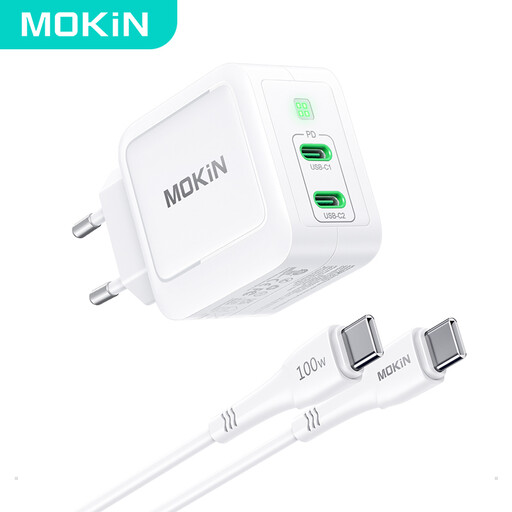
Why This Fits Their Persona: Perfect for anyone who wants to fast-charge their laptop, smartphone, and other devices with a single power adapter. Ideal for travel or a minimalist desk to reduce cable clutter.
This GaN charger avoids the trap of vague charging claims by clearly stating a maximum output of 67W from a single port. This is sufficient for many popular laptops like the MacBook Air or Dell XPS 13.
GaN technology allows for a significantly more compact and lightweight design compared to traditional silicon chargers with the same output. Two USB-C ports allow for simultaneous charging of two devices.
We've compiled a complete, up-to-date list of products that fully meet these strict selection criteria and safety standards.
No. The charging power is significantly limited by the cable. A cable must be explicitly designed and certified for higher wattages (e.g., 60W, 100W, or 240W). Using an unsuitable cable with a powerful GaN charger will result in slower charging speeds and, in the worst-case scenario, could damage the electronics. Pay attention to the wattage rating in the cable's product description.
A certain amount of heat is normal for a multiport adapter, especially when it is simultaneously charging a device via Power Delivery and transferring large amounts of data. Components like the charging controller and the USB controller generate waste heat. Aluminum housings dissipate this heat better than plastic ones. However, if the hub becomes uncomfortably hot or has a burning smell, disconnect it from power immediately and do not use it again.
No. Your laptop's USB-C port must support what is known as DisplayPort Alternate Mode (DP Alt Mode) to output a video signal. This is a hardware requirement of the device itself, not just the adapter. On many cheaper or older laptops, this feature is not available on all USB-C ports. Check your laptop's technical specifications or look for a lightning bolt (Thunderbolt) or DP (DisplayPort) icon next to the port.