
Lieferung heute & morgen

Qualitätsgarantie

Willkommens-Angebote freischalten: KOSTENLOSE Lieferung | Bis zu 80 % RABATT | Kostenlose 30-Tage-JoyPlus-Testphase
App herunterladen
The USB-C port has established itself as a universal standard for laptops, smartphones, and tablets, yet choosing the right accessory has become more complex. Many users invest in products that fail to meet their expectations or even pose safety risks. The most common issues include chargers that only slowly power devices, hubs with insufficient ports, or accessories that overheat after a short period of use.
These problems often arise from misleading marketing or a lack of understanding of technical specifications. This guide will help you identify the crucial features and make an informed purchasing decision for your next USB-C accessory.
To avoid these pitfalls, it's essential to understand a few core parameters. These specifications determine the performance, compatibility, and safety of your accessory.
A charger's power is measured in watts (W) and is the critical factor for charging speed.
A Power Delivery (PD) power adapter is an intelligent charger that communicates with the connected device to provide the optimal charging power. Ensure the charger's maximum output matches the needs of your most demanding device. A multi-port charger splits its total output among the connected devices. Check the product details to see how the power is distributed when multiple ports are in use simultaneously.
The number and type of ports determine an accessory's versatility.
GaN technology (Gallium Nitride) is a major innovation in chargers. Compared to traditional silicon-based chargers, GaN chargers are:
A fast charger with GaN technology is therefore often an excellent choice for users who travel frequently and need to power multiple devices.
Here are some product recommendations tailored to specific use cases that meet the criteria mentioned above.
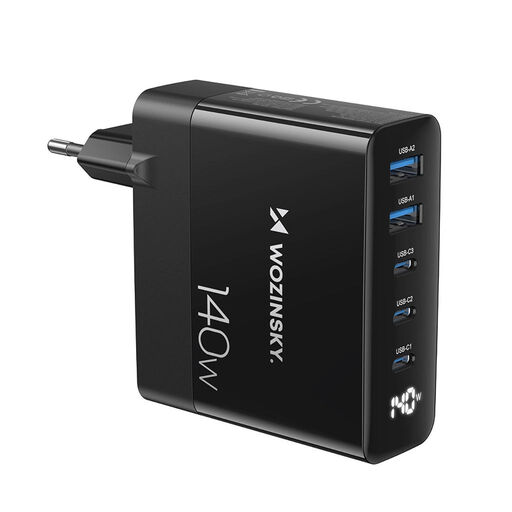
Why This Fits Their Persona: Ideal for users who want to charge their laptop, smartphone, and other devices simultaneously with a single power adapter. The GaN technology ensures a compact design that fits perfectly into carry-on luggage.
With 140W of total output and intelligent power distribution, it bypasses the pitfall of incompatible charging power. It can power even demanding laptops while fast-charging other devices at the same time.
High Power: 140W total output.
Versatility: Five ports (3x USB-C, 2x USB-A) for maximum compatibility.
Compactness: GaN technology for a small size and low weight.
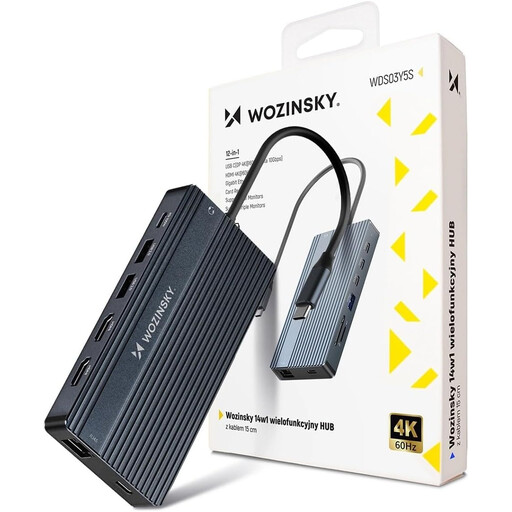
Why This Fits Their Persona: Perfect for users who want to transform their laptop into a fully-fledged workstation at their desk. It connects monitors, networking, storage media, and peripherals through a single USB-C port.
This hub avoids the pitfall of outdated ports by offering a comprehensive selection of modern connections, including multiple USB 3.0, 4K HDMI, Gigabit Ethernet, and 100W Power Delivery passthrough.
Maximum Connectivity: 14 ports for all conceivable peripherals.
Multi-Monitor Support: Connect up to three external displays.
High Performance: 100W PD charging capability and an aluminium housing for heat dissipation.
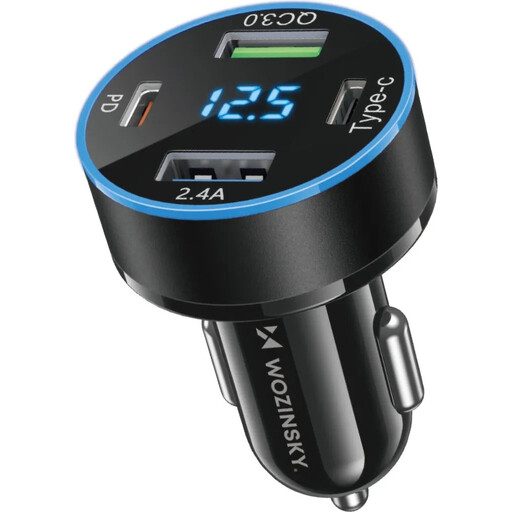
Why This Fits Their Persona: Designed for anyone who needs to charge their devices reliably and quickly on the go in their car. Ideal for families or professionals with multiple devices.
With 50W of power and four ports, it avoids the pitfall of slow in-car charging. The integrated voltage display builds additional confidence in its safety and functionality.
High Charging Power: 50W for fast charging on the move.
Four Ports: 2x USB-C and 2x USB-A for maximum flexibility.
Informative Display: Shows the charging status and the vehicle's onboard voltage.
We have compiled a complete, up-to-date list of products that fully meet these strict selection criteria and all relevant safety regulations.
1. Can I use any USB-C charger for my laptop? Not necessarily. The crucial factor is the power requirement (in watts) of your laptop. A 20W phone charger will not charge a laptop that requires 65W or more, or will only do so extremely slowly while it's turned off. Check your laptop's power requirements and choose a Power Delivery power adapter with at least that wattage.
2. What is the difference between a USB-C hub and a docking station? A USB-C hub is typically smaller, more portable, and powered by the laptop's USB-C port. It's ideal for on-the-go use. A laptop docking station solution is usually larger, often has its own power supply, and offers more ports and potentially higher performance (e.g., for multiple 4K monitors). It is designed for a permanent desk setup.
3. How safe are GaN chargers? When manufactured correctly, GaN chargers are very safe. Due to their higher efficiency, they generate less waste heat than traditional chargers, which reduces the risk of overheating. Always look for the CE marking when purchasing and choose products from reputable brands to ensure all relevant safety standards are met.