
Lieferung heute & morgen

Qualitätsgarantie

Willkommens-Angebote freischalten: KOSTENLOSE Lieferung | Bis zu 80 % RABATT | Kostenlose 30-Tage-JoyPlus-Testphase
App herunterladen
Modern laptops, tablets, and smartphones almost exclusively rely on the USB-C port. In principle, this is a positive development towards a universal standard. Yet, the reality is often different: your old mouse, external hard drive, or trusted headphones suddenly no longer fit. The market for USB-C adapters is vast and confusing, which quickly leads to frustration and buying mistakes. Before you spend money on an unsuitable solution, you should know the most common pitfalls.
The 3 Most Common Pitfalls When Buying USB-C Adapters:
You don't need to be a tech pro to find the right adapter. It's enough to check three core aspects that determine function and longevity.
Not every USB-C adapter can do everything. First, define your exact use case:
The physical shape of the adapter is often crucial for practical usability. A right-angle adapter, for example, can prevent cables from sticking out awkwardly and protects your device's port, especially in tight spaces. An aluminum housing also helps with heat dissipation, which is an important factor for the longevity of high-performance adapters that can get warm during operation.
For a single purpose, like connecting a mouse, a small, compact single adapter is often the most practical solution. However, if you need to connect multiple devices simultaneously—for example, a monitor, charging cable, and an external hard drive—a USB-C Hub or a Multi-port Adapter is the better choice. These bundle multiple ports into one housing and create order on your desk. For frequent travelers, there are special travel adapters that combine various international plug standards with USB charging ports.
Instead of presenting a confusing list, we have selected a few models that are precisely tailored to typical usage scenarios.
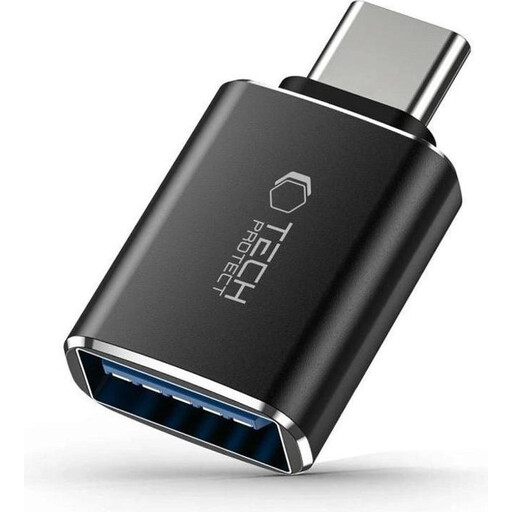
Why it's a great fit: Ideal for the most common requirement: connecting standard peripherals like a mouse, keyboard, or USB stick to a modern notebook or smartphone. A straightforward and direct solution for an everyday problem.
This adapter focuses on a single, clearly defined function. This means you don't pay for superfluous features you don't need (Pitfall 3).
Compact design and OTG functionality for directly connecting accessories to compatible smartphones and tablets. Simply plug and play.
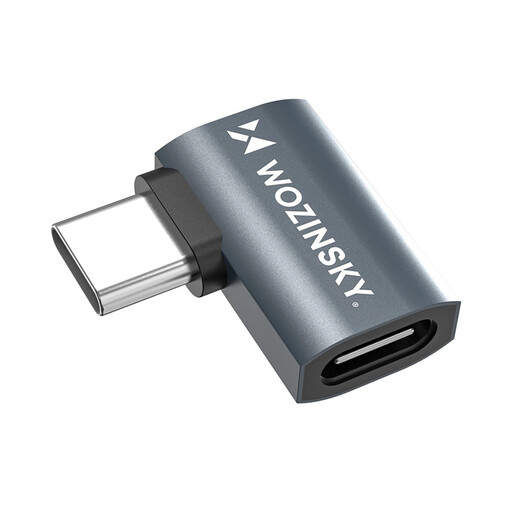
Why it's a great fit: For users with the highest demands who transfer large video files, use 8K monitors, and need to charge their high-end notebooks at maximum speed. The L-shape is also particularly practical.
It delivers verifiable top-tier specifications, thus avoiding the trap of functional shortcomings (Pitfall 1). The angled design also protects the device port and prevents mechanical wear (Pitfall 2).
Supports the Thunderbolt 4 standard with a 40 Gbit/s data rate, 240W Power Delivery (PD3.1), and 8K video output. A future-proof model for demanding setups.

Why it's a great fit: For drivers whose vehicle comes with factory-wired CarPlay or Android Auto and who want the convenience of a wireless connection without cable clutter in the cockpit.
This specialized product solves a specific problem, avoiding the trap of buying a generic adapter that doesn't support the necessary protocols for CarPlay/Android Auto (Pitfall 1).
Enables an automatic and stable wireless connection. Operation via steering wheel buttons and the touchscreen remains fully functional. A simple plug-and-play upgrade.
We have compiled a complete, up-to-date list of products that fully meet these strict selection criteria and safety regulations.
No, compatibility is not universal. It depends on the protocols supported by both the adapter and your device (laptop, smartphone). For example, an adapter might be designed for data transfer but not transmit a video signal, as this requires "DisplayPort Alt Mode". Therefore, always check the product specifications and compare them with your device's requirements.
USB-C merely refers to the physical, oval shape of the connector. Thunderbolt 3 and Thunderbolt 4, on the other hand, are transfer protocols that use this connector. They enable significantly higher speeds (up to 40 Gbit/s) and advanced features, such as driving two 4K monitors from a single port. So, every Thunderbolt port is a USB-C port, but not every USB-C port supports the faster Thunderbolt protocol.
Pay attention to the material and workmanship. An aluminum housing is often a good sign, as it dissipates heat better than plastic. Reinforced cable joints and a firm, wobble-free fit in the port also indicate higher quality. A clear and precise specification of technical standards like Power Delivery (PD) or USB 3.1 Gen 2 in the product description is also an indicator of a carefully engineered product.