
Lieferung heute & morgen

Qualitätsgarantie

Willkommens-Angebote freischalten: KOSTENLOSE Lieferung | Bis zu 80 % RABATT | Kostenlose 30-Tage-JoyPlus-Testphase
App herunterladen
A USB-C adapter and USB hub can expand a single port to include HDMI, USB, Ethernet, memory cards or additional charging functions. However, products can vary considerably in terms of transfer speed, display support and power delivery. If you only look at the number of ports or specifications such as “4K”, you may end up buying an accessory that is not suitable for your laptop or tablet.
This buying guide explains which technical specifications matter before you buy and which solutions are suitable for different usage scenarios.
A USB-A hub with four ports can accommodate several devices. However, this does not automatically mean that all ports will operate at high speed simultaneously. With external hard drives, webcams and USB sticks, the available bandwidth of the host port is shared between the devices. The computer’s power supply may also be limited.
For a mouse, keyboard and basic USB sticks, a USB 2.0 hub or USB 3.0 hub is often sufficient. For large files and fast storage devices, however, the specification should state at least USB 3.0 with up to 5 Gbit/s or USB 3.2 Gen 2 with up to 10 Gbit/s.
The term HDMI 4K alone says little about how the adapter will perform in practice. An adapter may support 4K at 30 Hz or 4K at 60 Hz. While 30 Hz may be sufficient for office applications, smooth motion in games, videos or large workspaces is more likely to benefit from HDMI 4K 60Hz adapter support.
The computer’s USB-C port must also support video output, for example via DisplayPort Alt Mode or Thunderbolt. A USB-C port that supports data only cannot necessarily drive a monitor.
A multi-port USB-C adapter with USB-C Power Delivery 100W can accept or pass through up to 100 W according to its specification. However, some of this power may be used by the hub itself and connected devices. The charger and USB-C cable must also support the required power level.
For a laptop with high power requirements, you should check whether the hub can pass through the appropriate PD output and whether the notebook supports the charging protocol. A GaN USB-C charger can be a useful compact power source, but it cannot replace a hub’s missing video or data functionality.
Before buying, identify the port on your computer precisely:
Specifications such as 5 Gbit/s or 10 Gbit/s describe the theoretical interface speed. In practice, the result is affected by the cable, storage device, file system and simultaneous use of other ports.
If you want to connect several USB devices, you should also distinguish between data and charging ports. A USB-C port labelled “Power IN” may be intended solely for additional power and is not necessarily designed for data transfer or charging a smartphone.
Three points are important when connecting an external display:
A Gigabit Ethernet adapter can provide a wired network connection of up to 1,000 Mbit/s. The actual speed achievable depends on factors including the router, network cable and internet tariff. A Bluetooth USB adapter is a separate solution for Bluetooth accessories. The operating system and Bluetooth version must be compatible with the intended device.
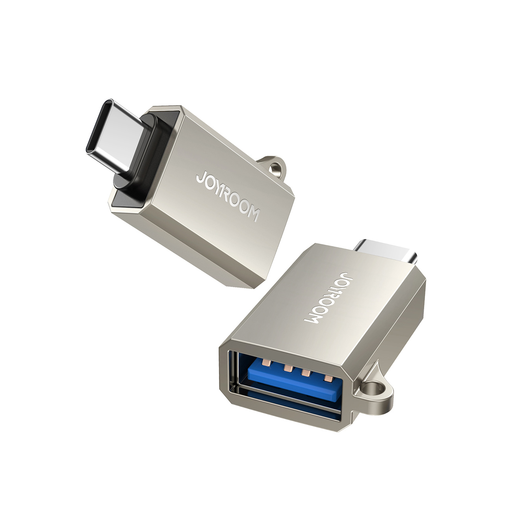
Why this product suits this profile: This compact USB-C to USB-A adapter is ideal for users who want to connect a USB-A stick, keyboard or mouse to a USB-C device.
Its design makes its purpose clear: this is a single USB-A port, not a hub with multiple ports.
USB 3.2 Gen 1 with USB 5 Gbit/s, OTG support and a zinc-alloy housing.
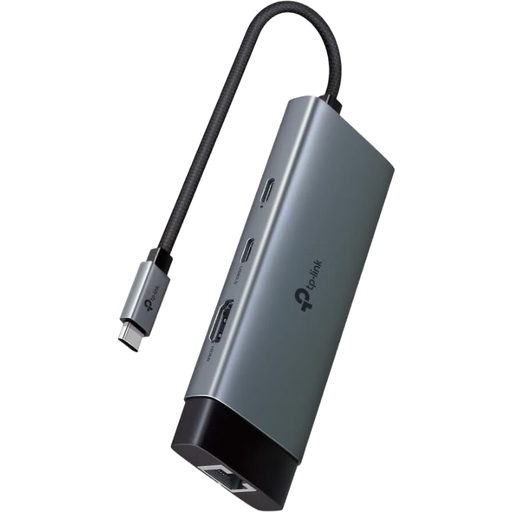
Why this product suits this profile: For home working, study and desk-based use, this USB-C hub combines several commonly needed ports in one device.
The specifications list the data ports, HDMI output and PD input separately. This makes it easy to check the functions against your own device before buying.
HDMI with 4K at 60 Hz, Gigabit Ethernet, two USB-A and one USB-C data port, plus USB-C PD pass-through up to 100 W.
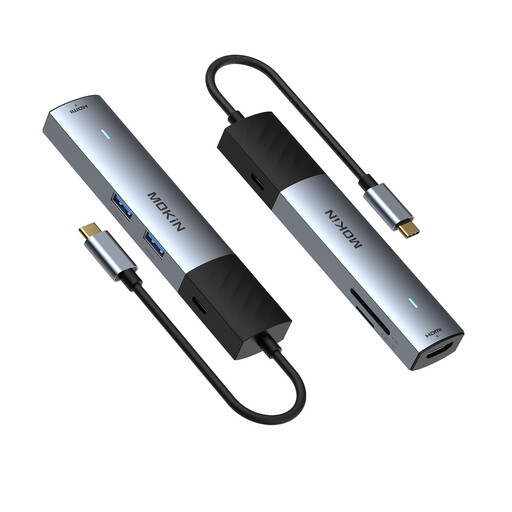
Why this product suits this profile: Photographers, students and users with several storage media get ports for USB devices, SD and TF cards, HDMI and power delivery.
The product specifications list the individual interfaces and speeds separately. According to the description, SD and TF cards can be used simultaneously.
HDMI output with 4K at 60 Hz, two USB-A 3.0 ports, one USB-C 3.0 port, SD/TF reader and PD 3.0 up to 100 W.
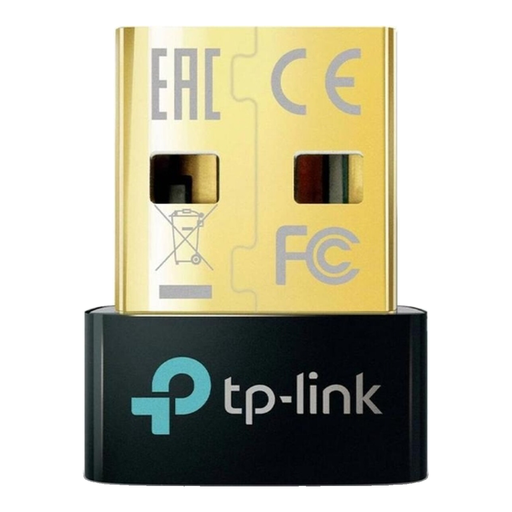
Why this product suits this profile: This nano dongle is designed for Windows desktop PCs and laptops that do not have built-in Bluetooth.
Compatibility is specifically stated for Windows 11, 10 and 8.1. A driver may be required for older systems.
Bluetooth 5.3, nano design, USB 2.0 connection and support for up to seven connected devices according to the product specifications.
We have put together a complete, regularly updated list of products that fully meet these strict selection criteria and the safety regulations applicable in the EU.
For a multi-port USB-C adapter on your desk, a combination of HDMI, USB-A, USB-C, Ethernet and PD may be useful. When you are on the go, a small USB-C to USB-A adapter is often all you need. Apple, Windows and Android users should also check the manufacturer’s compatibility information for their particular device before buying.
An adapter usually connects two different types of port or extends a single function, such as USB-C to USB-A. A USB-C hub combines several ports, including USB, HDMI, Ethernet or a card reader, in one device. A USB-C docking station often provides additional functions for a permanent workstation, such as multiple display outputs and network connections.
No. The hub, charger, cable and laptop must all support USB-C Power Delivery. The maximum charging power is determined by the weakest component involved and may be reduced by the hub’s own power consumption.
Its service life depends on insertion cycles, strain on the cable, heat, moisture and mechanical stress. Do not pull an adapter out of the port by its cable. When not in use, keep it dry and protect it from sharp bends. If you experience data loss or an unstable connection, safely eject storage media first and then check the adapter.