
Lieferung heute & morgen

Qualitätsgarantie

Willkommens-Angebote freischalten: KOSTENLOSE Lieferung | Bis zu 80 % RABATT | Kostenlose 30-Tage-JoyPlus-Testphase
App herunterladen
A USB-C adapter and hub can turn a single port into additional USB ports, display outputs, card readers or an audio connection. This is useful for home working, studying, gaming and mobile devices. However, USB-C products can differ considerably in the standards and functions they support. The external design alone says little about whether an adapter will actually work with your smartphone, tablet or laptop.
The USB-C connector initially describes only the physical design. A port may support USB data only, additionally support USB-C fast charging, or also output video signals. A USB-C to HDMI adapter generally requires the source device to support DisplayPort Alternate Mode over USB-C. If this function is not available, the screen will remain black despite the matching connector.
Thunderbolt 3, Thunderbolt 4 and USB4 are not automatically available on every USB-C port either. Therefore, check the technical specifications of your laptop or tablet and compare them with the product description.
Figures such as 10 Gbit/s, 40 Gbit/s or 100 W describe possible maximum values. Actual performance depends on the host device, cable, power supply, connected storage and protocol used. With a hub connected to several drives, the power supplied by the single USB-C port may be limited.
It is also important to distinguish between a USB-C hub for data and a USB-C multiport adapter with charging functionality. A hub without Power Delivery will generally not charge the laptop while it is in use. A USB-C PD port, in turn, may be intended solely for power input and not for data transfer.
An adapter may work with Windows laptops but have limitations with certain MacBook chips or smartphones. For example, the MOKiN model with two HDMI outputs is specified for MacBook Pro and MacBook Air models with two Thunderbolt 3 ports on one side, and does not support certain M chips. Such information should be more important before buying than a large number of ports.
First, make a short list of your devices:
A USB-C docking station model is particularly worthwhile for a permanent workstation. For smartphones and tablets, a small adapter with one clearly defined function is generally easier to carry.
Pay attention to the exact standard designation. USB 2.0 reaches up to 480 Mbit/s, while USB 3.1 and USB 3.2 Gen 2 can support up to 10 Gbit/s, depending on the version. A USB-C connector alone does not guarantee any of these data rates.
For large photo or video files, figures such as 10 Gbit/s or 40 Gbit/s are relevant. For a basic keyboard or mouse connection, however, a lower speed is often sufficient. If you regularly create backups, you should also look for UASP support and sufficient power for external drives.
With USB-C fast charging, the power supply, cable and end device must support the same standard. The PD value stated for a hub is not automatically the charging power delivered to the laptop. The Baseus PortalJoy, for example, is specified as offering up to 100 W PD output; effective charging power nevertheless depends on the power supply and connected device.
For monitors, resolution is not the only consideration: refresh rate and the number of displays that can be used simultaneously also matter. A product may specify 4K at 60 Hz, while different limitations apply when two monitors are connected. Therefore, check whether you need screen mirroring or an extended desktop.
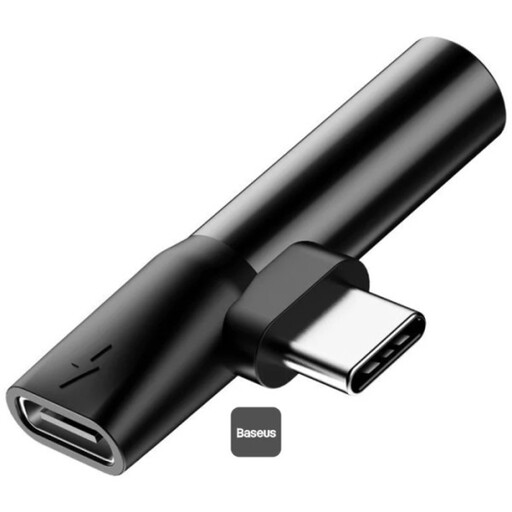
Why this product suits the profile: This compact adapter connects USB-C to a 3.5 mm headphone jack and, according to the product description, also allows charging via USB-C.
The product description clearly states its compatibility limitations. You should therefore check whether your smartphone is supported before buying.
USB-C to 3.5 mm jack, charging function, TPE and aluminium components, plus product dimensions of approximately 4 × 2 × 1 cm.
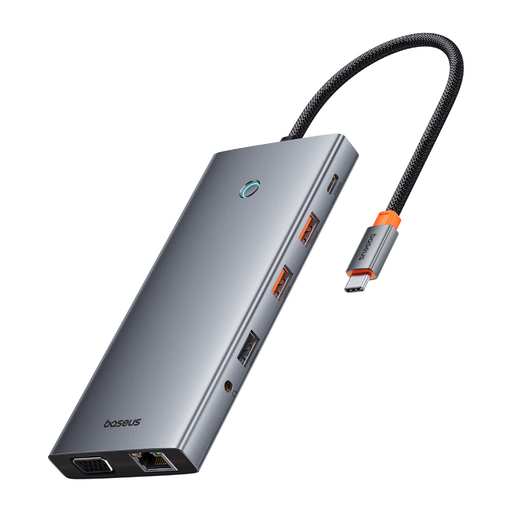
Why this product suits the profile: For a permanent workstation with monitors, networking, memory cards and USB devices, this model offers a wide range of connections.
The specifications state the individual standards: USB 3.2 Gen 2 up to 10 Gbit/s, HDMI, DisplayPort, VGA, RJ45 and 100 W PD.
Two HDMI ports, DisplayPort, VGA, card reader, 1 Gbit/s Ethernet and a 3.5 mm audio connection in one device.
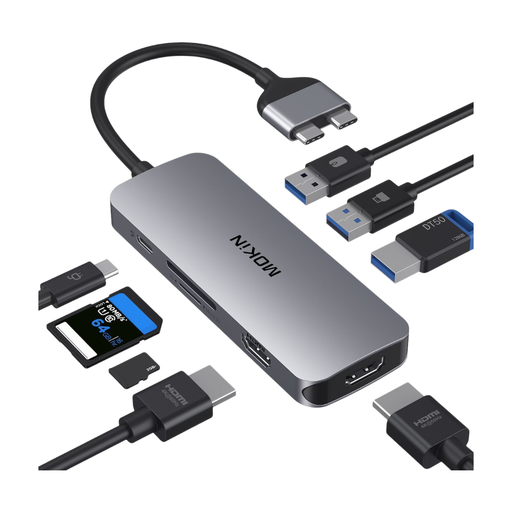
Why this product suits the profile: Suitable for users who want to connect several peripherals, cards and displays to their MacBook.
The description highlights MacBook compatibility and limitations with certain chip generations. These details should be checked before placing your order.
Two HDMI outputs, three USB 3.0 ports, SD/TF card reader and up to 100 W PD input according to the product specifications.
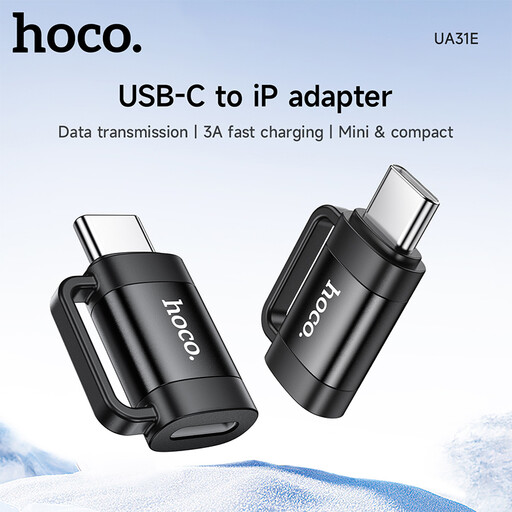
Why this product suits the profile: This adapter is designed for users of USB-C devices who want to continue using existing Lightning cables or compatible accessories.
The product specifications clarify its functionality: audio output and calls via Lightning headphones are not supported; OTG requires a compatible host.
USB-C to Lightning, data transfer up to 480 Mbit/s, charging support up to 3 A and a compact design.
Insert the adapter and hub without forcing them, and use cables that match the relevant standard. External hard drives may require their own power connection. Use your operating system’s eject function to remove storage media before unplugging the hub. When several ports are active, ensure sufficient ventilation and stop using the device if the casing becomes unusually hot or shows visible damage.
We have put together a complete, regularly updated list of products that fully meet these strict selection criteria and the safety regulations applicable in the EU.
No. For video output, the host device’s USB-C port must provide a suitable video signal, such as DisplayPort Alternate Mode or Thunderbolt. The hub, cable and monitor must also support the desired resolution and refresh rate.
That depends on the model. Only a specifically labelled USB-C PD port handles power input. On some hubs, this connection is intended solely for charging, while other ports are used for data. Check the description of the specific product.
The speed is determined by the slowest component involved. An adapter specified as offering “up to 10 Gbit/s” will only reach this figure if the host device, cable and connected device support the same standard. For OTG accessories with lower data requirements, a lower transfer rate is often sufficient.