
Lieferung heute & morgen

Qualitätsgarantie

Willkommens-Angebote freischalten: KOSTENLOSE Lieferung | Bis zu 80 % RABATT | Kostenlose 30-Tage-JoyPlus-Testphase
App herunterladen
A USB-C charging cable might seem like a simple accessory, but the differences in performance, durability, and functionality are enormous. Many users invest in cables that don't live up to their promises, throttle charging speeds, or show signs of wear after just a few months. Before you make a decision, it's crucial to understand the most common pitfalls that can lead to a bad buy.
The selection is vast, and marketing terms can be confusing. Pay attention to these three points to make an informed decision.
A cable labeled "100W" or even "240W" does not automatically guarantee maximum charging speed. The actual performance depends on the entire charging chain: the cable, the power adapter, and the end device (e.g., smartphone or laptop). A 240W charging cable can only unleash its full potential if the power adapter and the device also support this charging standard. If you buy a high-performance cable for a lower-wattage power adapter, the charging speed will be limited by the adapter.
Many users assume that a powerful charging cable is also suitable for fast data transfers. The reality, however, is that most USB-C cables optimized for charging only support the USB 2.0 standard, with a maximum data rate of 480 Mbit/s. This is sufficient for syncing contacts or small files but becomes a bottleneck when you want to transfer large amounts of data like videos or backups. A true USB C data cable with USB 3.2 or higher offers speeds of 5 Gbit/s and more.
A braided USB C cable made of nylon is often advertised as being particularly robust. However, the sheathing alone is no guarantee of longevity. The critical factors are the quality of the workmanship, the thickness of the internal conductors, and especially the reinforcement at the transition from the cable to the connector—the most common point of failure. A poorly constructed braided cable can wear out just as quickly as a simple PVC cable.
To avoid the pitfalls mentioned above, you should pay attention to the following technical parameters. These define the actual performance and reliability of your cable.
The charging power, measured in watts, is the most important criterion for charging speed.
A Power Delivery cable is crucial as it intelligently communicates with the power adapter and the device to negotiate the optimal charging voltage and current. Make sure the cable explicitly supports PD 3.0 or the newer PD 3.1 standard (for 240W).
Consider what you will primarily use the cable for.
A robust build significantly extends the cable's lifespan.
Based on the criteria above, we have compiled a few products for specific user groups.
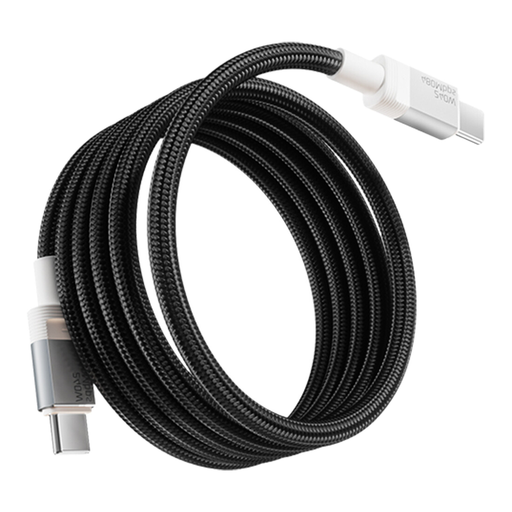
Why This Fits Their Persona: Ideal for users who own a MacBook Pro, a gaming notebook, and a modern smartphone. This cable is designed to power even the most demanding devices at maximum speed, eliminating the need for separate cables for your laptop and phone.
It bypasses the "wattage trap" by supporting the PD 3.1 standard and an E-Marker Pro chip, which ensures the full 240W output—provided the power adapter and device are compatible.
240W Charging Power: Future-proof for the next generation of high-performance devices. Robust Construction: Aluminum alloy and a 48-strand nylon braid for high durability.
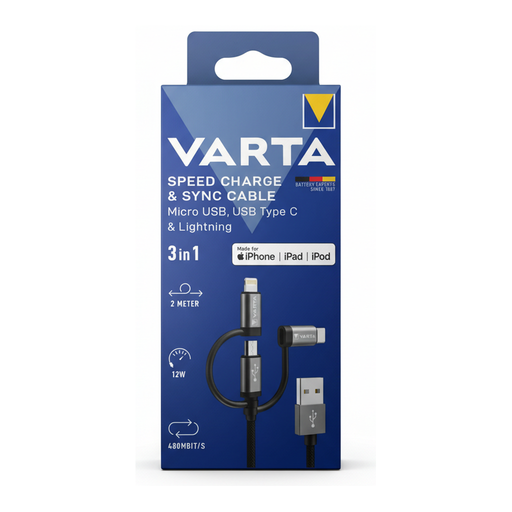
Why This Fits Their Persona: Perfect for anyone who travels light or wants to reduce cable clutter at home. With its interchangeable adapters, this cable serves devices with Lightning, USB-C, and Micro-USB ports, making it a universal solution.
It solves the compatibility problem by combining three connectors into one cable. Furthermore, the MFi certification for the Lightning adapter guarantees seamless functionality with Apple devices.
3-in-1 Design: One cable for almost all mobile devices. MFi-Certified: Guarantees full compatibility and safety for iPhone and iPad. The 2-meter length offers extra flexibility.
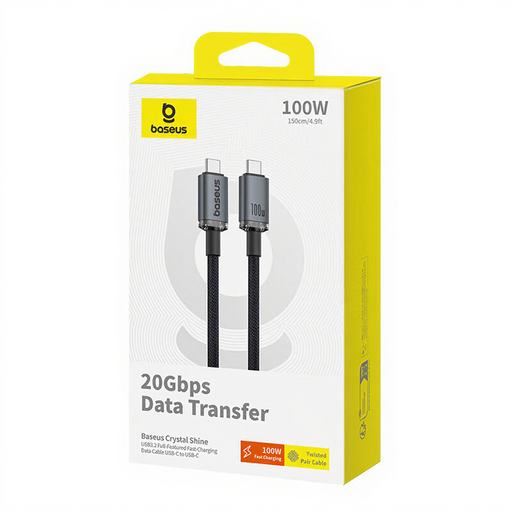
Why This Fits Their Persona: For users who need both high charging power for their notebook and extremely fast data transfer for backups or video files. This cable combines functionality with an attractive design.
This cable resolves the "data rate fallacy" by offering a 20 Gbit/s data transfer rate alongside 100W charging power—far exceeding the common USB 2.0 standard.
High Data Rate: With 20 Gbit/s, transferring 10 GB of data is possible in just a few seconds, according to the manufacturer. 100W Power Delivery: Reliably and quickly charges even demanding laptops.
We have compiled a complete, up-to-date list of products that fully meet these strict selection criteria and safety regulations.
Physically, the USB-C connector fits into any USB-C port. However, the functionality can vary greatly. A simple charging cable may not support high data rates or the power required for a laptop. Therefore, always check the cable's specifications (wattage, data rate) and your device's requirements.
This is usually due to one of the other links in the charging chain. For fast charging to work, three components must support the same fast-charging standard (e.g., Power Delivery): the end device (smartphone), the power adapter, and the Type-C fast-charging cable. If even one of these components does not support the standard, charging will occur at the slowest common speed.
Don't just look at the braid itself; pay close attention to the strain relief at the connector. It should be robust and flexible to absorb the stress from bending the cable. A metal (aluminum) connector housing is often an indicator of higher-quality construction compared to simple plastic.