
Lieferung heute & morgen

Qualitätsgarantie

Willkommens-Angebote freischalten: KOSTENLOSE Lieferung | Bis zu 80 % RABATT | Kostenlose 30-Tage-JoyPlus-Testphase
App herunterladen
A USB-C cable might look like a simple accessory at first glance. In practice, however, USB-C charging cables differ significantly in charging power, data transfer, connectors and build quality. A cheap cable can therefore be unsuitable if it needs to charge a laptop, transfer large files or drive a monitor.
The Joybuy Product Recommendation Officer filters the most important product specifications and shows what shoppers in the UK should look for when buying.
The USB-C connector only describes the shape of the port. A USB-C data cable can still be technically limited to USB 2.0 with up to 480 Mbit/s. For photos, documents and routine syncing, this is often sufficient. However, if you’re transferring video files, games or backups, you’ll need a higher data rate, such as USB 3.x, USB4 or Thunderbolt 4.
A 100W USB-C cable can support up to 100 watts, but the charger and device must also be able to negotiate that power. With a smartphone that has a lower charging capacity, the extra capacity won’t be used automatically. For powerful laptops, an E-Marker chip is also important, especially for cables rated at 5 A or more.
A USB-C to USB-C cable won’t fit an older charger with a USB-A output. For such power adapters, you’ll need a USB-A to USB-C cable. Apple devices with a Lightning connector, on the other hand, require a Lightning to USB-C cable. So before you buy, check both ends of your existing charger and device.
The shape of the connector can also matter. A right-angled connector can reduce mechanical strain on the port in tight workspaces, when gaming, or at a side laptop socket.
The term PD charging cable indicates support for USB Power Delivery. Typical power levels are 20 W, 60 W and 100 W. A 240W USB-C cable compliant with USB PD 3.1 is aimed primarily at powerful laptops and compatible devices.
Three values are important here:
A built-in display, such as on a cable with LED screen, can show wattage, voltage or current. However, it doesn’t replace checking the technical specifications of your charger and device.
For everyday syncing, many USB-C data cables with 480 Mbit/s are sufficient. For external SSDs and large files, models with 10 or 20 Gbit/s are more sensible. Thunderbolt 4 cables, according to the product specifications of certain models, support up to 40 Gbit/s and can also drive high-resolution displays.
The maximum video resolution doesn’t depend solely on the cable. Your laptop, graphics card, monitor, docking station and the standard used must all be compatible. So figures like 4K or 8K should always be understood as the result of the entire system working together.
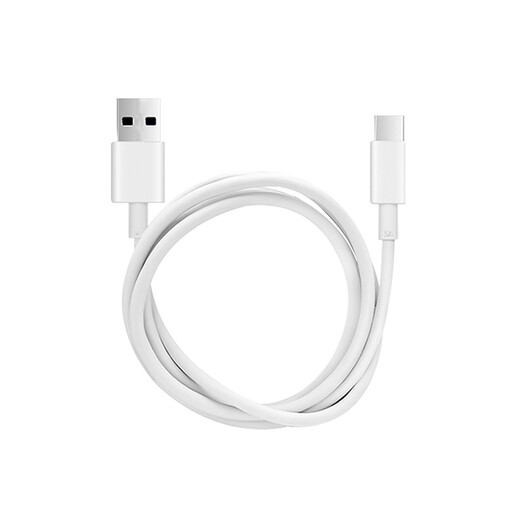
Why this product fits the profile: The 1-metre cable is designed for older USB-A chargers and computers, and supports charging and data syncing at up to 2 A.
The stated maximum current of 2 A makes it clear that it is not intended for 3 A or 5 A high-power charging.
USB-A and USB-C connectors, 1 metre length, and specified charging and data functions.
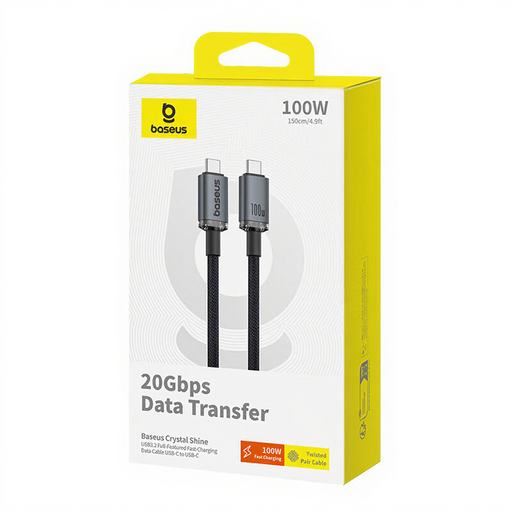
Why this product fits the profile: The USB-C to USB-C cable combines a stated charging power of 100 W with USB 3.2 Gen2 and a specified data rate of up to 20 Gbit/s.
Charging power and data standard are listed separately. This makes it easier to check whether the cable is suitable for laptop or SSD use.
100 W Power Delivery, up to 20 Gbit/s and support for 4K at 60 Hz according to the product description.
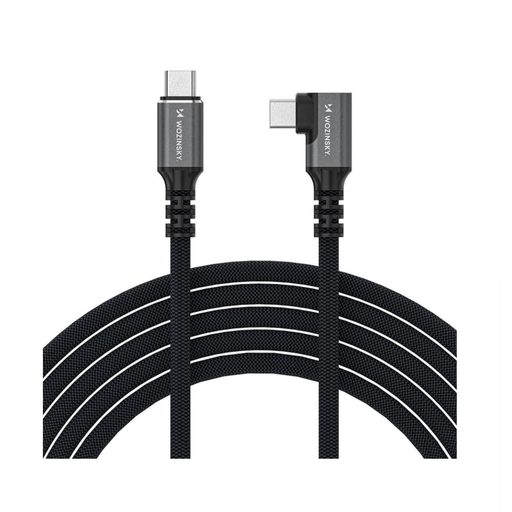
Why this product fits the profile: For compatible laptops, docking stations, external SSDs and monitors, the 1.5-metre cable offers specified Thunderbolt 4 and USB4 features.
The specifications list up to 240 W, up to 40 Gbit/s and specific video formats. So the high power isn’t defined by wattage alone.
Up to 40 Gbit/s, up to 240 W, 90-degree connector and support for 4K and 8K output according to the manufacturer’s specifications.
We’ve put together a complete, regularly updated list of products that fully meet these strict selection criteria and the safety regulations in force in the EU.
A USB-C charging cable will last longer if you don’t pull it out of the socket by the cable or wrap it tightly around the charger. A loose loop without sharp bends near the connectors is recommended. If you notice visible cracks, exposed wires, bent contacts or unusual heat, stop using the cable.
Also, keep the connectors dry and remove dust carefully. The stated power must not be exceeded. For a laptop charger rated at 100 W or 240 W, only use cables whose technical specifications explicitly support that power.
For fast charging, you need a cable with the right Power Delivery support, sufficient current rating and a compatible charger. For many smartphones, 20 to 60 W is enough, while powerful laptops often require 100 W or more.
The lifespan depends on the material, connector quality, bend radius and daily wear. A general time frame isn’t possible. Reinforced connectors, braided sleeves and careful storage can reduce mechanical stress.
No. What matters are the specific values you need: connector type, charging power, data speed, length and, if necessary, video or Thunderbolt support. A simple USB-A to USB-C cable with 480 Mbit/s can be perfectly suitable for a charger and smartphone, while a laptop setup will require a more powerful USB-C data cable.