
Lieferung heute & morgen

Qualitätsgarantie
App herunterladen
Kategorien
A USB-C charging cable with a display is more than just a connector; it's a diagnostic tool. The integrated digital display provides real-time data on charging power in watts (W), allowing users to objectively assess the efficiency of their charging process. This is particularly relevant when using Power Delivery (PD) and other fast-charging technologies, where the actual power transferred depends on the compatibility between the power adapter, cable, and end device. A display visualises whether the promised charging power is being achieved and helps identify bottlenecks in the charging chain.
The selection of a suitable cable is based on technical parameters. Compatibility and performance are determined by the connector type, maximum power delivery, data transfer rate, and material quality.
Choosing the right connector type is fundamental and depends on the available ports on your power adapter and end device.
The wattage indicated on the cable (e.g., 66W, 100W) represents the maximum supported charging power. A cable with a higher power rating can be safely used for devices with lower power requirements, as the end device requests only the power it needs. Conversely, a cable with a lower power rating (e.g., 60W) cannot charge a device that requires 100W (e.g., a laptop) at maximum speed. The wattage display helps to verify the actual power draw in this scenario.
Most USB-C charging cables with a display are primarily optimised for charging. Their data transfer rate often corresponds to the USB 2.0 standard, with speeds up to 480 Megabits per second (Mbps). This is sufficient for syncing photos, documents, or music files. For transferring large video files or for use as a connection to an external monitor, specialised USB 3.2 or Thunderbolt cables are required, which, however, rarely feature an integrated power display. A USB-C data cable focused on speed often has different design priorities.
The longevity of a cable is largely determined by the materials used.
Based on technical specifications and practical utility, we present two models that cover different use cases.
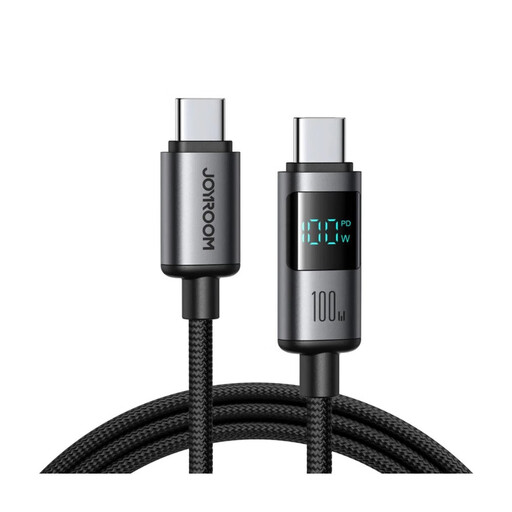
Why We Recommend This Product This cable is designed for power users who rely on devices with high energy demands. Its support for up to 100W Power Delivery makes it a suitable solution for charging laptops, while the digital display allows for precise monitoring of the charging performance. The construction of aluminium alloy and braided nylon addresses the need for durability in daily use.
Pros
Who It's For Users of modern laptops (e.g., MacBook Pro/Air), tablets (e.g., iPad Pro), and high-end smartphones who need a powerful USB-C to USB-C cable and want to actively monitor charging efficiency.
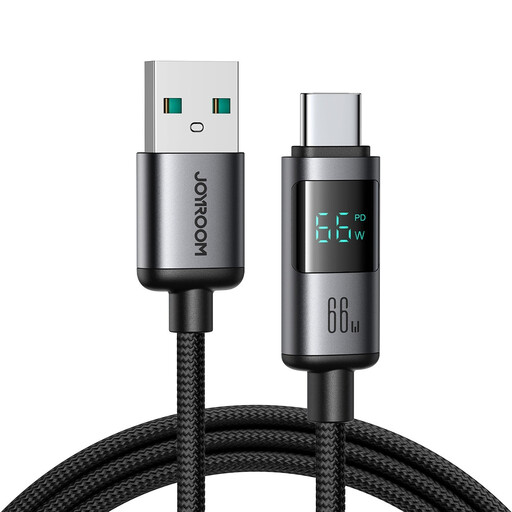
Why We Recommend This Product This model bridges the gap between older USB-A power adapters and modern USB-C devices. It enables high charging speeds of up to 66W, which is more than sufficient for most smartphones and many tablets. The integrated display also offers the benefit of power monitoring, which is particularly useful for verifying compatibility when using USB-A fast chargers.
Pros
Who It's For Users who want to fast-charge their USB-C devices with existing USB-A power adapters, power banks, or in the car, without forgoing the monitoring function of a wattage display.
The cables presented here cover common use cases in consumer electronics. For specialised charging requirements, such as in e-mobility, other standards and cable types exist. If you are looking for such solutions, you can find a selection of Mode 3 Ladekabel in the corresponding category.
1. Why isn't my charging cable with a display showing the full wattage? The displayed charging power is the result of communication between the power adapter, cable, and end device. If any of these three components do not support the high power, the speed will be reduced. A 100W-capable power adapter and a 100W-capable device are required to achieve the maximum power with a 100W cable. Additionally, the device automatically reduces the charging power as the battery nears full capacity to preserve battery health.
2. Is a braided charging cable really more durable? Yes, a jacket made of braided nylon offers significantly higher tensile strength and abrasion resistance compared to a standard TPE or PVC jacket. This reduces the risk of cable breakage and extends the lifespan of the cable, especially with frequent mobile use.
3. Can I use a 100W USB-C cable for my smartphone that only supports 25W? Yes, it is safe to use. The USB Power Delivery protocol ensures that the end device (your smartphone) only requests as much power from the adapter as it can safely handle. The cable acts as a neutral conductor rated for up to 100W, but the actual power transferred is limited to 25W by the smartphone.