Who are the different types of card reader for?

Photographers with SD cameras

If you regularly transfer camera photos to a computer or USB-C mobile device, check that the reader supports your SD format and the UHS standard you need. The SD Association distinguishes between several SD bus standards. Apple states that its USB-C to SD Card Reader supports UHS-II and is backwards compatible with other SD cards.

Photographers with CFexpress cameras

Make sure the reader is explicitly listed as compatible with the CFexpress type you use. Sony specifies Type A for the MRW-G2, while ProGrade Digital lists Type B alongside SDXC UHS-II for the PG05.5. These types are not interchangeable.

Importing photos from multiple devices

If you switch between SD and microSD cards, or between a computer and mobile device at the kitchen table, check the slots and the specific import method you’ll use. Lexar describes its Professional USB-C Dual-Slot Reader as supporting SD and microSD; Apple Support Germany explains how to import photos and videos from a memory card to supported iPhones.

What should you look for when buying?

Priority What to check before buying Who it matters to
Card format Match the markings on your card to the reader’s explicitly listed slots. For CFexpress, check whether you need Type A or Type B. If I want to make sure the reader fits my camera card exactly, compatibility comes first. Around 40% of consumers are likely to focus mainly on finding the right card format.
Speed when importing large files Compare the UHS generation of the SD card and reader, as well as the destination device’s data connection. Don’t assume advertised interface speeds guarantee a particular copying time. When I have lots of photos, I want to check that the card, reader and destination device all work together rather than relying on a single speed rating. Around 30% of consumers are likely to place particular importance on quickly importing large numbers of photos.
Multiple cards and ports Check that the reader has the SD and microSD slots you need, along with any extra USB or display connections. If I connect different cards or other accessories at my import station, having the right choice of ports matters to me. Around 20% of consumers are likely to need multiple card slots or extra ports in particular.
Importing to mobile devices Check that the device model, connection, card format and documented import method using the relevant app are all compatible. If you want to transfer photos directly to a phone or tablet, check how importing works on your specific device first. Around 10% of consumers are likely to focus on importing to a USB-C mobile device.

USB-C card reader buying pitfalls

  • Assuming a USB-C plug guarantees card compatibility

    USB-C describes the connection, not the card formats the reader supports. Readers for SD, microSD, CFexpress Type A and CFexpress Type B are not interchangeable.

    Check the markings on your camera card and match them to the slots explicitly listed for the reader you’re considering.

  • Assuming the USB speed is the card slot’s reading speed

    A USB port’s data rate alone doesn’t tell you how quickly the card slot can read. The card and destination device also affect the transfer process.

    Compare the card slot specifications separately from the USB data rate, and don’t treat advertised figures as a guaranteed copying time.

  • Checking only for USB-C when using a mobile device

    A USB-C connection alone doesn’t prove that a particular phone or tablet can read a memory card using the intended import method.

    Before buying, check the exact device model, card format and documented import process using the relevant app.

Key brands and product ranges

Apple

USB-C to SD card readers for importing photos to specified Mac, iPad and iPhone devices.

  • Apple states that the reader supports UHS-II and is backwards compatible with other SD cards.
  • The model described isn’t a CFexpress or standalone microSD dual-slot reader. Check compatibility with your specific destination device.

Lexar

The Professional USB-C Dual-Slot Reader is designed for SD and microSD cards.

  • Lexar states that it supports UHS-II for both formats and advertises read speeds of up to 312 MB/s.
  • The advertised speed isn’t a measure of import time with every card and destination device.

Sony

The MRW-G2 is specified for CFexpress Type A and SD cards.

  • Sony lists CFexpress Type A, UHS-II and UHS-I SD cards, and USB 3.2 Gen 2.
  • The specifications don’t list support for CFexpress Type B or guarantee a particular copying time.

ProGrade Digital

According to the manufacturer, the PG05.5 combines slots for CFexpress Type B and SDXC UHS-II.

  • ProGrade Digital lists both card formats and includes a USB-C cable.
  • Type A cards aren’t listed as compatible with this model. An advertised interface speed isn’t an independent real-world test result.

Verbatim

The USB-C Essentials Multiport Hub 32156 combines card slots with additional ports.

  • Verbatim lists SD and microSD slots, along with USB-A, HDMI and USB-C PD.
  • Choose the hub based on the card slots and additional ports you need. The USB ports alone don’t determine card reading speed.

Joybuy products for importing photos

The products below are for importing via USB-C using SD or SD/TF slots. Several models also list additional ports or features.

Acer 7-in-1 USB-C hub with SD/TF card reader

Acer 7-in-1 USB-C Hub ODK6V0

For an import station where you need extra ports alongside SD or TF card slots.

The title lists HDMI with 4K@30Hz, 100 W PD, three USB 3.0 ports with speeds of up to 5 Gbps, and an SD/TF card reader.

View at Joybuy

USB-C 3-in-2 adapter with SD card reader

USB-C 3-in-2 adapter with SD card reader

If you’re planning to import photos to an iPhone or iPad named in the product title, this adapter may be worth considering. Check the import method for your specific device.

The title lists an SD card reader and names iPhone and iPad as compatible uses.

View at Joybuy

7-in-1 external DVD drive with USB 3.0, Type-C and SD/TF card reader

7-in-1 external DVD drive with SD/TF card reader

If you need an external DVD drive as well as a way to import cards, the product title lists both features.

The title lists USB 3.0, Type-C and SD and TF card readers.

View at Joybuy

UGREEN USB-C dock with two HDMI, two USB-C, one USB-A and SD/TF ports

UGREEN USB-C Dock with 2 HDMI, 2 USB-C, USB-A and SD/TF

For a workspace where you need several display and USB connections as well as a way to import cards.

The product title lists two HDMI, two USB-C and one USB-A port, as well as an SD/TF card reader.

View at Joybuy
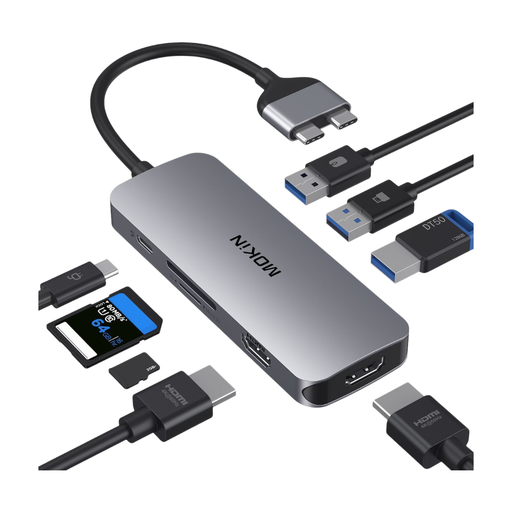
Mokin 2USB-C to 2HDMI dock with three USB 3.0 ports, PD and SD/TF

Mokin 2USB-C to 2HDMI Dock with 3 USB 3.0, PD and SD/TF

For importing cards at a workspace where you also need the monitor and USB connections listed in the title.

The product title lists 2USB-C, 2HDMI, 3USB3.0, PD and an SD/TF card reader.

View at Joybuy

Frequently asked questions

Can I import camera photos directly to an iPhone using a USB-C reader?

This may work with a compatible iPhone, card reader and import method. Apple describes importing from SD cards into the Photos app, as well as accessing them through supported apps. Check your specific iPhone and the intended method, as USB-C alone doesn’t confirm that every reader is compatible.

When should I remove the card after copying?

First, check that the copied photos are available on the destination device. On Windows, Microsoft recommends ejecting removable hardware using ‘Safely Remove Hardware and Eject Media’ before disconnecting it, to help prevent data loss.

What should I know about a faulty reader and a manufacturer’s warranty?

Your statutory rights against the seller are separate from a voluntary manufacturer’s warranty. The consumer advice centre (Verbraucherzentrale) explains that, when a product is faulty, the first step is to seek a remedy from the seller, such as a repair or replacement. Check the terms of any additional warranty separately.

What should I look out for when buying an electronic card reader in Germany?

As part of its market surveillance, the Federal Network Agency (Bundesnetzagentur) checks details including CE marking, product identification and manufacturer information. This regulatory role doesn’t confirm that any particular product mentioned here complies with the requirements.

Can I put a card reader I no longer use in the household rubbish?

No. The German Environment Agency (Umweltbundesamt) says that waste electrical and electronic equipment must be collected separately. A local recycling centre is one option.