Choose a card reader to match your action camera’s card format and the port on your target device. If you regularly transfer files from a UHS-II card, consider a reader that explicitly supports UHS-II. For UHS-I cards or a mix of USB-A and USB-C ports, a more flexible model may be a better fit. When using a shared computer, you should also take care to check for copied files and safely remove the card.
Who should consider their options?
People who often transfer video files
If you regularly copy large action camera files, check whether both your card and reader support UHS-II. The SD Association explains the different bus speeds of UHS-I and UHS-II, while TP-Link and Lexar explicitly list UHS-II support for their respective reader models.
People who use different work computers
If you switch between computers with different ports, or use SD cards as well as microSD cards, check that the reader’s card formats and USB connection match the ports available. TP-Link lists different combinations of card slots and USB-A or USB-C connections for its models.
People using shared computers
If you copy files on a shared computer, keep track of where you save them as well as keeping an eye on your card, and remember to take the card with you. The German Federal Office for Information Security highlights the risk of leaving removable storage devices behind; Microsoft recommends safely removing them in Windows.
What should you look for when buying?
First, check that the reader accepts your card directly. Then make sure its UHS support and USB connection match your card and target device.
| What matters when buying |
What to check |
Who is this important to? |
| Card format |
Check the format of your action camera’s card and compare it with the formats explicitly supported by the reader. |
If I want to copy files directly from my action camera card without an additional adapter or reader, the slot needs to be an exact match. This is likely to make card format a top priority for around 33% of consumers. |
| Speed for large files |
Check the UHS rating of both the card and reader, along with the data connection on the target device. Don’t treat maximum speeds as a guaranteed transfer time. |
If I regularly transfer large video files, I want to know whether my card and reader can use the same UHS standard. Around 27% of consumers are likely to prioritise transfer speed when buying. |
| Ports at work |
Check whether the computers you’ll use have USB-A, USB-C or both. The connector shape alone doesn’t tell you the data rate. |
If I work at different desks with different computers, I want to be able to plug the reader straight in. Connection flexibility is likely to be the main concern for around 20% of consumers. |
| Files on a shared computer |
Follow workplace rules for removable media, check the destination folder and eject the card properly. |
If I copy files on a shared computer, I want to take my card with me and leave no files behind at the workplace. Around 20% of consumers are likely to pay particular attention to how they handle their media and files. |
Common misconceptions
-
USB-C doesn’t automatically mean faster card speeds
The connector shape alone doesn’t determine transfer speed. The card, reader and host all affect the transfer path; a UHS-I card doesn’t become a UHS-II card when used with a UHS-II reader.
Compare the rating on the specific card with the reader’s explicitly stated UHS support.
-
A hub port’s data rate doesn’t automatically apply to its card reader
The Anker 565 lists its card slots at 104 MB/s, while separate USB data ports are specified at 10 Gbit/s. These figures refer to different ports.
Check the specification for the SD or microSD slot itself, rather than assuming the largest figure on the hub’s page applies to card transfers.
-
Don’t forget your card or files after copying
Unplugging the reader won’t remove files that have already been copied to a shared computer. The German Federal Office for Information Security points out that removable storage devices can be left unattended.
Check the destination folder, follow workplace rules and safely remove the card before you leave. Microsoft recommends safely removing devices in Windows to avoid data loss when disconnecting them.
Key brands at a glance
TP-Link
The UA440C and UA430D differ in their card standards and host connections.
- TP-Link describes the UA440C as having SD and microSD slots, with UHS-II support.
- According to TP-Link, the UA430D has USB-A and USB-C connections, as well as SD and microSD slots.
- The UA430D is listed as a UHS-I reader; manufacturer maximum speeds are not independent real-world test results.
Lexar
The Professional USB-C Dual-Slot Reader is designed for people who want to read SD and microSD cards via USB-C.
- Lexar lists an activity indicator and UHS-II read speeds of up to 312 MB/s.
- According to Lexar, results depend on system configuration and card speed; the listed connection is USB-C.
SanDisk
The QuickFlow microSD Card Reader with USB-C is designed for microSD cards.
- For model SDDR-B751-GNANN, SanDisk lists support for UHS-I and UHS-II microSD cards, along with USB 3.2 Gen 1.
- The product description lists a microSD reader, with no additional SD slot; speed figures are provided by the manufacturer.
Anker
The 565 USB-C Hub combines SD and microSD slots with additional ports for your workspace.
- Anker lists 104 MB/s for the card slots and 10 Gbit/s for separate USB data ports.
- These figures refer to different ports. According to Anker, pass-through charging requires a charger, which is not included.
Joybuy products for transferring files from cards
The following Joybuy products include card readers, USB-C hubs and docks for SD or microSD cards. Before buying, check that the card format and connection match your action camera card and target device.
 No image available
Acer 7-in-1 USB-C Hub ODK6V0
An option if you want to read SD and TF cards and use additional ports at your workplace.
Listed features include an SD card reader and a TF card reader, HDMI with 4K@30Hz, 100 W PD and three USB 3.0 ports at 5 Gbit/s. The 5 Gbit/s figure is not explicitly stated to apply to the card reader.
View at Joybuy
 No image available
Insta360 X5 Quick Reader
A targeted option if you want to transfer videos and photos from an Insta360 X5 microSD card to a mobile device.
The product description lists use with the Insta360 app and describes a compact reader for use on the go.
View at Joybuy
 No image available
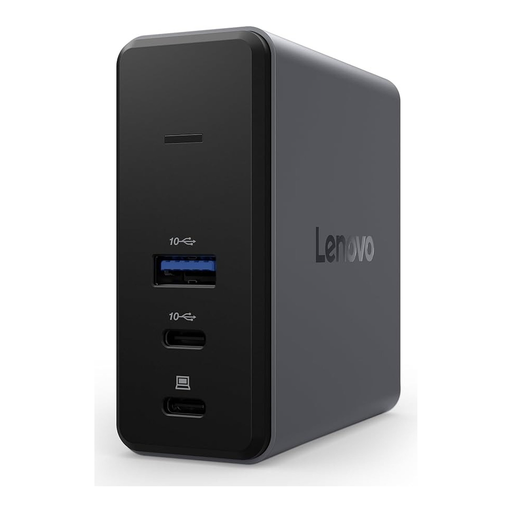
Lenovo X9 Charging GaN Dock
An option if you want to read a microSD card at a USB-C workstation.
Listed features include USB 3.2 Gen 2 Type-C, 60 W and a microSD slot. The product name specifies the colour Grey.
View at Joybuy
 No image available
WOZINSKY 14-in-1 USB-C Hub
An option if you need additional ports at your workplace alongside SD and TF card slots.
The product description lists SD and TF card readers, as well as USB ports, Ethernet and audio. The cable is specified as 15 cm; no data rate is given for the card reader.
View at Joybuy
 No image available
HOCO HB45 Spirit 2-in-1 USB-A/USB-C Card Reader
An option if you want to read microSD or TF cards on computers with USB-A or USB-C ports.
The product description lists both connection types and describes the device as light and compact. The colour is listed as Metal Grey.
View at Joybuy
Frequently asked questions
Do I need a UHS-II reader for a UHS-I microSD card?
No. A UHS-I card can generally also be read with a compatible UHS-I reader. A UHS-II reader may support UHS-I, but the higher potential UHS-II bus speed requires a compatible card and host interface.
Can I unplug the card as soon as it’s finished copying?
Wait until the transfer is complete, then use the safe removal feature in Windows. Microsoft recommends doing this to avoid data loss when disconnecting external storage devices.
Do I need an additional charger for a USB-C hub?
It depends on the model and the function you need. According to the manufacturer, pass-through charging with the Anker 565 requires a charger, which isn’t included. You don’t need this hub feature just to read a card.
What data protection rules apply to videos at a shared workplace?
If an organisation processes personal data, the European Data Protection Board’s guidance requires technical and organisational measures that are appropriate to the risks. Whether specific videos contain personal data, and which rules apply at a particular workplace, depends on how they’re used; a card reader won’t automatically meet these requirements.


