Travellers with a camera and a USB-C device
If you want to copy SD or microSD footage to a laptop or tablet while you’re away, first check that the card slots and USB-C connection are compatible.


First, choose a reader that matches your card and the USB-C port on the device you’re backing up to. For UHS-II footage, the reader should support UHS-II too; the SD Association notes that the actual transfer rate also depends on the card. A basic reader is enough if you don’t need extra ports. Make sure you have enough storage space, and check the copied files before deleting the originals.
If you want to copy SD or microSD footage to a laptop or tablet while you’re away, first check that the card slots and USB-C connection are compatible.
If you regularly transfer large recordings, check whether your cards and reader support UHS-II.
If you need to connect extra storage or power while copying files, compare a USB-C hub with a card reader against a standalone reader.
First check the card format and connection to your backup device, then the card standard, and finally whether you need any extra ports.
| Consideration | What to check before buying | Who it matters most to |
|---|---|---|
| Card and device compatibility | Check for an SD or microSD slot, a USB-C connection and support for external storage on the destination device. | If I want to copy SD and microSD footage to my USB-C device, I check the card and connection first. Around 33% of consumers put compatibility first. |
| Transfer time for large video files | Check whether the card is UHS-I or UHS-II, then compare this with the reader’s supported standard. | When transferring large files, I want to know whether the card and reader support the same card interface. Around 27% of consumers prioritise transfer speed. |
| Verifiable backup | Check that there is enough free space on the destination, then verify the copied files before deleting the originals from the card. | If I don’t want to leave my footage on the memory card alone, I plan to make an extra copy and check it. Around 20% of consumers pay particular attention to being able to verify their backup process. |
| Ports and power | Check which USB data ports and card slots you need, and whether USB-C PD passthrough is required. | At a café table, I want to be able to connect a card, external storage and, if needed, a power supply. Around 20% of consumers prioritise extra ports or charging options. |
A hub’s USB specification doesn’t automatically indicate the speed of its card slot. A UHS-II card won’t reach its potential transfer rate simply because it’s connected to a USB port advertised as fast.
Compare the card standard of your existing card with the one supported by the specific reader. Manufacturers’ maximum figures aren’t guaranteed transfer times.
A card reader transfers files, but it doesn’t automatically create an extra backup. Without a usable copy, your footage could be at risk if the card fails, gets lost or is accidentally erased.
Make sure you have enough storage space, check the copied files and keep the original card for now.
A hub can offer extra ports and charging; if you only need to connect one card reader to an available USB-C port, a basic reader may be enough.
Before buying, think about which devices you’ll actually need to connect at the same time while copying files.
The UA440C and UA430C are USB-C readers for SD and microSD cards.
According to the manufacturer, the Professional USB-C Dual-Slot Reader is designed for SD and microSD cards, including UHS-II.
The CONNECT USB-C 7-in-1 is a hub for situations where you need more than just card slots.
The 553 USB-C Hub combines an SD and microSD slot with additional ports.
Kingston describes Workflow SD as a USB-C reader for two UHS-II SD cards, which can also be part of a modular dock.
This selection includes USB-C card readers and USB-C hubs with SD or TF card slots. Before buying, check your card format and the ports on your backup device.
 No image available
A good option if you want to connect additional devices or a display while copying files from a card.
 No image available
An option if you want to read SD or microSD footage on a USB-C device and don’t need a multi-port hub.
 No image available
Best suited if you want to read or burn optical discs as well as read SD or TF cards.
 No image available
A good option if you want to connect USB devices or a display and use PD while reading a card.
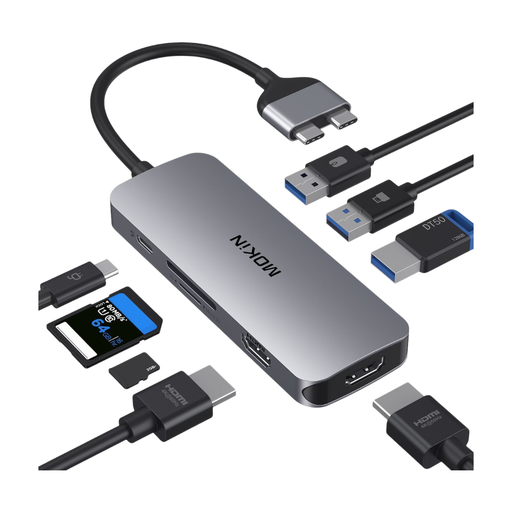 No image available
An option if you need several ports and a PD port in addition to the card reader.
No. To benefit from UHS-II, both the card and reader should support the standard. Manufacturers’ figures are maximum speeds under suitable conditions, not guaranteed transfer times.
Connect a compatible reader to your device, copy the files to storage with enough free space, and check the copy before removing the originals. Germany’s Federal Office for Information Security recommends keeping backup copies to guard against data loss and advises disconnecting backup media from the device when you’re not backing up. Be cautious if you’re also copying files to the cloud over public Wi-Fi.
According to consumer information from the European Union, you have at least two years of legal rights against the seller from the date you receive the goods. This is separate from any additional manufacturer’s guarantee.
No. Germany’s Federal Environment Agency explains that electrical waste must be collected separately. Options include recycling centres and suitable retail take-back points.