Mobile microSD users
If you want to copy drone footage straight from a microSD card to a USB-C device, the card format, data connection and your device’s import function are key.


If your drone records to microSD and you only need to read that card, a compact USB-C microSD reader is a good fit. If you also use SD cards, a dual-slot reader is more practical. UHS-II is mainly relevant if both the card and the device you’re transferring to support the interface. Before buying, check that your device has a USB-C data port and supports importing files. Open the copied files and keep the originals until you’ve checked them.
If you want to copy drone footage straight from a microSD card to a USB-C device, the card format, data connection and your device’s import function are key.
If you use SD cards as well as a drone, a reader with both SD and microSD slots can give you access to both formats at the same workstation. Lexar and UGREEN describe dual-slot models for different card interfaces.
For large recordings, consider the card, reader and device you’re transferring to as a whole. The SD Association explains that the interface in use also depends on the capabilities of the host device.
| Consideration | What to check before buying | Who should consider this? |
|---|---|---|
| Card and device compatibility | Check whether you need microSDHC/microSDXC or SD, and make sure your device has a USB-C data port and supports importing files. | If I want to copy files straight from my drone card to my device in a café, the card slot needs to be the right fit and importing must work. Around 33% of consumers put compatibility first. |
| A copy you can check | Make sure you have enough free storage and check how to open the transferred files on your device. | If I’m backing up footage while I’m out, I want to check the files before deleting the originals. Around 27% of consumers put a reliable copy first. |
| Speed with large files | Compare the UHS support of the card and reader separately from the USB interface on your device. Don’t treat maximum speeds as guaranteed copy times. | If I need to transfer large video files, what matters to me is the time taken for the whole transfer, not just the speed of one connection. Around 20% of consumers prioritise copying speed. |
| Portability and connections | Check which SD and microSD slots you need, what other connections are available and, if relevant, the requirements for pass-through charging. | If there’s not much room on the café table or I need extra connections for my laptop, I want to weigh up the size and features that suit me. Around 20% of consumers pay particular attention to portability or the range of connections. |
The interfaces of the card, reader and device you’re transferring to all affect the potential throughput. A USB specification alone doesn’t tell you how quickly your files will actually transfer.
Consider the card, reader and device together as one transfer route. If they’re not well matched, you may have to wait longer.
A microSD-only reader won’t take a full-size SD card. And having the right connector doesn’t automatically mean your device supports importing files from a card.
Before buying, check the card format and import function on the specific device you’ll be using. If the reader doesn’t support your card format, you may need an additional reader or adapter.
A backup is only useful if the files you need are actually on your device and can be opened.
Open or check the copied files, and keep the originals on the card until you’ve done so.
The QuickFlow USB-C reader is designed for microSD cards.
The Professional USB-C Dual-Slot Reader is designed for SD and microSD cards at a USB-C workstation.
The 50706 model offers USB-C and USB-A connections alongside SD and microSD slots.
The 553 USB-C Hub is designed for a laptop workstation, with card slots and additional connections.
According to the manufacturer, the portable PGM0.5 combines SDXC and microSDXC slots with USB-C.
This selection includes USB-C card readers and hubs with SD or TF card slots for copying drone footage to compatible devices.
 No image available
An option if you need a card reader and additional connections at a mobile USB-C workstation.
The product title lists HDMI with 4K@30Hz, 100W PD, three USB 3.0 ports at 5 Gbit/s, and SD and TF card readers.
 No image available
For reading SD or microSD cards on a compatible USB-C or USB-A device.
The title and description list SD, microSD/TF, SDHC and SDXC. The description gives USB 2.0 at up to 480 Mbit/s as the interface specification, not as a guaranteed copying speed.
 No image available
An option if you want to read cards while using additional connections on your laptop.
The description lists SD and TF card readers that can be used simultaneously, as well as additional video, USB, Ethernet and PD ports.
 No image available
For a laptop workstation where you need a card reader and additional connections.
The title lists HDMI, VGA, three USB 3.0 ports, SD/TF and PD. According to the description, your laptop needs a Thunderbolt or full-featured USB-C port.
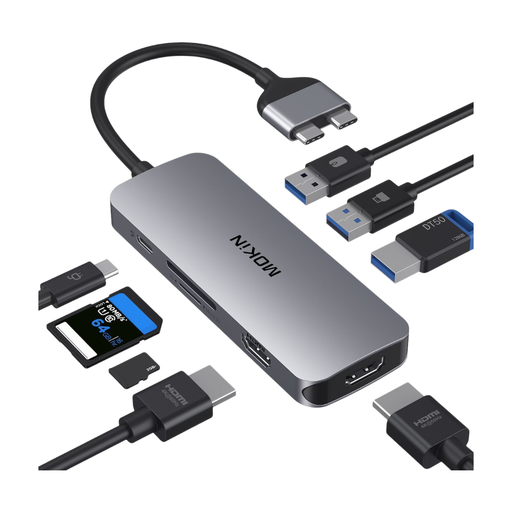 No image available
An option if you need an SD/TF card slot and additional connections for a compatible laptop.
The description lists MacBook Pro/Air models with two Thunderbolt 3 ports on the same side as compatible, but excludes models with M1, M2 and M3 chips.
No, you don’t have to use a UHS-II reader to read the card. The SD Association describes backward compatibility. To benefit from the potential speed advantage, both the card and the reader or host device need to support the faster interface.
No. The SD Association describes Speed Class markings as minimum write-speed ratings under specified conditions, not as a promise of the copying speed for the entire USB workflow.
Open or check the transferred files, and initially keep the originals on the card. This is a precaution to help protect your data, not a guarantee that the card reader has checked the files for errors.
If a product is faulty, it’s important to distinguish your statutory rights from a voluntary manufacturer’s guarantee. The Verbraucherzentrale names the seller as the point of contact for having the issue resolved; an additional manufacturer’s guarantee doesn’t affect your statutory rights.
No. If footage containing personal data is captured outside purely personal or family activities, you need to check the relevant data protection rules. In its position paper of 16 January 2019, the Datenschutzkonferenz addressed this issue in relation to camera drones. Whether a particular publication is permitted depends on its purpose and content.