If your drone footage is stored on a removable microSD card, choose a reader that supports both the card format and the connection on your destination device. UHS-II matters most when your card also supports UHS-II and you regularly transfer large amounts of data. A hub is a better choice if you also need extra ports at your desk.
Which card reader is right for you?
Backing up drone footage to a laptop
If you want to remove the memory card from your drone and read it on a USB-C computer, first check that the files are actually stored on the card and that the reader supports its format. DJI Support notes that footage may be stored either in the internal memory or on an inserted microSD card.
Copying footage directly to a mobile device
To import files without a laptop, the connection and file access need to work with your specific mobile device. Apple Support explains how suitable iPhones can access connected SD cards through Files and supported apps.
Regularly transferring large amounts of video
If you often copy large files and use a UHS-II card, compare its interface with the reader’s stated support. A USB-C connection alone tells you nothing about the card’s transfer rate.
What should you look for when buying?
First check where your footage is stored and what card format you have. Then check that your destination device can access it, and only after that consider whether faster card performance or extra hub ports will genuinely help your workflow.
| Buying priority |
What to check before buying |
Who is this most relevant to? |
| Card format and storage location |
Check where the footage is stored and that the reader has the right microSD or SD slot. |
If I want to read the drone card directly, the files need to be on it and the slot needs to match the card format. Around 36% of consumers focus on this basic card import. |
| Importing to a mobile device |
Check that the connection is compatible, files are accessible and there is enough free space on the destination device. |
If you want to copy files to a smartphone or tablet without a laptop, you need both the right connector and accessible files. Around 29% of consumers prioritise importing to a mobile device. |
| Speed when transferring large files |
Check that both the card and reader support the same UHS standard, and treat manufacturer figures as maximum speeds. |
When I regularly copy large files, it matters whether the card and reader support the same fast interface. Around 21% of consumers prioritise transfer time. |
| Extra ports at your desk |
Check which hub ports you need and the separately stated card reader speed. |
If I need to connect other devices at my desk as well as import files from a card, a hub can bring several types of port together. Around 14% of consumers focus mainly on extra ports. |
Avoid common misconceptions
-
Confusing a hub’s USB speed with its card reader speed
For the Verbatim 32156, the manufacturer states speeds of up to 5 Gbit/s for the USB-A 3.2 Gen 1 port, but a card slot read speed of up to 30 MB/s. These are different specifications.
Look for the card slot’s read speed in the specifications for the specific model, not just its USB standard.
A slower card read speed can mean longer transfer times when copying large amounts of data.
-
Assuming a USB-C connector means UHS-II support
UHS-I and UHS-II are different card interfaces. A USB-C connection does not prove that a reader supports UHS-II.
Compare the UHS marking on your card with the reader’s stated support.
If either the card or reader does not support UHS-II, you may not be able to make full use of a reader bought for that standard when copying files this way.
-
Not checking where your footage is stored before buying
According to DJI Support, drone footage may be stored in the internal memory or on an inserted microSD card. A card reader will not automatically access files in the internal memory.
Check where the original files are stored on your specific drone model before choosing a reader for importing files from a card.
Key brands at a glance
Hama
A compact USB-C card reader for SD and microSD cards, when a standalone reader is all you need.
- Hama says model 00200131 supports, among others, microSDXC and SDXC cards, with capacities of up to 2 TB.
- The stated interface speed of up to 5 Gbit/s is not a confirmed card transfer rate; UHS-II support is not specified for this model.
UGREEN
A USB-A and USB-C card reader for switching between devices with different connections.
- For the model reviewed, UGREEN lists two card slots and speeds of up to 104 MB/s with UHS-I.
- For smartphone use, the manufacturer’s description requires a suitable USB-C host or OTG functionality; UHS-II support is not specified.
Lexar
Professional USB-C Dual-Slot Reader for SD and microSD cards, including UHS-II.
- Lexar states read speeds of up to 312 MB/s with UHS-II and also lists UHS-I support.
- Actual results depend on the card and system configuration, according to Lexar; the top speed is not a guaranteed copying speed.
SanDisk
ImageMate PRO USB-C, model SDDR-A631-GNGNN, for SD, microSD and CompactFlash cards.
- SanDisk lists UHS-II support and speeds of up to 312 MB/s for SD and microSD cards.
- The extra CompactFlash slot is not needed if you’re only copying footage from a drone microSD card.
Verbatim
USB-C Essentials Multiport Hub 32156 for a desk setup with a card reader and extra ports.
- The manufacturer lists HDMI, USB-A, USB-C PD, and SD and microSD slots.
- Verbatim states a read speed of up to 30 MB/s for the card slots; the speed of up to 5 Gbit/s applies to the USB-A 3.2 Gen 1 port.
Joybuy products for importing files from cards
The Joybuy products below are USB-C hubs with SD or SD/TF card readers and extra ports. Before buying, check that the host connection, card format and features you need are compatible with your device and file transfer method.
 No image available
Acer 7-in-1 USB-C hub ODK6V0
For a USB-C laptop when you need extra ports as well as a way to import files from a card.
SD/TF card reader, HDMI with 4K@30Hz, 100 W PD charging and three USB 3.0 ports at 5 Gbit/s, according to the product name.
View at Joybuy
 No image available
USB-C 3-in-2 hub with SD card reader
For importing files from a card to an iPhone or iPad, provided the connection and file access are compatible with your specific device.
The product name describes a USB-C hub with an SD card reader.
View at Joybuy
 No image available
UGREEN USB-C dock with HDMI and SD/TF
For a desk setup where you need extra ports as well as SD/TF card import.
The product name lists two HDMI ports, two USB-C 3.2 ports and one USB-A port.
View at Joybuy
 No image available
MOKiN USB-C hub with HDMI, VGA and SD/TF
For a laptop where you need video, USB and charging connections at your desk as well as a card reader.
The product name lists HDMI, VGA, USB 3.0, SD/TF and PD. According to the description, the laptop needs a full-featured USB-C or Thunderbolt port.
View at Joybuy
 No image available
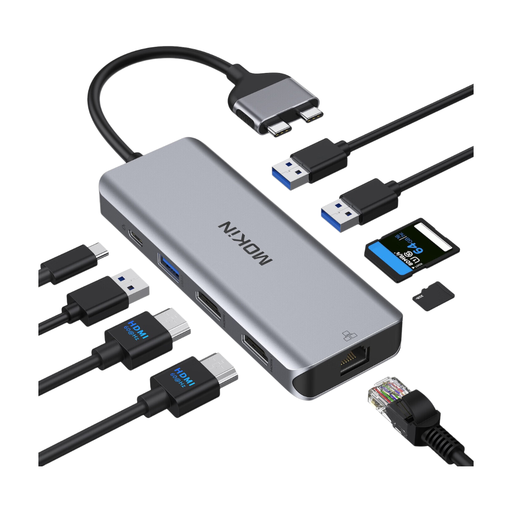
MOKiN dual-port USB-C docking hub
For a docking setup with an SD/TF card reader and several extra ports.
The product name lists HDMI, two USB 3.0 ports, USB 2.0, RJ45 Ethernet and PD. According to the description, MacBook models with standard M1, M2 or M3 chips are not supported; M Pro and M Max models are listed as compatible.
View at Joybuy
Frequently asked questions
Do I need a card reader if my drone uses internal storage?
Not for files stored only in the internal memory. DJI describes connecting the drone using a USB cable, as well as removing a microSD card and using other transfer methods that vary by model. Check where files are stored on your specific model.
Can I copy footage from my drone card directly to an iPhone?
On a supported iPhone, a compatible connected memory card may be accessible through Files or other supported apps. Apple lists requirements for the connection and file system. So check your specific iPhone, card and available storage space.
How do I safely remove a card reader in Windows after copying files?
Wait until copying is complete, then use the Windows feature to safely remove or eject the device before unplugging it. Microsoft recommends this to help prevent data loss.
What legal rights apply when shopping online in Germany?
When you buy from a business seller in the EU, you are generally entitled to a legal guarantee of at least two years from the date you receive the goods. This is separate from a voluntary manufacturer’s warranty. For a standard online distance sale, you generally have a 14-day right to cancel from the date of delivery, subject to statutory exceptions.


