What should you look for when buying?
First, match the card format to the connection on the device you’re transferring to. Then decide whether transfer speed, a checked backup or extra ports matter most for your journey.
| Priority |
What to check before buying |
Who is it important to? |
| Card and device compatibility |
Check for a microSD slot, as well as the USB-C connection and file access on the specific device you’re transferring to. |
If I want to open the microSD card directly on my own smartphone on the train, the card format, connection and file access all need to work together; around 36% of consumers put compatibility first. |
| Transfer speed for large files |
Check the UHS standard supported by the card and reader, and the host interface; don’t assume maximum figures reflect actual transfer times. |
If I want to transfer large video files during my journey, the way the card, reader and host work together matters; around 29% of consumers prioritise transfer speed. |
| Verified copy |
Check available storage in advance, then open important files once the transfer is complete, before deleting the originals. |
If I need a reliable copy while travelling, I want to keep the original footage until I’ve checked the transfer; around 21% of consumers put backing up first. |
| Extra ports |
Check which ports you need and whether the specific hub supports pass-through charging; consider the card reader and USB port specifications separately. |
If I need to connect or charge other devices at my train seat as well as read a card, the available ports are key; around 14% of consumers prioritise extra ports. |
Joybuy products
This selection includes USB-C readers and hubs with card slots, including models with extra ports or pass-through charging.
 No image available
Acer 7-in-1 USB-C Hub ODK6V0
For microSD footage and situations where you need extra ports or pass-through charging as well as a card reader.
SD/TF card reader, 100 W PD pass-through charging, 3 USB 3.0 ports at 5 Gbit/s and HDMI with 4K at 30 Hz.
Joybuy
 No image available
USB-C 3-in-2 adapter with SD and Micro SD card reader
For microSD footage when you want to copy to an iPhone or iPad and the specific device supports the adapter.
The product title lists iPhone and iPad as target devices; the description lists SD and Micro SD cards.
Joybuy
 No image available
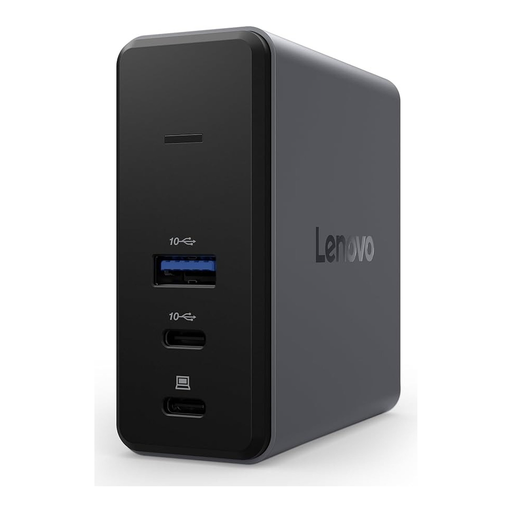
Lenovo X9 Charging GaN Dock, Wired, 60 W, MicroSD
For microSD footage when you’d like to use a charging dock while copying files.
The product title lists 60 W and USB 3.2 Gen 2 (3.1 Gen 2) Type-C; a MicroSD slot is also listed.
Joybuy
 No image available
WOZINSKY 14-in-1 USB-C Hub
For copying cards when you need extra ports or pass-through charging from a USB-C connection.
The description lists SD and TF card readers, a 15 cm cable and 100 W PD pass-through charging.
Joybuy
 No image available
HOCO HB45 Spirit 2-in-1 USB-A/USB-C card reader
For microSD footage when you want to use the reader with both USB-C and USB-A devices.
The product title lists USB-A and USB-C; the description lists a MicroSD/TF card reader.
Joybuy
Frequently asked questions
Can I copy drone videos to an iPhone using a USB-C reader?
Yes, provided the connection or adapter is compatible and the iPhone recognises the card. Apple explains how to access external storage using the Files app and lists FAT and exFAT, as well as a data partition, among the requirements. Also check that there’s enough free storage on your iPhone.
Do I need a UHS-II reader for a UHS-I drone card?
No, not just because it’s labelled UHS-II. The SD Association explains that performance depends on how the host and card interface work together; Lexar also lists compatibility with UHS-I cards for its UHS-II reader. Assess the potential speed based on your specific card and the device you’re transferring to.
How can I copy my footage carefully while travelling by train?
Copy the files you want, wait for the transfer to finish, then open important videos on the device you’re transferring to. Keep the originals on the card for now: the Federal Office for Information Security highlights the risk of data loss from interrupted write operations and accidental deletion.
What are my rights if the card reader is faulty?
If you’ve bought a faulty product, your statutory rights against the seller are separate from any voluntary guarantee. The Verbraucherzentrale says that, when a seller provides a repair or replacement, transport, labour and material costs are the seller’s responsibility; check the terms of any additional manufacturer’s guarantee separately.
Does copying footage on the train mean I’m allowed to publish it?
No. The technical act of copying doesn’t determine whether recording or publishing footage is lawful. In its 2019 guidance, the Data Protection Conference distinguishes activities carried out exclusively for personal or family purposes from uses such as commercial activity or publishing identifiable footage; the latter may require a legal basis. This doesn’t establish current permission for a particular drone flight or specific publication.


