First, check your camera’s card format and the connection on the device you want to transfer your photos to. If you have a large number of images and compatible UHS-II cards, a UHS-II reader may be worth considering. A hub is most useful if you need extra ports in your hotel room. Advertised transfer rates are not guaranteed import times.
Which reader is right for you?
Travellers with an SD or microSD camera
If you want to copy photos to your own device in the evening without unnecessary adapters, make sure the card format and connection match. UGREEN EU and Apple Support offer advice on card readers and mobile devices.
Photographers with large volumes of UHS-II images
If you regularly import lots of files, it’s important that both the card and reader support the same high-speed card bus. Lexar Deutschland and the SD Association explain what UHS-II requires.
Photographers importing to a mobile device
If you’d rather use a smartphone or tablet than a laptop, check the connection, file access and available storage. Apple Support explains how to access external storage devices using supported apps.
What to look for when buying
First, make sure the reader supports your card format. Then check the card bus and the device you’ll be importing to. Extra hub ports only matter if you’ll actually need them at your hotel workstation.
This guide is for consumers who want to transfer camera photos to their own device in a hotel room. Each row represents the main buying priority for that group.
| Buying priority |
What to check |
Who it matters most to |
| Card format |
Compare the card label and camera manual with the formats supported by the specific reader; don’t confuse CFexpress Type A with Type B. |
If I want to import photos in the evening without an extra format adapter, the card slot must match my camera card exactly. Consumers who prioritise card format account for around 36%. |
| Import speed |
Check the UHS rating of both the card and reader, as well as the data connection on the device you’re importing to. Manufacturers’ maximum speed claims depend on the card and system. |
If I regularly import large volumes of images, I want to know whether both the card and reader support UHS-II. Consumers who prioritise faster imports account for around 29%. |
| Mobile importing |
Before your trip, check the connection on your smartphone or tablet, file access and available storage using a test card. |
If I want to back up photos without a laptop, my mobile device and card reader must work together, and there must be enough storage available. Consumers who prioritise mobile importing account for around 21%. |
| Extra ports |
Check that the hub has only the ports you need and that they match your laptop; check card bus support separately. |
If I want to connect other devices at my hotel workstation as well as import photos, a hub with the right ports is useful. Consumers who prioritise extra hub ports account for around 14%. |
Common buying mistakes
-
Assuming USB-C means UHS-II
USB-C describes the connection. The UHS-II card bus is a separate feature of the card and reader; the connector type alone doesn’t confirm UHS-II support.
Compare the UHS rating of both components, not just the shape of the connector.
-
Buying CFexpress without checking the type
Sony says the MRW-G2 supports CFexpress Type A and SD. That doesn’t mean it’s compatible with CFexpress Type B; if you have a different card, you may need another suitable reader.
Check the full card type printed on the card or in your camera manual against the model specifications.
-
Planning around a maximum speed as if it were an import time
Lexar notes that results vary depending on the card and system. The stated reader speed therefore doesn’t guarantee how long it will take to transfer your photos.
Before your trip, test the import with your own card and the device you plan to use.
Key brands at a glance
UGREEN
The 50706 is a compact reader with USB-C and USB-A plugs, plus SD and microSD slots for cards explicitly specified as UHS-I.
- UGREEN says this model can use both card slots at the same time and is compatible with mobile devices.
- These specifications don’t confirm UHS-II support or a specific import time, and don’t necessarily apply to other UGREEN readers.
Lexar
According to Lexar, the Professional USB-C Dual-Slot Reader is designed for SD and microSD cards, including UHS-II.
- Lexar quotes read speeds of up to 312 MB/s for UHS-II, and says the reader is backwards compatible with UHS-I.
- Lexar says results depend on the card and system; the maximum speed isn’t a guaranteed import speed.
Sony
According to Sony, the MRW-G2 supports CFexpress Type A and UHS-I/UHS-II SD cards via a USB-C connection.
- Sony says it comes with USB-C-to-USB-C and USB-C-to-USB-A cables, as well as an access indicator.
- CFexpress support applies to Type A, not Type B. Claims about fast transfers aren’t based on independent testing.
Anker
The Anker 553 USB-C Hub is an option if you need extra laptop ports as well as card slots.
- Anker lists USB-A, HDMI, Ethernet and pass-through charging among this hub’s features.
- This doesn’t confirm UHS-II support for the card slots, and doesn’t tell you anything about other Anker readers.
Joybuy products for importing photos
The Joybuy products below include USB-C hubs and devices with SD/TF card readers, as well as a mobile reader for the Insta360 X5 workflow. Before buying, check that the card format and connection suit your camera and the device you’ll be importing to.
 No image available
Acer 7-in-1 USB-C Hub, ODK6V0
An option if you want to import SD/TF cards and need extra ports on your laptop.
The product title lists HDMI with 4K@30Hz, 100W PD charging and three USB 3.0 ports.
View at Joybuy
 No image available
7-in-1 external DVD drive with SD/TF card reader
A better fit if you want to use optical media with an external drive as well as SD/TF cards.
The title and description list USB 3.0, Type-C and SD and TF card readers. The description lists Windows, Linux and Mac OS as compatible systems.
View at Joybuy
 No image available
Insta360 X5 Quick Reader
For importing photos and videos from an Insta360 X5 microSD card to a smartphone or tablet.
The description specifies transfers via the Insta360 app. The stated workflow is for the Insta360 X5.
View at Joybuy
 No image available
MOKiN USB-C hub with HDMI, VGA, USB 3.0, SD/TF and PD
An option if you want to read SD/TF cards and use extra ports on your laptop.
The title and description list three USB 3.0 ports, HDMI, VGA and USB-C PD. The description requires a laptop with full-function USB-C or Thunderbolt 3; devices with MHL mode are excluded.
View at Joybuy
 No image available
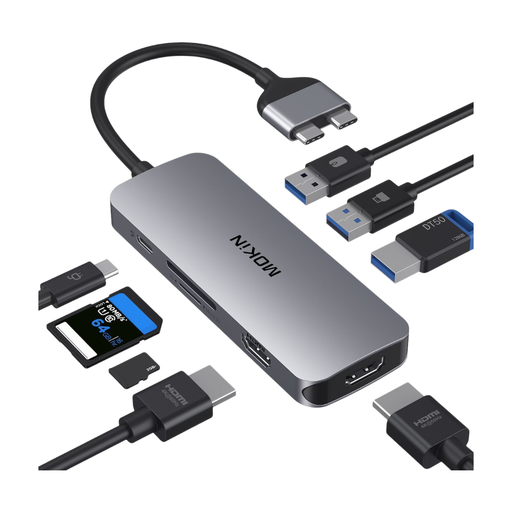
Mokin 2USB-C TO 2HDMI+3USB3.0+PD+SD/TF
This docking option may suit you if you want to read SD/TF cards and use extra ports with a compatible MacBook.
The description says the dock is for MacBook Pro/Air models with two Thunderbolt 3 ports on the same side. Standard M1, M2 and M3 models are excluded.
View at Joybuy
Frequently asked questions
Can I import photos to a USB-C iPhone without a laptop?
Yes, provided your iPhone, card reader and card are compatible and a supported app can access the files. Apple explains how to access SD cards using supported apps and import photos directly. Check your available storage before travelling too; a USB-C connector alone doesn’t guarantee a successful import.
How do I remove the card after importing?
First, check that the files have imported correctly. Microsoft recommends safely removing external storage devices in Windows before disconnecting them; Apple explains how to eject a card after importing on a Mac. Keep the originals on your camera card until you’ve checked the copy and completed any backups you need.
Are a manufacturer’s warranty and statutory consumer rights the same thing?
No. Statutory consumer rights cover claims against the seller in the event of a fault; a manufacturer’s warranty is an additional voluntary service, subject to its own terms. So don’t compare a card reader’s warranty information with your statutory rights.
Do online purchases in Germany come with a right to cancel?
Consumers generally have a right to cancel a distance contract; Section 355 of the German Civil Code (BGB) sets out a 14-day period. Section 312g BGB provides for exceptions. The specific contract, when the cancellation period starts and the applicable terms all matter.


