Photographers using different camera cards
If you use SD and possibly CFexpress cards, check the exact card type. The CompactFlash Association distinguishes between different CFexpress form factors, including Type A and Type B.


Choose a card reader that explicitly supports your camera card format and the port on your workstation; CFexpress Type A and Type B must be checked separately. If several people regularly import cards, a dual-slot reader that explicitly supports simultaneous use may be useful. For cards containing originals you need to protect, a specified write-protect feature matters more than an advertised top speed. Transfer rates also depend on the card and computer.
If you use SD and possibly CFexpress cards, check the exact card type. The CompactFlash Association distinguishes between different CFexpress form factors, including Type A and Type B.
If two SD cards often need to be read on the same computer, simultaneous reading is an important feature to look for. Lexar says its Professional Workflow Dual-Slot SD UHS-II Card Reader has two SD slots that can be used at the same time.
If several people use the same camera cards, check whether the specific reader has write protection. OWC, SanDisk Professional and Angelbird describe this feature on certain models in their respective ranges.
First, check the card format and the port on your workstation. Then decide whether simultaneous reading, write protection or a particular interface is important for your workflow.
| What you need | What to check | Who it matters to most |
|---|---|---|
| Card format | Compare the card label or camera specifications with the format list for the exact reader model. Check CFexpress Type A and Type B separately. | If I use different camera cards, I want to be sure the slot matches the card format exactly. Around 33% of consumers put format compatibility first. |
| Simultaneous importing | Check the slot formats and whether simultaneous use is explicitly supported on the specific model. | If several compatible cards arrive at our shared computer, reading them in parallel could streamline our workflow. Around 27% of consumers prioritise this. |
| Protecting originals | Check whether there is a write-protect switch and what it applies to; safely eject cards through the operating system after importing. | If several people use the same camera card, I want to avoid accidental changes during importing. Around 20% of consumers prioritise protecting their originals. |
| Import speed and connection | Check the card's UHS generation, the reader interface and the computer port separately. Manufacturers' maximum speeds are not guaranteed file-copy rates. | When I transfer large numbers of photos, I look for compatible interfaces without assuming a particular copying time. Around 20% of consumers prioritise the connection and potential import speed. |
CompactFlash and CFexpress are different card formats; CFexpress Type A and Type B also have different form factors. The SanDisk Professional PRO-READER Multi-Card lists CompactFlash, not CFexpress.
Before deciding, compare the full card format with the specifications for the specific reader model.
If you also need to use another card format, you may need a second compatible reader.
An interface specification or stated SD bus speed alone does not tell you how quickly files will be copied. Lexar's stated maximum per slot applies under the specified UHS-II card conditions.
Check the card, reader and computer port together, and treat manufacturers' maximum speeds as conditional figures.
Write protection applies to changes made through the relevant reader. It does not replace checking the copied files or safely ejecting the card through the operating system.
Finish importing, check the copies you need and eject the card before removing it or handing it on.
Removing a card while it is being accessed may mean you have to import the files again, or could result in data loss.
The Professional Workflow Dual-Slot SD UHS-II Card Reader is designed to import two SD cards simultaneously.
The Atlas Dual CFexpress + SD Card Reader combines CFexpress Type B and SDXC UHS-II.
The MRW-G2 is specified for CFexpress Type A and SD cards rated UHS-I or UHS-II.
According to its German-language specifications, the PRO-READER Multi-Card supports CompactFlash, SD and microSD cards.
The Card Reader PKT SD is described as an SD reader for SDXC UHS-I and UHS-II.
The following Joybuy listings include card readers and a docking station for SD and TF cards. Before buying, check that the card format and connection match your camera and workstation.
 No image available
For importing compatible SD or TF cards; according to the description, both formats can be used simultaneously.
USB 3.0 is specified in the product name. Check that the card format and connection are compatible with your workstation.
 No image available
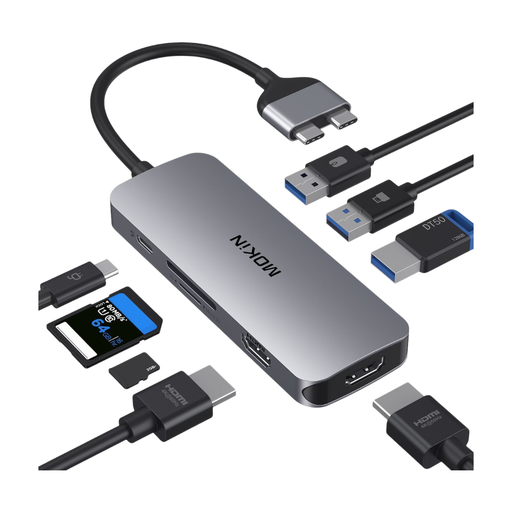
The docking station has built-in SD and TF card readers, along with other ports for a compatible workstation.
The description lists three USB 3.0 ports and data transfer speeds of up to 5 Gbit/s. It limits compatibility to certain MacBook Pro and MacBook Air models with two Thunderbolt 3 ports on one side, and excludes M1, M2 and M3 models.
 No image available
For accessing compatible microSD or TF cards on a device with a USB-A or USB-C port.
USB-A and USB-C are specified in the product name. Before importing, check that the connection and card format are compatible with your workstation.
No. The CompactFlash Association distinguishes between Type A and Type B form factors. Check your card type against the specification for the exact model: Sony lists Type A and SD for the MRW-G2, while OWC lists Type B and SD for the Atlas Dual.
Finish importing and check the copies you need before reusing the card. Then eject the storage device through the operating system: Apple requires you to do this before removing an SD card from a Mac; Microsoft recommends safely removing USB storage devices to avoid data loss.
No. For consumer purchases in the EU, you have a statutory guarantee of at least two years against the seller; a manufacturer's warranty is separate and may have its own terms. Angelbird makes the three-year limited warranty stated for the PKT SD conditional on activation within 30 days.
A photo showing only an animal does not automatically mean that using a card reader involves processing personal data. If identifiable people appear in the photos and their personal data is processed, there must be a lawful basis under Article 6 of the GDPR. Consent is one possible basis, but not the only one; which rules apply depends on how the photos are taken and used.