Choose a reader based first on the SD or microSD card format, then on whether your smartphone or laptop supports the reader and file system. Apple Support Germany lists a data partition and supported file systems as requirements for an iPhone to access external storage. For a UHS-I card, a compatible reader is an obvious choice. UHS-II is mainly a speed option if the card and target device support it too, while a hub only makes sense if you actually need the extra ports. Copy important clips and check the file before using the card again; if people or number plates can be identified, you should also follow German data protection rules.
Which card reader is right for you?
Backing up to a smartphone
If you want to read your dash cam card directly with a USB-C smartphone and save clips in its file manager, the connection, card format and file system all need to be compatible. Apple Support Germany lists a data partition and supported file systems as requirements for accessing external storage.
Archiving clips
If you back up important footage while you’re out and about, copy it and check the files before using the card again. If people or number plates can be identified, the Hessian Commissioner for Data Protection and Freedom of Information highlights restrictions on dash cam footage recorded in public places.
Laptop users with larger files
If you regularly transfer large recordings, you could consider a UHS-II reader, provided your card supports the standard too. The SD Association notes that card performance affects speed; a hub is an option if you also need extra ports for your laptop.
What should you look for when buying?
First check the card format and target device, then consider your backup process and the transfer standard you need. Extra ports only matter if you’ll actually use them with your laptop.
The approximate percentages indicate the main buying priorities when backing up dash cam clips in a café; each row describes what matters most to the consumers in that group.
| Priority |
What to look for |
Who is it most relevant to? |
| Smartphone compatibility |
Check the card format, USB-C recognition, partition and file system. Apple Support Germany lists APFS, APFS (Encrypted), HFS+, exFAT or FAT for iPhones. |
If I want to copy clips straight to my smartphone, the reader, card and file system need to work together. Consumers who prioritise smartphone compatibility account for around 36%. |
| Verifiable backups |
Make sure you have enough free storage and open the copied file before writing to the dash cam card again. |
When I back up important footage, I want to be able to check the copy before using the card again. Around 29% of consumers prioritise being able to verify their backup. |
| Speed for large files |
For UHS-II, both the card and reader must support the standard. The read speed of up to 312 MB/s quoted for the TP-Link UA440C is a manufacturer's maximum figure, not a guaranteed copy speed. |
When I regularly transfer large batches of clips, I want to make sure the card and reader work together rather than relying on a maximum figure alone. Around 21% of consumers prioritise transfer speed. |
| Extra laptop ports |
Check which ports you need to use at the same time and whether your laptop, power adapter and hub requirements are compatible with pass-through charging. |
If I need to connect other devices or charge my laptop while copying, I’ll consider a hub rather than just a card reader. Around 14% of consumers prioritise extra laptop ports. |
Avoiding buying and backup mistakes
-
Assuming USB-C guarantees a set copy speed
The USB connection, card standard and card performance all affect transfer speeds. The SD Association notes that speed can also depend on the memory card’s performance.
Check the card standard, reader and target device together. Treat Gbit/s as an interface specification and MB/s as a read speed, not as a guaranteed copy time for your clips.
-
Reusing the card before checking the copy
Being able to access the card doesn’t confirm that the file has been fully and successfully saved to your target device.
Copy the clip rather than moving it straight away, then open and check the destination file before deleting the original or writing to the card again.
You may not be able to recover an important clip if it’s missing or incomplete.
-
Buying a USB-C reader without checking your iPhone’s file system
Having the right connector doesn’t guarantee that your iPhone will recognise the card. Apple Support Germany lists a data partition and supported file systems as requirements for accessing external storage.
Check the connection, partition and file system on your existing card. Don’t format a card containing important footage just to test it.
Depending on the card you have, you may need to use a different compatible device or take an extra step.
Key brands at a glance
UGREEN
The UGREEN 50706 combines USB-C and USB-A with SD and microSD slots for use with different devices.
- According to the manufacturer, both card slots can be used at the same time; the model is designed for UHS-I cards.
- The advertised USB data rate doesn’t prove UHS-II support or guarantee a particular copy time.
TP-Link
The UA440C is a USB-C reader with SD and microSD slots and UHS-II support.
- TP-Link quotes a read speed of up to 312 MB/s and simultaneous access to both cards.
- This maximum figure isn’t a guaranteed speed for your dash cam card or smartphone; performance depends on factors including the card.
Anker
The Anker 553 is a USB-C hub with an SD and microSD card reader for laptops that need extra ports.
- The manufacturer lists extra data and video ports, as well as pass-through charging.
- The extra features may be unnecessary if you’re copying a single card; whether it can charge your laptop depends on your setup.
Lexar
The Professional USB-C Dual-Slot Reader is designed for users of UHS-II SD and microSD cards.
- Lexar quotes read speeds of up to 312 MB/s and an activity indicator.
- According to Lexar, results may vary depending on system configuration and card speed.
USB-C hubs with card readers on Joybuy
This selection includes USB-C hubs with an SD or TF card reader, for backing up clips on your laptop and using extra ports, depending on the model.
 No image available
Acer ODK6V0 7-in-1 USB-C hub with SD/TF card reader
If you need extra ports as well as a card reader when backing up footage on your laptop, this hub brings them together.
The product title lists HDMI with 4K@30Hz, 100W PD charging, 3x USB 3.0 with 5Gbps, and SD/TF.
View on Joybuy
 No image available
UGREEN USB-C dock with 2x HDMI, 2x USB-C 3.2, USB-A and SD/TF
This dock is worth considering if you need extra ports as well as a card reader when copying files on your laptop.
The product title lists 2x HDMI, 2x USB-C 3.2, 1x USB-A and SD/TF.
View on Joybuy
 No image available
MOKiN USB-C hub with HDMI, VGA, 3x USB 3.0, SD/TF and PD
If you’re backing up clips on your laptop and need video and USB ports too, this hub offers extra connections alongside the card reader.
The product title lists HDMI, VGA, 3x USB 3.0, SD/TF and PD. According to the product description, the device is not suitable for devices in MHL mode.
View on Joybuy
 No image available
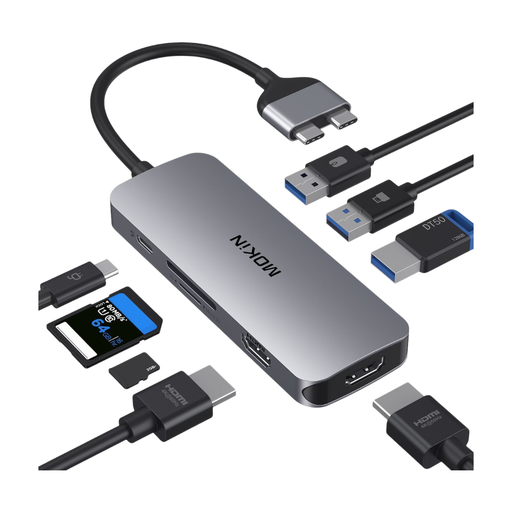
MOKiN dock with 2x USB-C, 2x HDMI, 3x USB 3.0, PD and SD/TF
This dock is an option if you want to copy clips and use extra ports with a compatible MacBook.
The product title lists 2x HDMI, 3x USB 3.0, PD and SD/TF. According to the description, the dock is not compatible with MacBook Pro or MacBook Air models with base M1, M2 or M3 chips; check the MacBook configurations listed there.
View on Joybuy
 No image available
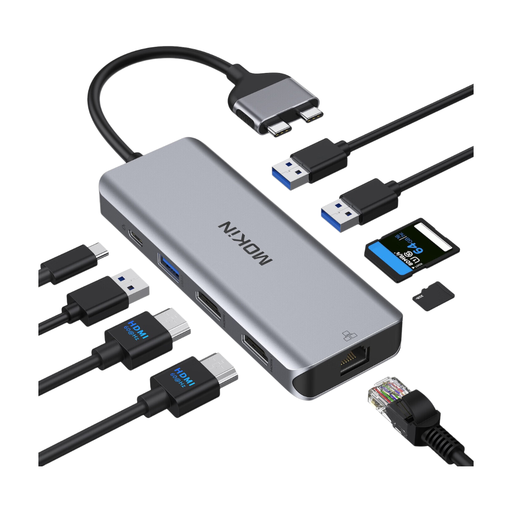
MOKiN dock with USB-C, HDMI, USB 3.0 and 2.0, RJ45, SD/TF and PD
If you need extra laptop ports as well as a card reader, this dock could be an option for backing up clips.
The product title lists HDMI, USB 3.0, USB 2.0, RJ45, SD/TF and a PD charging port. According to the description, it is not compatible with MacBook Pro or MacBook Air models with base M1, M2 or M3 chips; M Pro and M Max models are listed as compatible.
View on Joybuy
Frequently asked questions about USB-C card readers for dash cam clips
Can I copy dash cam clips straight to an iPhone with a USB-C reader?
Yes, if your iPhone, card reader, card and file system are compatible. Apple Support Germany explains how to access memory cards using a compatible card reader in the Files app. For external storage, it lists a data partition and APFS, APFS (Encrypted), HFS+, exFAT or FAT; also check the connection on your specific iPhone and the available storage space.
How do I back up an important clip while I’m out?
Copy the clip to your target device and check the file there before deleting the original or writing to the card again. Remove the card as instructed in your dash cam’s manual. Checking the copy is a cautious approach, not a guaranteed feature of the card reader.
Do I need a UHS-II reader for dash cam videos?
No, not necessarily. A UHS-II reader is mainly a speed option if your card supports UHS-II too. Manufacturers’ maximum figures aren’t guaranteed copy speeds, and transfers also depend on the card and target device.
What should I know about faults and online orders?
When you buy from a business seller, your statutory rights against the seller are separate from any voluntary guarantee. The EU consumer portal states that ordinary online purchases of goods generally come with a 14-day right to cancel from the date of delivery; check separately for possible exceptions and return postage costs.
Can I share dash cam clips that show identifiable people or number plates?
Saving a clip doesn’t automatically make it lawful to publish. The Hessian Commissioner for Data Protection and Freedom of Information warns in particular against continuous, indiscriminate recording of public traffic; the ADAC warns against publishing footage of other people or number plates without their permission. Whether you can share a particular clip depends on the circumstances.


