
Lieferung heute & morgen

Qualitätsgarantie

Willkommens-Angebote freischalten: KOSTENLOSE Lieferung | Bis zu 80 % RABATT | Kostenlose 30-Tage-JoyPlus-Testphase
App herunterladen
A USB-C charging cable may seem like a simple accessory at first glance. In practice, however, the connector type, charging power, data standard and build quality all determine whether it’s right for your smartphone, tablet, laptop or power bank. A cheap purchase can prove impractical if the cable is too short, doesn’t charge quickly enough or doesn’t support the connector you need.
This buying guide explains what shoppers, professionals and tech enthusiasts in Germany should look out for, and which cables suit different uses.
A 240W charging cable can deliver a high level of power, but it won’t make a 20 or 65-watt charger any faster. The actual charging speed is determined by the weakest link: the power adapter, cable or device. To deliver 240 watts, both the charger and device must support the appropriate USB Power Delivery standard, particularly PD 3.1.
USB-C describes the shape of the connector. Depending on its specification, a USB-C data cable may support USB 2.0, USB 3.x or another data standard. Some cables are designed primarily for charging and only transfer data at up to 480 Mbit/s. This may be too slow for large video files or external SSDs.
A 3 m charging cable is useful if the plug socket is some distance from your sofa, desk or bed. However, as a cable gets longer, its handling, voltage drop and weight can change. A durable nylon charging cable will often withstand more mechanical stress than a simple plastic coating, but it should still not be bent, crushed or kept under tension for long periods.
So, a MacBook charging cable, Samsung charging cable or iPhone charging cable doesn’t necessarily need to be a brand-specific cable. What matters is the device connector, supported charging protocol and power required.
Look for details such as watts, amps and supported standards. A 5 A cable with an E-Mark chip may be designed for higher-powered USB-C PD applications. However, that doesn’t automatically mean every connected device will use that much power.
Depending on the model, smartphones often need lower power levels. For tablets and laptops, a USB-C fast-charging cable with a higher wattage rating may be a good choice. Always follow the specifications provided by the power adapter and device manufacturer.
If you want to sync photos, documents or music, the cable must explicitly support data transfer. Before buying, check for:
A cable optimised for high-power charging won’t necessarily support video output.
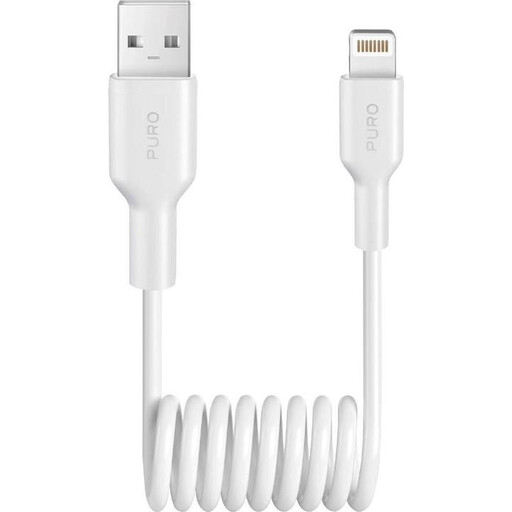
Why this product suits this user: This 1-metre USB-A to Lightning cable is suitable for compatible Apple devices and existing USB-A chargers. Its coiled design makes it easy to store at home, in the office or on the go.
The connector type, length and maximum power of 12 W are clearly stated. That makes it easy to check before buying whether the cable is compatible with your existing USB-A and Lightning devices.
TPE material, 1 m length, 20 g weight, and support for charging and data transfer.
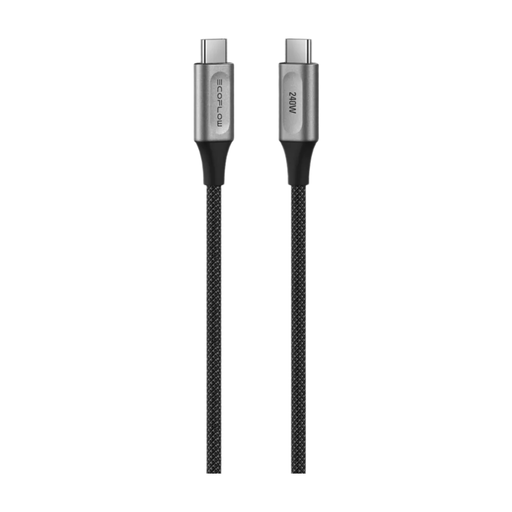
Why this product suits this user: This USB-C to USB-C cable is designed for anyone who wants to connect a smartphone, tablet, power bank and laptop with a single cable, while having plenty of power capacity to spare.
The E-Mark identification and rating of up to 240 W make its power limits clear. According to the product specifications, data transfer is limited to USB 2.0.
Up to 240 W, 1.82 m length, nylon braiding, reinforced connectors and a silicone cable tie included.
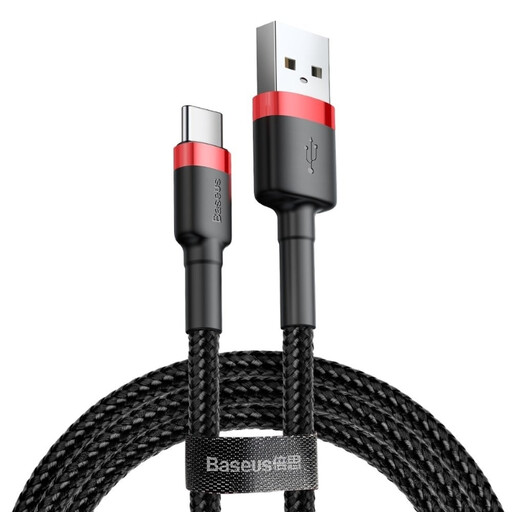
Why this product suits this user: At 3 metres long, it’s a good fit for desks, bedside tables or seats some distance from a plug socket. Its USB-A to USB-C design works with many older chargers.
Its maximum current of 2 A and USB 2.0 data transfer of up to 480 Mbit/s are clearly stated. This makes it clear that the cable isn’t designed for every high-powered laptop application.
3 m length, nylon braiding, aluminium connectors, reinforced joints and a hook-and-loop strap for storage.
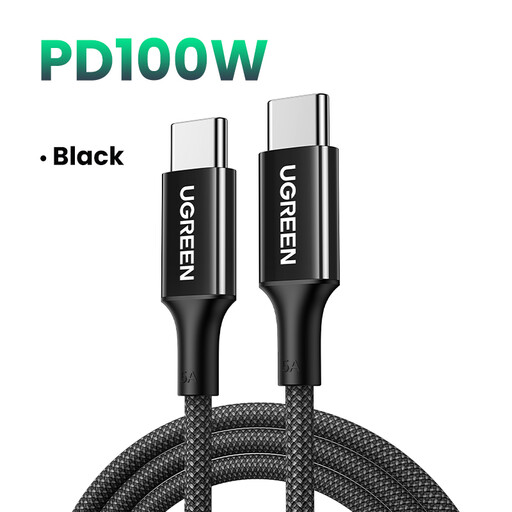
Why this product suits this user: This USB-C to USB-C cable is suitable for anyone who wants to power a MacBook, compatible Windows laptops, smartphones and tablets with a single cable.
Charging profiles of up to 100 W and USB 2.0 data transfer at 480 Mbit/s are clearly specified. This makes it easier to check compatibility with your laptop power adapter and device.
Braided outer sheath, E-Mark chip, 5 A rating, USB-C connectors, and support for charging and data transfer.
We’ve put together a complete, regularly updated list of products that fully meet these strict selection criteria and the safety regulations in force in the EU.
A USB-C to USB-C cable that supports the power delivery level your phone requires is often enough. Older chargers may need a USB-A to USB-C cable. Apple devices with a Lightning connector need a compatible Lightning cable; the connector on your device is what matters.
Its lifespan depends on how often it’s bent, how much it’s pulled, how it’s stored and what it’s made from. Nylon braiding and reinforced connectors can improve its resistance to wear, but they’re no substitute for careful use. Avoid kinks, moisture and crushing the cable.
A longer cable can cause small losses due to electrical resistance. With typical lengths and a suitable, correctly specified cable, however, the main factors are usually the combination of charger, cable standard and device. For a 3 m cable, pay particular attention to the stated power specifications.