
Lieferung heute & morgen

Qualitätsgarantie

Willkommens-Angebote freischalten: KOSTENLOSE Lieferung | Bis zu 80 % RABATT | Kostenlose 30-Tage-JoyPlus-Testphase
App herunterladen
The switch to USB-C has simplified charging our devices, but choosing the right accessories has become more complex. We’ve all been there: you buy a new fast charger, but your smartphone still charges at an agonizingly slow pace. Or that expensive charging cable fails at the connector after just a few months. These issues often stem from subtle but critical product flaws or misleading marketing claims.
As your Joybuy Product Recommendation Officer, I'm here to help you identify these pitfalls. We'll focus on the facts so you can make an informed decision and find the perfect USB-C charging accessories for your needs.
To avoid making the wrong purchase, you should focus on verifiable technical specifications. Here are the three most important aspects to check before you buy.
The charging power, measured in watts (W), determines how quickly your device charges. Modern devices like the iPhone 15, laptops, or current Samsung models use the Power Delivery (PD) standard.
GaN stands for Gallium Nitride, a semiconductor material that is replacing traditional silicon in modern chargers. A GaN charger offers significant advantages:
For a power bank, the capacity, specified in milliampere-hours (mAh), is the key criterion. A 10000mAh power bank offers a good balance of portability and performance, capable of fully charging a modern smartphone about 1.5 to 2 times. For air travel, the rating in watt-hours (Wh) is relevant; the limit is typically 100 Wh, which a 10000mAh power bank (approx. 37 Wh) is well below.
Another practical feature is a power bank with a built-in cable. This saves you from carrying separate cables and prevents a tangled mess in your bag.
Here are some product recommendations tailored to specific use cases that meet the criteria mentioned above.
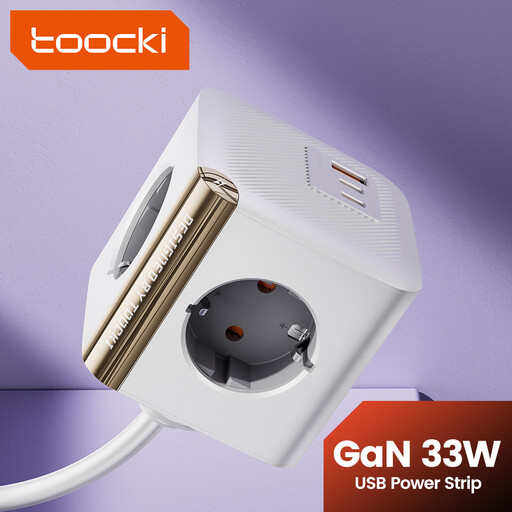
Why This Fits Their Persona: Ideal for the desk to reduce cable clutter. It simultaneously charges a laptop (via AC), smartphone, and tablet (via USB-C PD), along with other devices.
It combines a classic power strip with modern USB-C ports (33W PD), eliminating the need for separate, low-power adapters.
4 AC outlets and 2 USB-C ports in one device. Integrated surge protection for added safety.
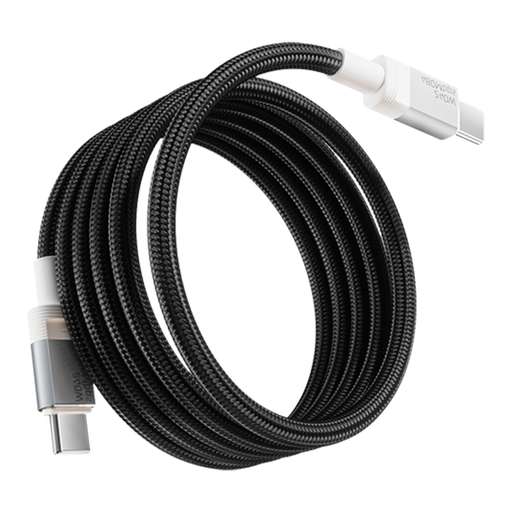
Why This Fits Their Persona: For users who demand maximum performance and durability for their high-end devices, like gaming laptops or the latest iPhone/Samsung models.
It prevents performance bottlenecks by supporting the 240W PD 3.1 standard. The 48-strand braided nylon and aluminium alloy prevent cable breakage.
Supports 240W charging and includes an E-Marker chip for safe power delivery. The robust construction ensures a long lifespan.
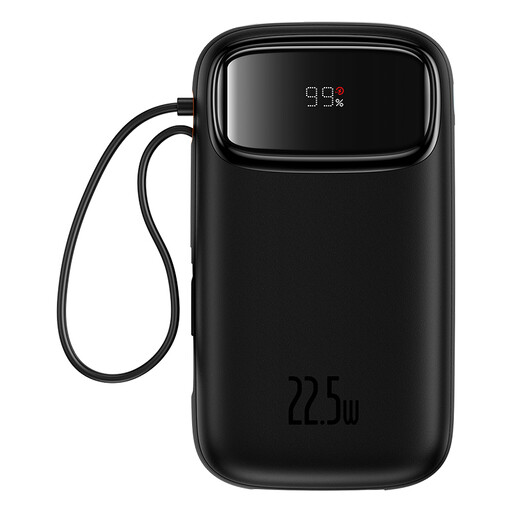
Why This Fits Their Persona: Compact, airline-approved, and extremely practical thanks to its integrated USB-C and Lightning cables. Perfect for charging multiple device types on the go without extra accessories.
It solves the problem of forgotten or incorrect cables. The built-in cables are matched to the power bank's output, guaranteeing efficient 22.5W charging.
Two built-in cables (USB-C & Lightning) plus additional ports. A digital display allows for precise battery level monitoring.
We have compiled a complete, up-to-date list of products that fully meet these strict selection criteria and safety regulations.
1. How can I identify a good USB-C charging cable? You can spot a high-quality cable by several features: a durable jacket (e.g., braided nylon), reinforced strain relief at the connector, and clear specifications for supported charging power (e.g., 100W or 240W) and data transfer speed. For power levels above 60W, an integrated E-Marker chip is a must-have, as it manages safe communication between the charger and your device.
2. Can I use any USB-C charger for my iPhone 15? Generally, yes, as USB-C is a universal standard. However, to get the fastest charging speeds for an iPhone 15 (or newer), you need a charger that supports the Power Delivery (PD) standard with at least 20 watts of power. Using a higher-wattage charger, like a 65W GaN charger, is perfectly safe, as the iPhone will only draw the power it is designed for.
3. What is the advantage of a GaN charger over a conventional one? The main advantage of a GaN charger lies in its efficiency and compact size. Gallium nitride generates less heat than silicon during power conversion. This allows components to be packed more tightly, resulting in significantly smaller and lighter chargers with the same or even higher power output. This makes them especially practical as a travel charging adapter or as a multi-port USB-C charger for your desk.