What should you look for when buying?
First, check the card format and capacity standard, then the connection and file access on the device you’ll be using. The SD Association recommends checking compatibility with the relevant SD standard. If you’re using a shared computer, choosing a suitable storage location should also be part of your backup plan.
| What matters when buying |
What to look for |
Who should consider this? |
| Card compatibility |
Check whether you need SD or microSD, the SDHC or SDXC standard, and the supported capacity. |
If you want to read a microSD dashcam card without an incompatible SD slot, the physical format is the first thing to check. Around 33% of consumers put card compatibility first for this reason. |
| Access protection |
Before copying, decide where the files will be stored and who will have access. |
On a shared computer, you’ll want to prevent others from viewing personal clips without permission. Around 27% of consumers prioritise access protection for this reason. |
| Copying time |
Check that the card and reader both support the same UHS standard; don’t treat interface maximums as guaranteed copy speeds. |
If you often back up large recordings, you’ll want to use compatible card interfaces. Around 20% of consumers put copying time first. |
| Device compatibility |
Check the USB connection and operating system. For mobile devices, also check file access and supported file systems. |
If you need to open the card on a particular computer or mobile device, access on that device is essential. Around 20% of consumers prioritise host compatibility for this reason. |
Joybuy products for card backups
This Joybuy selection includes USB-C hubs with SD and TF or microSD slots, as well as a 2-in-1 card reader with USB-A and USB-C. Before buying, check that the card format, connection and additional ports you need are right for your workspace.
 No image available
Acer 7-in-1 USB-C Hub ODK6V0
An option if you need additional connections alongside card slots at a USB-C workstation.
The product name lists SD and TF card readers, HDMI with 4K at 30 Hz, 100 W Power Delivery and three USB 3.0 ports at 5 Gbit/s.
View at Joybuy
 No image available
UGREEN USB-C Dock with 2 HDMI and SD/TF
An option if you want to combine card slots with additional connections for your workspace.
The product is described as a dock with two HDMI, two USB-C 3.2, one USB-A, and SD and TF card slots. The product description says both card slots can be used at the same time.
View at Joybuy
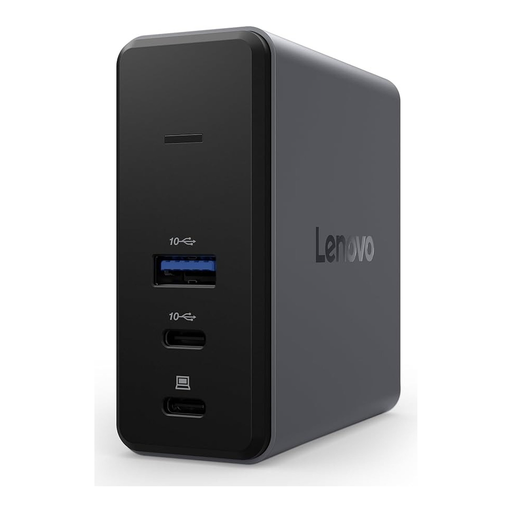 No image available
Lenovo X9 Charging GaN Dock, 60 W, microSD
An option if you need a dock with a specifically listed microSD slot for dashcam recordings.
The product is described as a wired dock with USB 3.2 Gen 2 (3.1 Gen 2) Type-C, 60 W and microSD.
View at Joybuy
 No image available
WOZINSKY 14-in-1 USB-C Hub
An option if you want a hub that combines card slots with additional connections for your workspace.
The product name lists SD and TF card readers, HDMI, RJ45, USB ports and a 15 cm cable.
View at Joybuy
 No image available
HOCO HB45 Spirit 2-in-1 USB-A/USB-C card reader
An option if you’re looking for a card reader with USB-A and USB-C for different host connections.
The product details list microSD support; the finish is described as Metal Grey.
View at Joybuy
Frequently asked questions
Can I put a microSD dashcam card into any SD card reader?
No. Check whether the reader has a microSD slot or whether a suitable adapter is available for your card and reader. Also check the SDHC or SDXC standard and supported capacity.
How do I finish a backup before removing my dashcam card?
First, check that the files you need have reached their intended destination and can be opened. On Windows, Microsoft recommends safely removing removable drives before disconnecting them. Don’t format the original card as part of an unchecked backup.
Do I need anything else to use a USB-C reader with an iPhone?
That depends on the connection on your particular iPhone. Apple specifies a compatible connector or adapter. To access external storage, you’ll also need a supported file system and a suitable app, such as Files.
What additional costs or services should I check before buying?
Check the specific offer to see whether you’ll also need a suitable adapter or destination storage, and what’s included in the box. Returns and warranty terms may vary depending on the offer.
Can I store or share dashcam clips in Germany on a shared computer?
There’s no single answer that applies in every case. If people or number plates can be identified, you need to consider the purpose, legal basis and appropriate protection against unauthorised access. In its position paper dated 28 January 2019, the German Data Protection Conference was particularly critical of continuous traffic recording without a specific reason. This doesn’t amount to general permission, or a blanket ban, for every individual clip. The circumstances of the specific recording and any sharing are what matter.


