
Lieferung heute & morgen

Qualitätsgarantie

Willkommens-Angebote freischalten: KOSTENLOSE Lieferung | Bis zu 80 % RABATT | Kostenlose 30-Tage-JoyPlus-Testphase
App herunterladen
Modern laptops like the MacBook or Dell XPS are powerful and portable, but their minimalist port selection presents a challenge for many users in a home office. A single USB-C docking station promises the solution: one cable for monitors, peripherals, network, and power. However, the market is flooded with products featuring misleading specifications that can quickly lead to a costly mistake. Before you invest, you should know the three most common pitfalls that can turn a tidy workspace into a mess of incompatible devices.
To avoid these problems, you should base your purchasing decision on objective technical features. Three parameters are non-negotiable.
The most important function of a docking station is often connecting external displays. Pay close attention to the following specifications:
Charging via USB-C is a key convenience factor. The Power Delivery 100W rating on a product refers to the maximum input power the hub can draw from the power adapter. The hub itself diverts a portion of this for its own operation (typically 10-15W).
Rule of thumb: Choose a docking station whose PD rating is at least equal to the wattage of your laptop's original power adapter, ideally with a reserve of 15-20W. For an 87W MacBook Pro power adapter, a 100W PD hub is a suitable choice to ensure reliable charging.
A good docking station doesn't just replace ports; it expands your capabilities.
Based on these objective criteria, we have identified some products that are a sensible addition for specific user profiles in the UK.
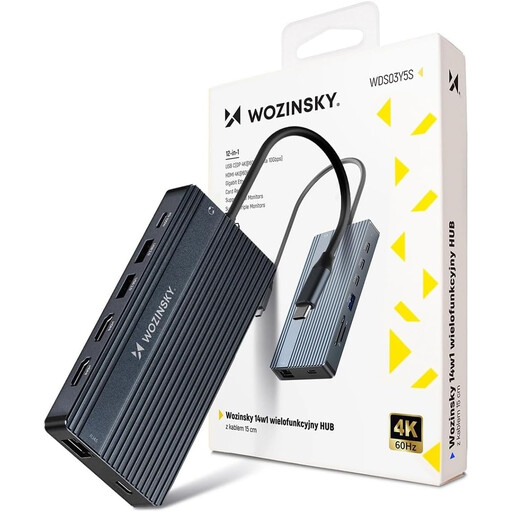
Why This Fits Their Persona: Ideal for home office professionals who want to create a full-fledged workstation with up to three monitors. This model bundles all the necessary ports into a single device, ensuring a clutter-free desk.
According to the manufacturer's specifications, the hub supports multiple monitors with 4K at 60 Hz and offers 100W Power Delivery, avoiding common performance and display issues. The Gigabit LAN port also bypasses Wi-Fi bottlenecks.
Comprehensive connectivity with 14 ports, including 2x HDMI, 1x DisplayPort, Gigabit Ethernet, and multiple high-speed USB ports. The aluminium casing aids in heat dissipation.
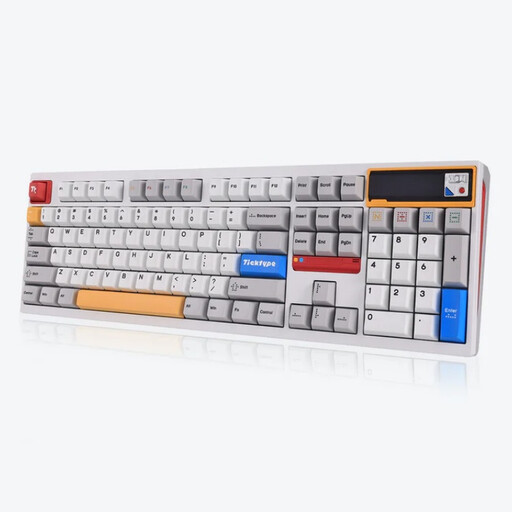
Why This Fits Their Persona: For users who want to complete their dock-optimised workspace with high-quality peripherals. A mechanical keyboard enhances typing comfort and efficiency during long workdays.
Instead of relying on the standard laptop keyboard, this model offers a tactile and precise typing experience. Its tri-mode connectivity (USB-C, 2.4GHz, Bluetooth) ensures maximum flexibility, with or without a cable.
Hot-swappable switches allow for customisation of the typing feel. The full aluminium body and 8000 mAh battery stand for durability and long-lasting wireless use.

Why This Fits Their Persona: Perfect for users who frequently participate in video conferences in their new docking station setup. The open-ear design allows for clear communication without completely blocking out surroundings—important in a home office.
Instead of relying on the built-in laptop microphone, this headset uses Lenovo's ENC (Environmental Noise Cancellation) algorithms to separate the voice from ambient noise, thereby improving call quality.
The lightweight, open-ear design provides comfort over many hours. Compatibility with Windows, macOS, and other systems ensures seamless integration into any setup.
For the perfect audio connection at your new workstation, we've compiled a complete, up-to-date list of products that meet strict selection criteria and UK regulations.
1. Does every USB-C docking station work with a MacBook? No, compatibility is not guaranteed, especially when driving multiple external monitors. Many hubs only support screen mirroring (SST) on macOS, not extending the desktop. Look for explicit manufacturer claims about compatibility with macOS and the supported display modes (e.g., "extended desktop").
2. How much Power Delivery (PD) wattage do I really need? Use your laptop's original power adapter wattage as a guide. A docking station should have a PD input rating that at least matches this value. A buffer of 15-20 watts is recommended, as the dock itself consumes power. For a notebook that ships with a 65W power adapter, a hub with 85W or 100W PD is a safe choice.
3. Does a USB-C hub slow down my internet connection? A hub itself does not slow down the connection. On the contrary, a model with an integrated Gigabit Ethernet (LAN) port can provide a significantly more stable and faster connection than Wi-Fi. This is particularly beneficial for data-intensive tasks like high-quality video streaming or large file uploads.