
Lieferung heute & morgen

Qualitätsgarantie

Willkommens-Angebote freischalten: KOSTENLOSE Lieferung | Bis zu 80 % RABATT | Kostenlose 30-Tage-JoyPlus-Testphase
App herunterladen
A new USB-C fast charging cable might seem like a simple purchase. But in practice, it quickly becomes clear that not every cable delivers on its promises. Many users invest in a supposedly high-performance product, only to be faced with slow charging speeds, rapid wear and tear, or unexpected compatibility issues. Before you make a decision, it's crucial to understand the most common pitfalls that can lead to a bad purchase.
The selection of cables is vast, and marketing terms can be misleading. Here are three typical problems to watch out for:
To avoid these pitfalls, you should focus on verifiable technical specifications. These three criteria are essential for making an informed purchasing decision.
Charging power is measured in watts (W). Modern devices require different power levels:
Look for the Power Delivery (PD) label. This standard enables intelligent communication between the power adapter, cable, and device to optimise charging power safely and efficiently. Cables with an integrated E-Marker chip are required for power levels above 60W to ensure full speed.
If you also use the cable for data transfer, speed is crucial:
The physical quality determines a cable's lifespan.
Based on these objective criteria, we have identified some products that represent a suitable solution for specific user groups.
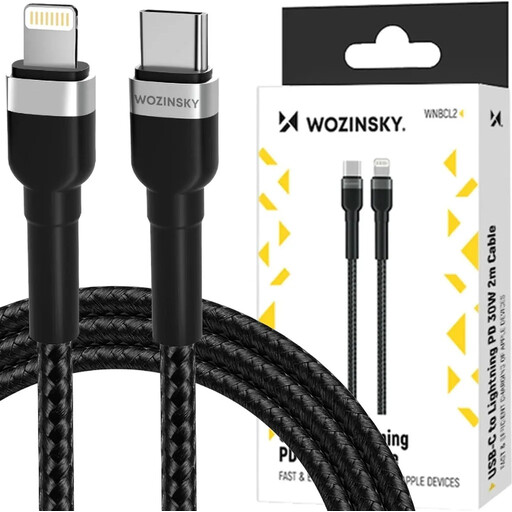
Why It's a Match: Ideal for owners of iPhones, iPads, and AirPods who need a reliable USB-C to Lightning cable with sufficient length and charging power for daily use. The 2-meter length provides convenience at the workplace or at home.
Instead of vague promises, this cable delivers a defined 30W charging power with Power Delivery, optimised for Apple devices. It thus avoids the pitfall of incompatible fast-charging standards.
The robust nylon jacket and connectors rated for 25,000 bends, according to the manufacturer, address the typical weak point at the connection ends and promote longevity.
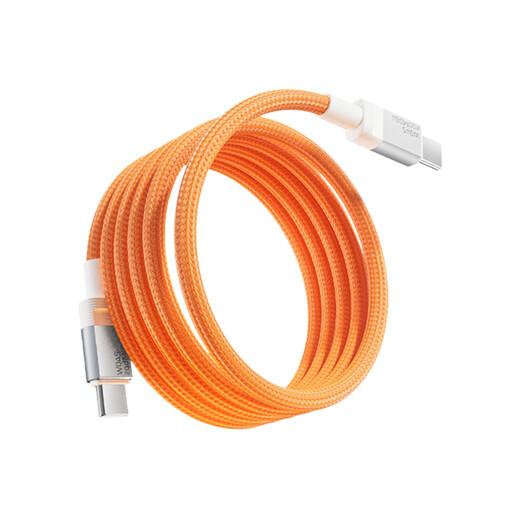
Why It's a Match: Perfect for users looking to replace a high-performance MacBook charging cable or a high-end Samsung charging cable and want maximum charging power without compromise. It is also compatible with the iPhone 15 (USB-C).
With a specified power of up to 240W and an E-Marker Pro chip, it ensures that even demanding laptops receive the maximum possible energy, instead of just charging at smartphone speeds.
Supports the PD 3.1 standard for future-proof compatibility. The integrated chip intelligently regulates the power supply and protects the connected device's battery.
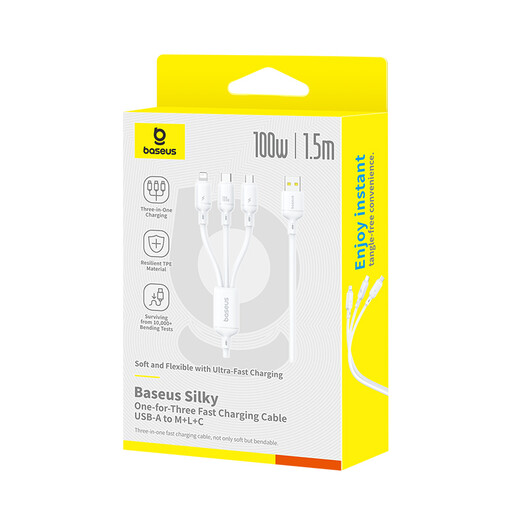
Why It's a Match: The solution for anyone tired of cable clutter on their desk or in their travel bag, who wants to charge devices with different connectors (Micro-USB, Lightning, USB-C) with a single cable.
This 3-in-1 charging cable eliminates the need to buy multiple specific cables that often serve only one purpose. It bundles the charging function for different standards into a single, convenient solution.
One cable for three common connector types. It supports high charging power (up to 100W on the USB-C connector), which is a standout feature for a multi-cable.
We have compiled a complete, up-to-date list of products that fully meet these strict selection criteria and safety regulations.
1. Can any USB-C cable fast-charge my device? No. For fast charging to work, the device, the power adapter, and the cable must all support the same fast-charging standard (e.g., Power Delivery) and a sufficient wattage. A basic USB-C cable without a PD specification will only charge a modern smartphone or laptop at a slow speed.
2. What is the difference between a USB-C and a Thunderbolt 4 cable? Although they both use the same physical USB-C connector, their capabilities are different. USB-C is a connector standard that can support various protocols. A standard USB-C cable is often limited to charging and slow data transfer (480 Mbit/s). A Thunderbolt 4 cable is a high-end version that always supports a 40 Gbit/s data rate, high power delivery, and video signal transmission. It is backward compatible with USB-C, but a standard USB-C cable cannot provide Thunderbolt features.
3. How can I identify a durable charging cable? Look at the connector construction. A sturdy metal housing and a long, flexible strain relief are more important than the mere appearance of the cable jacket. Manufacturer claims about bend lifespan (e.g., "withstands 10,000 bends") can also be an indicator of higher quality, provided they come from a reputable brand. A nylon jacket provides additional protection against everyday wear and tear.