
Lieferung heute & morgen

Qualitätsgarantie

Willkommens-Angebote freischalten: KOSTENLOSE Lieferung | Bis zu 80 % RABATT | Kostenlose 30-Tage-JoyPlus-Testphase
App herunterladen
If you are looking for USB-C headphones, you will usually want a straightforward solution: plug them in, start your music and make calls without a battery or Bluetooth pairing. However, not every model suits every device or everyday situation. The key factors are less about eye-catching advertising claims and more about the connection standard, design, microphone quality and cable management.
Depending on the device, a USB-C port may be intended for charging, data transfer or digital audio output. Before buying, check whether your smartphone, tablet, laptop or games console supports USB-C audio. With some devices, the port only works with a compatible digital-to-analogue converter or a specific adapter.
iOS and Android devices may also behave differently when controlling the volume, changing tracks or using voice assistants. Basic audio transmission is possible, but individual button functions depend on the device and operating system.
Terms such as “Hi-Res”, “powerful bass” or “crystal clear” do not, on their own, describe how a pair of headphones will sound in your everyday use. Also consider driver size, design, frequency range, sensitivity and fit. A good seal in the ear canal often has a greater effect on perceived bass response and passive noise reduction than individual marketing terms.
With wired USB-C headphones, it is also important to check whether the manufacturer actually specifies a digital USB-C audio connection. A model with a 3.5-millimetre jack and an included adapter is technically not the same as headphones with a USB-C connection.
The cable is a wear part on wired USB-C headphones. The transitions between the plug, cable and earpiece are particularly exposed to stress. Strain relief, a flexible bend protector or a flat cable design that is less prone to tangling can make everyday handling easier. Always remove the plug from the device by holding the housing, not by pulling the cable.
USB-C in-ear headphones are lightweight, compact and suitable for commuting, travelling or listening to podcasts. Different silicone ear tips help you adjust the fit to your ear canal. If you have very small or sensitive ears, pay particular attention to the shape before buying.
On-ear headphones with USB-C sit on your ears and usually have a headband. They can often be folded up and offer larger ear cups. However, they need more storage space and may put pressure on your ears during extended use. This design can be a practical alternative for use with a laptop, in a home office or when travelling.
If you make frequent calls, take part in online meetings or need a USB-C headset for gaming, the product specifications should explicitly state that it has an integrated microphone. An in-line remote with buttons for playback, volume and calls makes operation easier, but it is no substitute for a complete compatibility check.
To use voice assistants such as Siri or Google Assistant, the connected device must support the relevant function. With USB-C gaming headphones, the microphone position is also important: a microphone positioned closer to your mouth can be more practical during conversations than one placed much lower down on the cable.
A cable length of around 1.2 metres is generally suitable for smartphones, tablets and laptops. A desktop PC or console may require more distance. Weight is particularly important during long listening sessions. Wired models generally do not need a battery, so there are no charging times or ongoing power costs. Audio output is supplied directly through the device’s USB-C port.
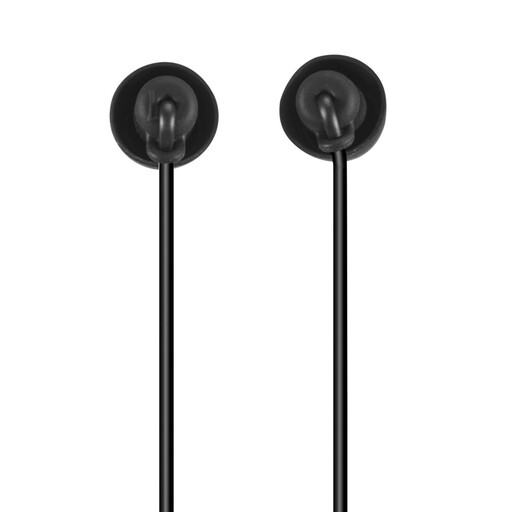
Why this product suits this profile: This lightweight in-ear model is designed for smartphones, tablets and laptops with USB-C audio output. It does not require a battery and features an integrated remote with microphone for music and calls.
The stated strain relief at the cable connection and the flexible silicone housing address typical stress points during everyday use.
10 g weight, 1.2 m cable length, integrated microphone and support for Siri and Google Assistant, according to the product specifications.
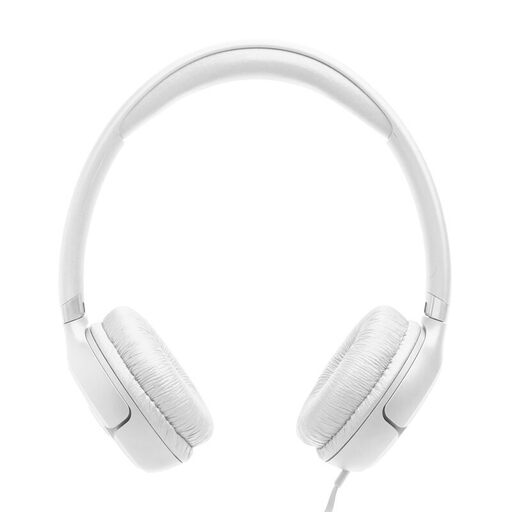
Why this product suits this profile: The on-ear design is aimed at users who prefer USB-C headphones with a headband for listening to music, making calls and using a laptop.
The flat, foldable cable design is made for easy storage. The three buttons control playback, volume and calls.
33 mm drivers, 1.2 m USB-C cable, integrated microphone, foldable construction and three selectable EQ modes, according to the manufacturer’s specifications.
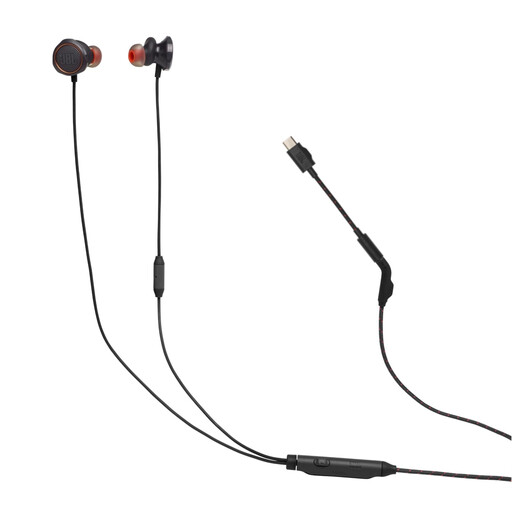
Why this product suits this profile: This USB-C headset is designed for gaming, voice chat and mobile devices. Multiple silicone ear tips help you adjust the fit to suit different ears.
The voice-optimised in-line microphone sits closer to your mouth than those on many basic earphones. The TwistLock fit and three ear tip sizes reduce the risk of a loose fit.
9 g weight, passive sound isolation, 16 ohm impedance and compatibility with PC, PlayStation, Switch and USB-C mobile devices, according to the product data.
We have put together a complete, regularly updated list of products that fully meet these strict selection criteria and the safety regulations applicable in the EU.
No. The device must support USB-C audio output. Check the technical specifications of your smartphone, tablet, laptop or console. A USB-C port alone does not guarantee audio functionality.
Generally, no. Passive models draw power through the USB-C port of the connected device. This means you do not need to charge them, although your smartphone’s battery may be used slightly more heavily during extended use.
Avoid sharply bending the cable, moisture and pulling on the cable. Clean silicone ear tips with a soft, dry cloth and store the headphones loosely coiled. Also use a comfortable volume level and take breaks during longer listening sessions. If the cable or plug is damaged, stop using the product.