
Lieferung heute & morgen

Qualitätsgarantie

Willkommens-Angebote freischalten: KOSTENLOSE Lieferung | Bis zu 80 % RABATT | Kostenlose 30-Tage-JoyPlus-Testphase
App herunterladen
USB-C headphones are a practical alternative to Bluetooth models: they require neither a battery nor pairing and work directly through the USB-C port. However, not every model is suitable for every device or everyday situation. If you focus only on terms such as “Hi-Res”, “Bass” or “universally compatible”, you may quickly end up with a product that does not work properly with your smartphone or becomes uncomfortable after a short time.
This guide explains what to look for when choosing USB-C in-ear headphones, USB-C on-ear headphones and other wired headphones with USB-C.
The USB-C plug initially describes only the shape of the connector. For audio transmission, the device must also support USB-C audio output. Some smartphones, tablets and laptops primarily use the port for charging or data transfer. Before buying, check your device’s technical specifications.
A USB-C-to-3.5-mm adapter cannot always be used universally either. Depending on the model, an integrated digital-to-analogue converter may be required. With direct USB-C earbuds featuring a microphone, this electronics module is already built into the headphones or plug.
Terms such as “Pure Bass”, “Studio Quality” or “Hi-Res Audio” often come from manufacturer descriptions. On their own, they reveal little about whether the sound will suit your preferences. Also consider:
According to the manufacturer, the JBL Tune 530C features 33-mm drivers, three EQ modes and playback of up to 96 kHz/24-bit. These specifications describe the equipment, but do not constitute a universal quality guarantee for every listening situation.
An integrated microphone makes phone calls, online meetings and voice commands more convenient. However, its actual functionality depends on the operating system, app and device configuration. With headphones featuring a remote control, you should also check whether volume, track and call controls are supported by your smartphone or laptop.
USB-C in-ear headphones sit directly in the ear canal. They are compact, lightweight and well suited to commuting, travelling or use with a smartphone. Multiple silicone ear tips help you adjust the fit. A loose fit can impair both sound quality and passive noise isolation.
USB-C on-ear headphones rest on the ears and usually feature an adjustable headband. Their larger drivers can deliver a different sound presentation for films, games or music. However, they take up more space in a bag and may place pressure on the ears during extended use.
If you frequently make calls, participate in online meetings for school or university, or speak via your laptop, a USB-C earphone with a microphone is a sensible choice. Useful features include:
According to the manufacturer, the Sony IER-EX15C models offer an integrated remote control for playback, volume, track selection, calls and voice assistants.
Strain relief at the transition between the plug, cable and earphone can reduce mechanical stress during everyday use. Flat cables or cables described as tangle-resistant are generally easier to store. Even so, do not pull the plug out by the cable and avoid sharp bends.
For mobile use, weight and packed dimensions are important. The JBL Tune 530C is specified at 143 grams and features a foldable design. The Hama “Calm” and “Curly” models are designed as lightweight in-ear options with silicone ear tips. For desk use or gaming, however, a sturdy headband may be more comfortable.
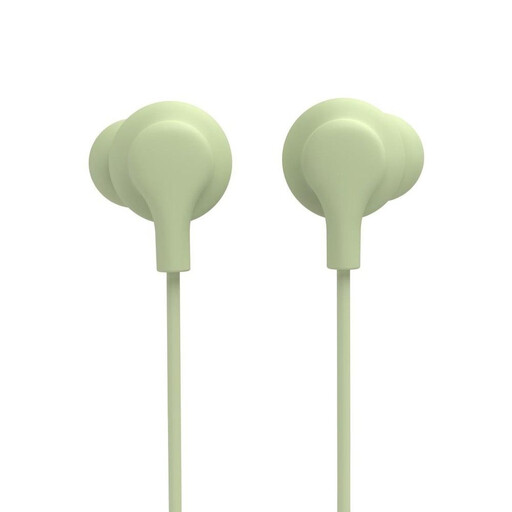
Why this is a good fit: For smartphone users, school pupils and students looking for a straightforward solution for music, calls and the daily commute to work or school.
The integrated microphone and in-line remote are clearly specified. The reinforced cable connection provides strain relief. Compatibility requires USB-C audio output.
Silicone ear tips, voice-assistant support according to the manufacturer, and direct use without a battery or Bluetooth pairing.
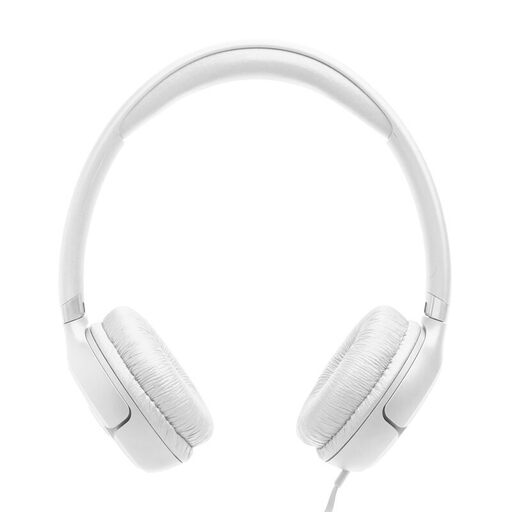
Why this is a good fit: For laptop, tablet and smartphone users who prefer an on-ear design for streaming, music and travel.
The technical specifications list a USB-C cable, microphone, 1.2-metre cable length and three EQ presets. The foldable design makes storage easier.
33-mm drivers, a closed housing, a weight of 143 grams and controls for volume, playback and calls according to the product specifications.
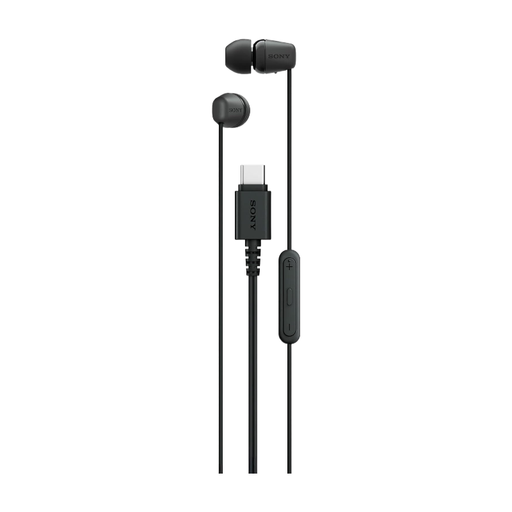
Why this is a good fit: For users looking for compact headphones without Bluetooth for a smartphone, tablet, laptop or PC, while valuing an adjustable in-ear fit.
Multiple ear-tip sizes allow for a more personalised fit. The cable is described as tangle-resistant, while the battery and pairing requirements are eliminated.
Integrated microphone, in-line remote and 5-mm drivers according to the manufacturer. Available in black, white and blue.
Check the return policy, particularly for in-ear products. Ear tips should be cleaned regularly with a dry, soft cloth. Moisture, high heat and sharp bends can damage the electronics or cable.
For gaming and streaming, low latency is a key advantage of wired models. With specialised products such as the Sony INZONE E9, however, you should carefully check whether the package actually includes the required USB-C audio unit and whether the model is intended for PC, console or smartphone use.
Our complete selection includes USB-C wired headphones for a range of devices, designs and use cases. Before buying, check compatibility with your device and review the latest product specifications.
No. The smartphone must support audio over USB-C. Check the device manufacturer’s specifications. If you are unsure, compare the compatibility details of the specific headphone model with those of your smartphone.
Usually not. Passive wired models draw the required power directly from the connected device. This eliminates the need for charging, although the smartphone battery may be used slightly more intensively depending on the model and volume level.
Their lifespan depends primarily on the cable, plug, strain relief, moisture and frequency of use. Remove the plug by holding its housing, avoid sharp bends and store the headphones in a dry place. If the cable shows visible damage, discontinue use of the product.