
Lieferung heute & morgen

Qualitätsgarantie

Willkommens-Angebote freischalten: KOSTENLOSE Lieferung | Bis zu 80 % RABATT | Kostenlose 30-Tage-JoyPlus-Testphase
App herunterladen
Modern laptops like the MacBook Pro or Dell XPS feature a minimalist design—often at the expense of port variety. A single USB-C port must suffice for power, data, and external displays. A USB-C Hub or a USB C Docking Station is therefore an essential accessory for many professionals, creatives, and students. But the market is confusing and full of technical pitfalls that can quickly lead to buyer's remorse.
Before you invest, you should be aware of the most common marketing traps. Many users regret their purchase because their new adapter fails to meet basic requirements. We'll show you what really matters.
To avoid these problems, you should carefully check three technical specifications. These determine whether a Multiport USB C Adapter will boost or hinder your productivity.
For smooth and comfortable work on an external monitor, a refresh rate of 60 Hz is essential. Look explicitly for USB-C Hub 4K 60Hz in the product description. If you want to connect two monitors, check for compatibility with your operating system. Some high-quality hubs also allow for extending to two different 4K displays on MacBooks. A USB C Adapter with HDMI and LAN is often a good all-around solution, covering both video and a stable network connection.
A good Power Delivery Dock should not only support a high input wattage (e.g., 100W) but also transparently state how much power reaches the laptop after its own consumption is deducted. For a 16-inch MacBook Pro or a comparable Windows notebook, at least 85W of charging power is recommended to ensure a stable supply even during intensive use.
Not all USB ports are created equal. A USB 2.0 port (480 Mbps) is sufficient for connecting a mouse and keyboard. However, for fast data transfers from external SSDs or large video files, you need at least USB 3.0 (5 Gbps) or, ideally, USB 3.2 Gen 2 (10 Gbps). Those who need maximum performance for multiple high-speed devices and displays should consider a Thunderbolt 3 Dock, which offers a bandwidth of up to 40 Gbps.
Based on these objective criteria, we have identified some products that are a suitable solution for specific user groups.
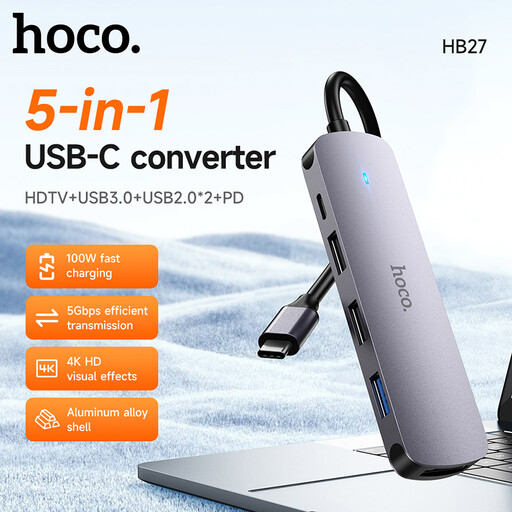
Why This Fits Their Persona: Ideal for users who need a lightweight and compact solution for on-the-go use. The hub covers basic needs like connecting an external monitor for presentations and charging the laptop, without unnecessary bulk.
The product description clearly states 4K at 30 Hz, which is sufficient for its intended purpose (presentations, office work) and doesn't create false expectations. The 60W PD output is adequately sized for most ultrabooks.
Compact 5-in-1 design with an aluminum alloy for heat dissipation. Supports OTG for directly connecting peripherals to compatible smartphones and tablets.
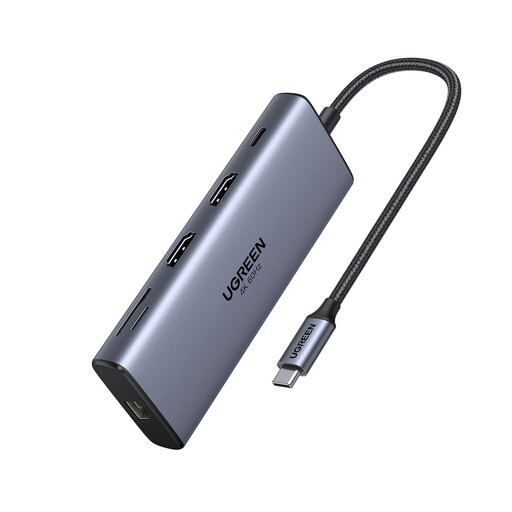
Why This Fits Their Persona: Designed for demanding users, especially USB-C Hub for MacBook Pro users, who need a dual-monitor setup with high resolution and fast data transfer rates for video or photo editing.
This hub directly addresses the compatibility trap: it explicitly supports dual 4K@60Hz even on macOS. Furthermore, with 100W PD input and 10 Gbps USB ports, it provides the necessary power for professional workflows.
Two HDMI ports with 4K@60Hz, two USB-C 3.2 ports at 10 Gbps for extremely fast data transfer, and a stable Gigabit Ethernet port.
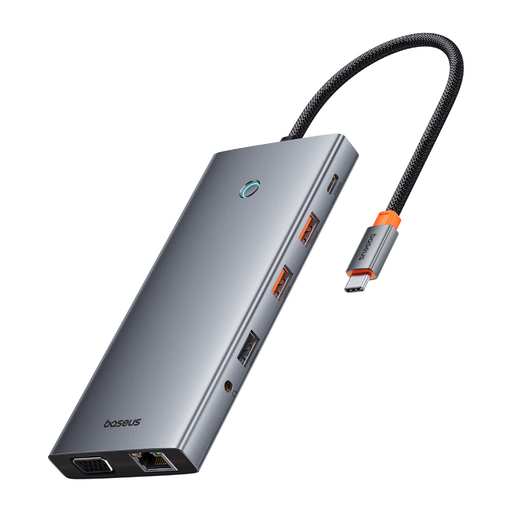
Why This Fits Their Persona: For users who refuse to compromise. This hub is a full-fledged docking station that enables a workstation with up to four monitors, extremely fast data connections, and maximum port variety.
This model far exceeds the usual specifications. It not only offers 4K@60Hz but even 8K@30Hz via DisplayPort and supports up to four monitors simultaneously. The 100W PD power and 10 Gbps ports are standard here.
Massive 13-in-1 expansion, including support for four monitors (2x HDMI, 1x DP, 1x VGA), USB 3.2 Gen 2 (10 Gbps), and even a 3.5mm audio jack.
We have compiled a complete, real-time updated list of products that fully meet these strict selection criteria and UK safety regulations.
Yes, it's normal for a USB-C hub, especially a model with an aluminum casing, to become warm during operation. Processes like Power Delivery charging and 4K video transmission generate heat. The casing acts as a heatsink to dissipate this warmth. The device should feel warm, but not so hot that you can't touch it. Ensure good ventilation at your workspace.
Most modern USB-C hubs are "plug-and-play," meaning they work on common operating systems like Windows, macOS, and Linux without needing to install additional software or drivers. Only very specific docking stations, such as those using DisplayLink technology to bypass the monitor limitations of M1/M2 Macs, may require a driver installation from the manufacturer.
The main difference is bandwidth. A standard USB-C port (USB 3.1/3.2) offers a data transfer rate of 10 Gbps. A Thunderbolt 3 Dock uses an interface that reaches up to 40 Gbps. This higher bandwidth allows for the simultaneous operation of multiple high-resolution monitors (e.g., two 4K@60Hz displays), ultra-fast external SSDs, and other peripherals without performance bottlenecks. Thunderbolt 3 docks are generally more powerful but also come with a higher price tag.