
Lieferung heute & morgen

Qualitätsgarantie

Willkommens-Angebote freischalten: KOSTENLOSE Lieferung | Bis zu 80 % RABATT | Kostenlose 30-Tage-JoyPlus-Testphase
App herunterladen
Modern laptops like the MacBook Pro or sleek ultrabooks are powerful and portable, but this elegance often comes at a price: a severely reduced number of ports. Often, only a single USB-C port is available, making it impossible to simultaneously use external monitors, storage media, network cables, and other laptop accessories. A USB-C hub or docking station is the obvious solution.
However, the market is crowded and full of products whose marketing promises often don't hold up in practice. As your Joybuy Product Recommendation Officer, I'll help you distinguish the important features from the unimportant ones and navigate the typical pitfalls, so you can make an informed decision.
Before we get to the recommendations, it's important to know the most common issues that can lead to a bad purchase. Pay attention to these points to avoid disappointment.
To find the right multiport adapter, you should focus on the specifications that are relevant to your use case.
For most professional and personal users, a smooth picture is essential.
The PD function allows you to charge your laptop through the same USB-C port the hub is connected to. The key is the pass-through power. A hub with a 100W PD input will typically deliver about 85-95 watts to the notebook, as the hub itself consumes some power. For a MacBook Pro or a comparable Windows device, a charging power of at least 85 watts is recommended.
Consider which peripherals you use regularly.
Here are a few models tailored to different user profiles that meet the criteria mentioned above.
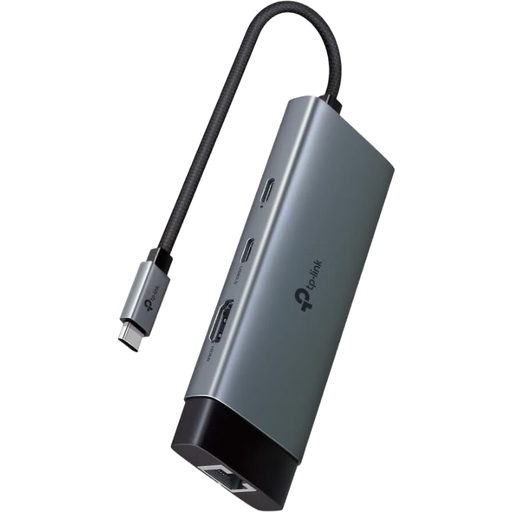
Why This Fits Their Persona: This model offers a well-balanced mix of the most important ports for the modern workplace. It's compact enough for on-the-go use but powerful enough for a full-fledged desk setup with an external monitor and wired internet.
The hub delivers a smooth 4K resolution at 60Hz and features a 100W Power Delivery port that reliably supplies power to even demanding laptops. The TP-Link brand is also known for stable network components.
Offers a Gigabit Ethernet port for a stable internet connection and fast 5 Gbps data ports (USB-A and USB-C) for swift file transfers.
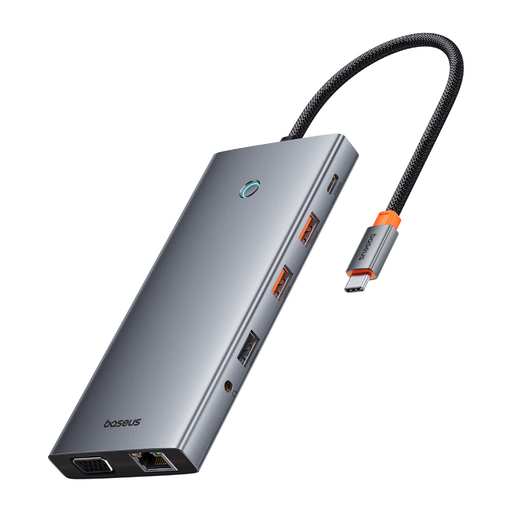
Why This Fits Their Persona: For users who refuse to compromise. This hub is a full-fledged docking station that combines support for up to four monitors, high-speed data transfer, and comprehensive peripheral connectivity in a robust aluminum housing.
With 100W PD, support for dual monitor setups (even up to four monitors), and video outputs up to 8K, this hub addresses the needs of the most demanding users. The aluminum casing ensures effective heat dissipation.
Offers extremely fast 10 Gbps USB 3.2 Gen 2 ports for lightning-fast data transfers and an enormous variety of ports, including DisplayPort, VGA, Ethernet, and SD/TF card readers.
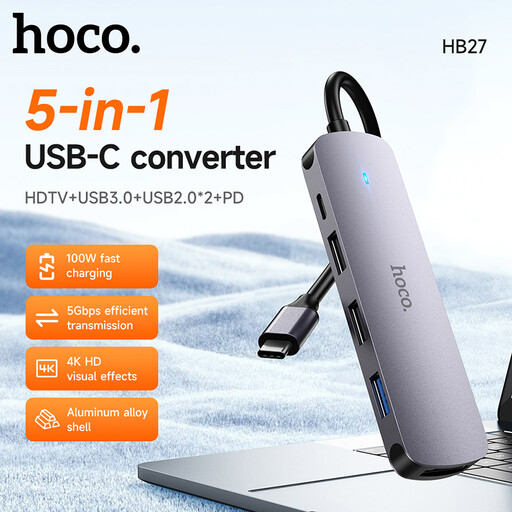
Why This Fits Their Persona: A simple and cost-effective solution for users who need basic connectivity. Ideal for connecting a monitor while simultaneously using a few USB devices like a mouse, keyboard, or USB drive.
Although it is limited to 4K@30Hz and 60W PD, the specifications are clearly stated. It is intended for users whose needs (e.g., office work, presentations) do not exceed these specs. The aluminum alloy housing helps with heat dissipation.
Focuses on the 5 most essential expansion ports (HDMI, USB 3.0, 2x USB 2.0, PD) in a compact and sturdy housing at an attractive price-performance ratio.
We have compiled a complete, up-to-date list of products that fully meet these strict selection criteria and safety regulations.
Not necessarily. For video output via HDMI or DisplayPort, your laptop's USB-C port must support DisplayPort Alternate Mode (DP Alt Mode). Most modern laptops (especially those with Thunderbolt 3 / 4) do, but with cheaper models, it's wise to check the manufacturer's specifications. Compatibility with operating systems like Windows, macOS, or Linux is usually a given (Plug-and-Play).
A certain amount of warmth is normal. The hub converts power and transfers data, which generates heat. The casing can become noticeably warm, especially when using Power Delivery and 4K video output. An aluminum case acts as a heat sink and effectively dissipates this heat. However, if the hub becomes uncomfortably hot or connections start to drop, it could indicate an overload or a defect.
Most USB-C hubs are "bus-powered," meaning they draw their power directly from the laptop. This is sufficient for low-power devices like mice or USB drives. However, if you want to charge your laptop through the hub, you must connect your original laptop power adapter to the hub's PD input. The hub then passes the power through to the notebook (pass-through charging).