
Lieferung heute & morgen

Qualitätsgarantie

Willkommens-Angebote freischalten: KOSTENLOSE Lieferung | Bis zu 80 % RABATT | Kostenlose 30-Tage-JoyPlus-Testphase
App herunterladen
Modern laptops, such as MacBooks or Windows notebooks from Dell and HP, are renowned for their sleek designs and high performance. This emphasis on a compact form factor, however, often comes at the expense of port variety. It's common to find only one or two USB-C ports, which can quickly become a bottleneck in daily use. If you need to connect an external monitor, keyboard, mouse, and maybe an external hard drive, you're faced with a challenge.
A USB-C hub or a multiport adapter is the functional solution. It expands a single USB-C port into a variety of ports, restoring the connectivity needed for productive work. This guide is designed to help you understand the technical features and find the right model for your needs.
The choice of the right hub depends entirely on your individual use case. Pay attention to the following three features to make an informed decision.
Consider which devices you use daily. The most common ports are:
Some laptops, particularly compact models, charge via USB-C. In this case, a USB-C hub with Power Delivery (PD) is essential. It features a dedicated USB-C input port where you can connect your laptop's power adapter. The hub then passes the power through to the notebook (pass-through charging) while simultaneously powering itself and the connected devices. Pay attention to the maximum power output, which is specified in watts (W). Common values are 60W, 85W, or 100W.
For on-the-go use or occasional work from home, a compact, lightweight USB-C hub is ideal. It is powered directly by the laptop (bus-powered) and fits into any laptop bag.
For a permanent desk setup with multiple monitors and peripherals that are always connected, a USB-C docking station or laptop docking station may be the better choice. These models are larger, often offer more ports, and come with their own power adapter to ensure a stable power supply for all devices.
Based on functionality and use cases, we have compiled a selection of models that cater to different needs.
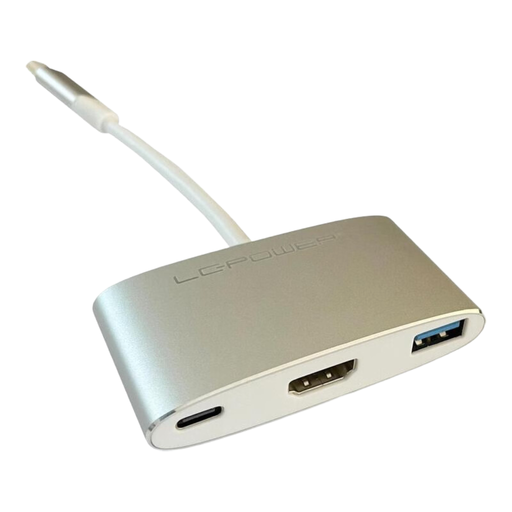
Why it stands out This model is a straightforward and portable solution for basic connectivity needs. It combines the three most frequently required ports in a compact housing.
Pros
Who is it for? Users looking for a simple and reliable solution for travel or the home office. Ideal for connecting a monitor, using a USB device, and charging the laptop simultaneously.
View the LC-POWER HUB-C-MULTI-4
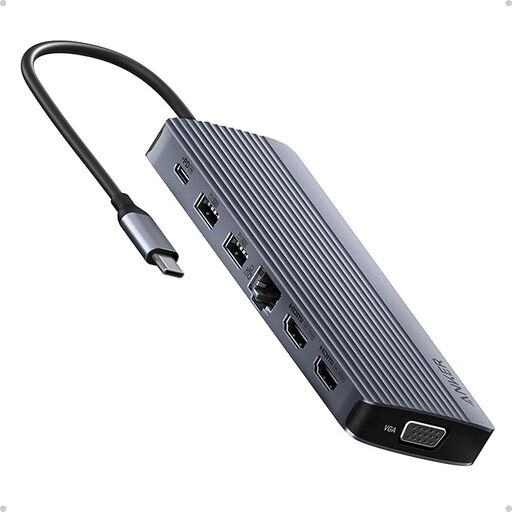
Why it stands out This hub offers maximum port variety, transforming a notebook into a fully-equipped workstation. Its support for three monitors makes it a tool for demanding multitasking.
Pros
Who is it for? Power users, creatives, and professionals who are setting up a permanent workstation with multiple monitors and numerous peripherals. A functional alternative to a traditional laptop docking station.
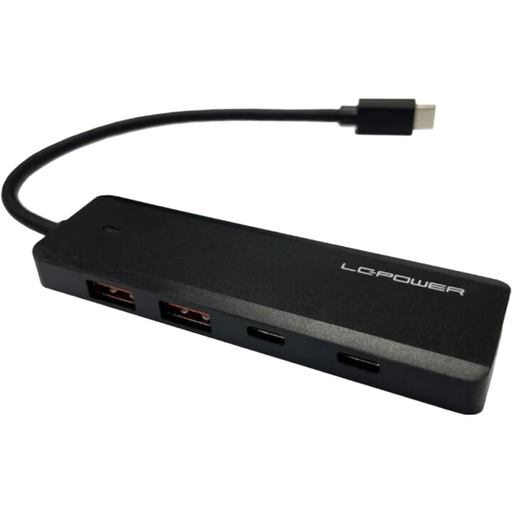
Why it stands out This hub's focus is clearly on expanding USB connectivity with maximum speed. It is designed for fast data exchange with modern storage media.
Pros
Who is it for? Users who primarily need fast USB ports for external SSDs, hard drives, or other data-intensive devices and do not want to compromise on speed. This model does not include video outputs.
View the LC-POWER LC-HUB-U3-4-C
The models featured here cover common use cases. However, if you have more specific requirements, such as a different combination of ports or a model with an integrated power supply, you can find more products in our range.
Explore Our Full Range of Powered USB Hubs
A USB-C hub is typically smaller, lighter, and powered by the laptop's USB-C port (bus-powered). It is designed for mobile use. A USB-C docking station is larger, intended for stationary use at a fixed workstation, and usually has its own power adapter. This allows it to stably power more peripherals and often multiple monitors.
If your laptop has only one or two USB-C ports and one is used for charging, a hub with PD functionality is highly recommended. It allows you to charge your notebook through the hub while all other ports on the hub remain usable.
Most basic functions like USB-A ports, Ethernet, and Power Delivery are cross-platform compatible. However, video output requires special attention. Support for multiple monitors can depend on the laptop's hardware. For example, some USB hub for MacBook models (especially those with M1/M2 chips) have system-level limitations on driving multiple external displays. It is therefore important to check the hub manufacturer's compatibility notes against your laptop's specifications.