
Lieferung heute & morgen

Qualitätsgarantie

Willkommens-Angebote freischalten: KOSTENLOSE Lieferung | Bis zu 80 % RABATT | Kostenlose 30-Tage-JoyPlus-Testphase
App herunterladen
Modern laptops are slim and powerful, but this elegance comes at a price: a drastically reduced number of ports. A USB-C Hub is often the necessary expansion to connect monitors, peripherals, and network cables. However, the market is flooded with products making lofty promises that they often fail to deliver in practice. Before you make a purchasing decision, it's crucial to understand the most common pitfalls that lead to frustration and unnecessary expenses.
Common Pitfalls When Buying a USB-C Hub:
To avoid a bad purchase, you should focus on verifiable technical specifications. These three criteria are decisive for the performance and longevity of your hub.
Not all USB ports are created equal. Pay close attention to the exact specifications to prevent bottlenecks:
Two values are crucial for a smooth and sharp picture. A USB C Hub with HDMI 4K should meet the following standards:
For a stable work environment in the home office or at the office, a wired network connection is often more reliable than Wi-Fi.
Instead of making a one-size-fits-all recommendation, we have identified models tailored to specific user profiles and their requirements.
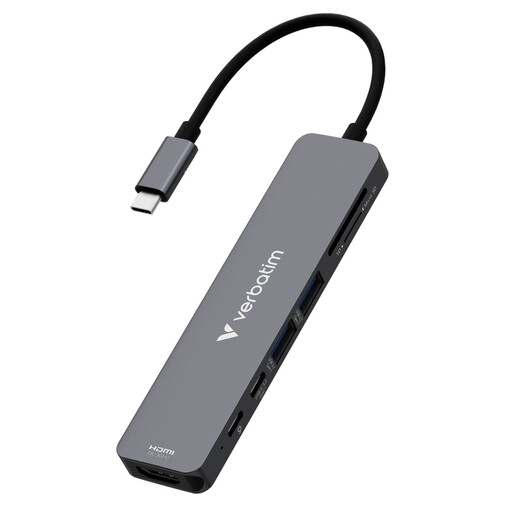
Why it's a good fit: This 7-in-1 USB Hub offers a well-balanced mix of the most important ports for daily use in the office or home office. It's a pragmatic solution for users looking to expand their workspace without a high cost.
The product clearly lists its specifications, including 5 Gbps for the USB-A ports and 100W PD charging. This prevents surprises with data transfer and charging performance.
The combination of 100W Power Delivery, SD/microSD card readers, and USB 3.2 Gen 1 ports provides a solid feature set for a wide range of applications.

Why it's a good fit: This USB C Docking Station is designed for users who demand maximum performance. It is ideal for video editing, graphic design, or complex multi-monitor setups where high data rates and refresh rates are required.
It directly addresses performance and multi-monitor issues. With two HDMI ports (one supporting 4K@120Hz) and 10 Gbps data ports, it prevents bottlenecks in video output and data transfers.
Support for 4K@120Hz on one HDMI port is a clear differentiating feature for fluid motion graphics. The 10 Gbps USB-C and USB-A ports also enable extremely fast file transfers.
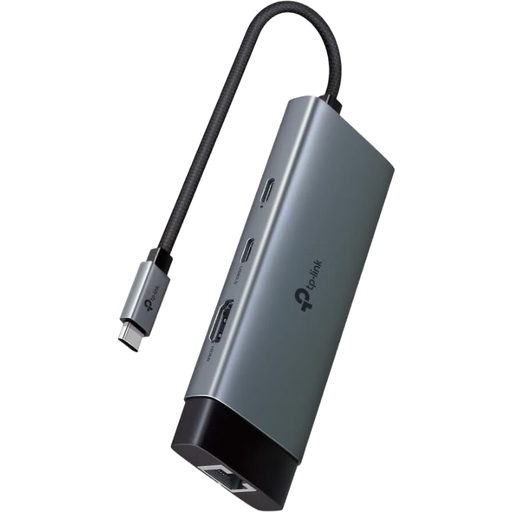
Why it's a good fit: This compact model from an established networking brand is a reliable choice for on-the-go use. It combines the most important ports for presentations and mobile work in a robust housing.
It solves the problem of unstable connections with a reliable Gigabit Ethernet port and stable 4K@60Hz video output. This minimizes technical issues during important meetings or presentations.
The combination of 100W PD, 4K@60Hz, and Gigabit Ethernet in a compact form factor makes it a dependable companion for users who value stability and portability.
We have compiled a complete, up-to-date list of products that fully meet these strict selection criteria and safety regulations.
A certain amount of heat is normal for USB-C hubs, especially when multiple power-intensive functions are used simultaneously, such as charging the laptop via Power Delivery and outputting 4K video. The housing, often made of aluminum, acts as a heatsink to dissipate heat. However, if the hub becomes too hot to touch, or if it starts to malfunction, this could indicate an overload or a defect.
No. To run two monitors with an extended desktop (not just mirrored), the hub must support Multi-Stream Transport (MST) technology. Additionally, the laptop's operating system must also be compatible. Windows systems generally support MST well. However, for Apple laptops with standard M-series chips (M1, M2, M3), support for multiple external monitors via a single port is often limited. This requires special docking stations for MacBook Pro or models with Thunderbolt technology. Therefore, always check the manufacturer's compatibility information.
That depends on the type of hub and how you use it.