
Lieferung heute & morgen

Qualitätsgarantie

Willkommens-Angebote freischalten: KOSTENLOSE Lieferung | Bis zu 80 % RABATT | Kostenlose 30-Tage-JoyPlus-Testphase
App herunterladen
A USB-C hub can expand a single port on your laptop, tablet or smartphone to include HDMI, USB, memory cards, networking and charging capabilities. At first glance, the choice seems straightforward, but technical specifications are often used inconsistently. A high number of ports doesn't automatically mean all connections will work at full speed simultaneously.
For home office, study, photo editing, gaming or travel, three typical pitfalls are worth knowing about:
Before buying, you need to establish which functions your computer's USB-C port supports. For a USB hub with HDMI, many devices require the so-called DisplayPort Alternate Mode. If this feature is missing, the hub can connect USB devices but won't transmit video to a monitor.
Resolution also matters. A USB-C hub 4K can, depending on the model, output 4K at 30 Hz or 4K at 60 Hz. For office work, 30 Hz is often usable, while smoother motion for presentations, videos or games benefits from 60 Hz. Specifications such as 8K or multiple monitors should always be checked against the limitations of your operating system. With some multi-monitor features, Windows and macOS differ.
A USB hub 3.0 is often rated at up to 5 Gbit/s. USB 3.2 Gen 2 can support up to 10 Gbit/s depending on the product. These values are theoretical interface speeds and are affected in practice by protocol overhead, cable quality, storage media and the simultaneous use of multiple ports.
If you use external SSDs, cameras or large image files, pay attention to the specific rating per port. With a USB-C multiport hub, several ports may share a single connection to your laptop. For a keyboard, mouse and printer, a lower data rate is usually sufficient; for external drives, a port with 5 or 10 Gbit/s is more sensible.
A USB-C hub with Power Delivery can power your connected notebook via a separate USB-C power adapter. The specification "up to 100 W" describes the hub's maximum input or pass-through power. Depending on the device, some of this may be used by the hub itself. The power adapter, charging cable and laptop must also be compatible.
For video calls, cloud synchronisation or gaming, a USB-C hub with Ethernet can provide a wired network connection. An RJ45 port with 1000 Mbit/s is a concrete technical specification, but it doesn't replace a sufficiently fast internet connection or network hardware.
Photographers and creatives should pay attention to the specifications of the USB-C hub with SD card reader. Some models have separate slots for SD and microSD cards and allow simultaneous use, while others share the internal connection. Reading speeds can also vary significantly.
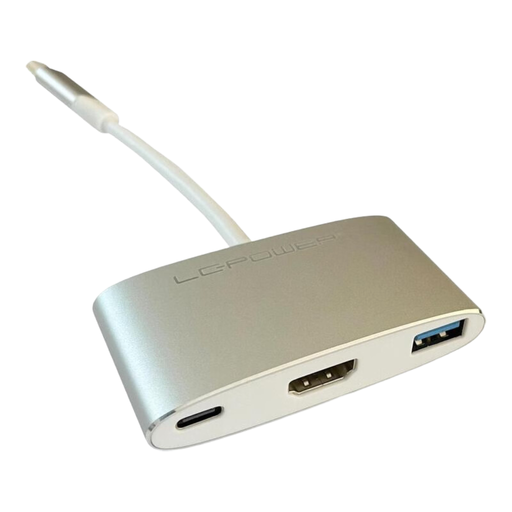
Why this product fits the profile: This compact 3-in-1 solution connects USB-A 3.0, HDMI and a USB-C PD port. The 0.85 m integrated cable makes it easy to position on your desk or when you're on the move.
The port types and performance values are clearly stated: HDMI, USB 3.0 up to 5 Gbit/s and PD up to 100 W. There's no vague listing of many identical ports.
USB-A 3.0, HDMI and PD in a small housing; supports extending a single external monitor.
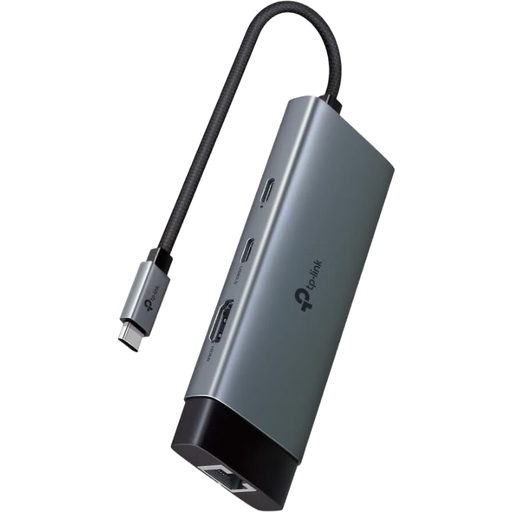
Why this product fits the profile: This hub combines HDMI with 4K at 60 Hz, Gigabit Ethernet, USB-A, a USB-C data port and PD up to 100 W. It's ideal for a structured workspace with a monitor and wired network.
The specifications for video, network, data rate and power supply are listed separately. This makes it easier to check whether the hub is compatible with your laptop.
4K output at 60 Hz, Gigabit Ethernet and multiple 5 Gbit/s data ports in one device.
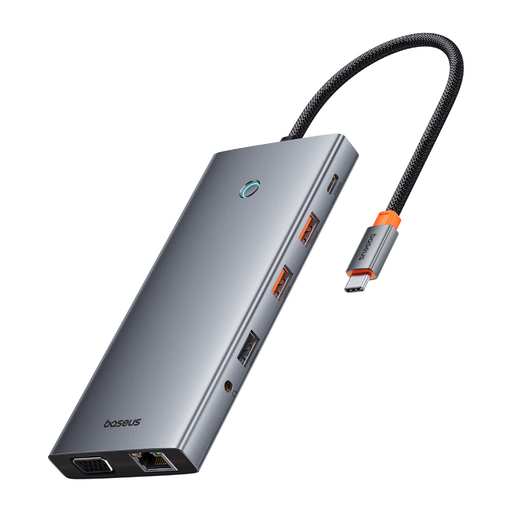
Why this product fits the profile: With two HDMI ports, DisplayPort, VGA, USB ports, SD and TF card readers, RJ45 and audio, this USB-C multiport hub is designed for extensive workstation setups.
The individual video standards and port speeds are specified. With multiple monitors, your graphics card, operating system and displays must still support the desired combination.
Up to 13 ports, USB 3.2 Gen 2 with up to 10 Gbit/s, SD/TF reader and USB-C PD up to 100 W.
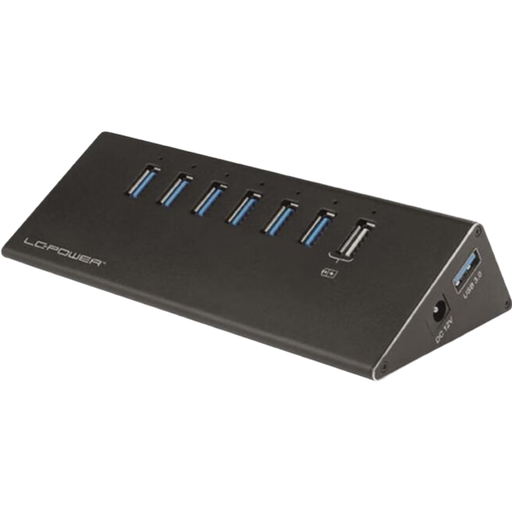
Why this product fits the profile: Seven USB-A 3.0 ports, including six data ports and a separate charging port, are ideal for printers, input devices and external drives at a stationary workstation.
The division between data and charging ports is clearly described. This reduces the risk of mistakenly planning to use a charging port as a fast data port.
Seven USB-A 3.0 ports with up to 5 Gbit/s and backwards-compatible support for USB 2.0 and USB 1.1.
We've put together a complete, regularly updated list of products that fully meet these strict selection criteria and the safety regulations in force in the EU.
No. Your laptop must support the appropriate USB-C standard. For HDMI output, DisplayPort Alternate Mode is usually required; for charging, the USB-C port must accept Power Delivery. In addition, the operating system, cable and power adapter can limit functionality.
This is possible with a USB-C hub with Power Delivery if the hub has a PD port and a suitable USB-C power adapter is connected. The hub's maximum power rating should not be equated with the power that actually reaches the laptop. The notebook manufacturer's specifications remain definitive.
The lifespan depends on factors including plug cycles, heat generation, cable strain and connected devices. Using the hub in a well-ventilated, dry environment and safely ejecting external storage can help extend its life. If you connect several power-hungry devices, you should observe the hub's total permissible power rating.