
Lieferung heute & morgen

Qualitätsgarantie

Willkommens-Angebote freischalten: KOSTENLOSE Lieferung | Bis zu 80 % RABATT | Kostenlose 30-Tage-JoyPlus-Testphase
App herunterladen
Modern laptops, especially models like the MacBook Pro, embrace a minimalist design with very few ports. This often leads to a practical problem: How do you connect an external monitor, a mouse, a keyboard, and an external hard drive at the same time? A USB-C Hub is the obvious solution. However, the market is crowded and full of products that overpromise and underdeliver.
As your Joybuy Product Recommendation Officer, I'll help you identify the common pitfalls and make an informed decision. The goal isn't to find the most expensive product, but the one that's right for your specific needs.
Many users invest in a Multiport Adapter only to find out after a short time that it's unreliable or can't handle all their tasks. Watch out for these three common issues to avoid making a bad purchase:
To steer clear of these problems, you should check three core aspects before buying. These define the actual performance and reliability of a hub.
Think carefully about which ports you need. A good USB Hub with HDMI is a must-have for many. Pay attention to the specification here: 4K@30Hz is standard, while 4K@60Hz provides a smoother picture but also demands more power from the hub and laptop. Other important ports include:
If you want to charge your notebook through the hub, a PD port is essential. A full-fledged Docking Station USB-C often provides 100 watts (W) of charging power. Smaller hubs are usually around 60W. Note that the hub itself consumes about 5-15W. If your laptop's power adapter supplies 65W and the hub needs 15W, only 50W will reach the laptop, reducing the charging speed. Check your laptop's power requirements and choose a hub with a sufficiently rated PD output.
The functionality of a USB-C hub heavily depends on the host device.
Instead of making a one-size-fits-all recommendation, we have selected products for three typical usage scenarios.
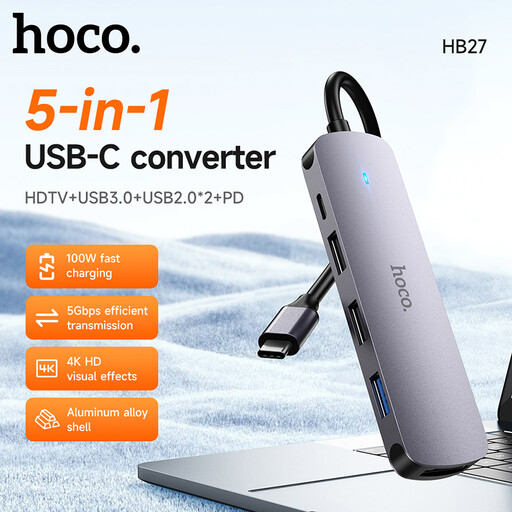
Why it's a good fit: Ideal for students or home users who need a basic expansion for their notebook. It covers the most common use cases—connecting a monitor, a fast hard drive, and charging the device—without breaking the bank.
The aluminum alloy casing aids in heat dissipation and prevents overheating. The dedicated 60W PD port ensures defined and stable charging performance.
Offers 5-in-1 functionality with 4K HDMI output and Power Delivery in a compact, portable form factor.
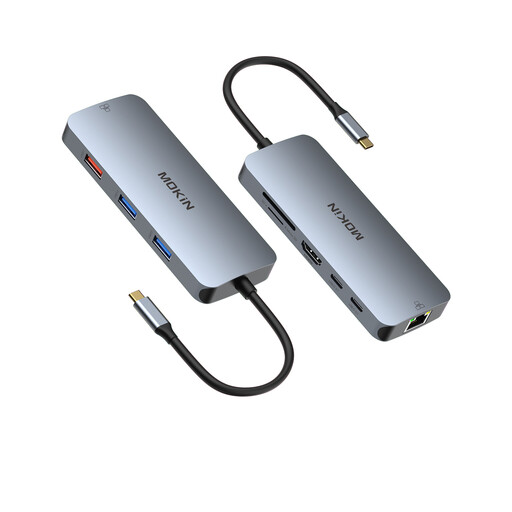
Why it's a good fit: For home office professionals or creatives looking for a full-fledged docking station replacement. The RJ45 port ensures a stable internet connection, while the variety of USB ports and card readers allows for connecting all peripherals. A true **MacBook Pro adapter** for your desk.
With 100W Power Delivery, it ensures sufficient charging power for high-performance laptops even when all ports are in use. The Gigabit Ethernet port bypasses the unreliability of Wi-Fi connections.
Comprehensive 9-in-1 connectivity, including a stable Gigabit Ethernet port and powerful 100W pass-through charging.
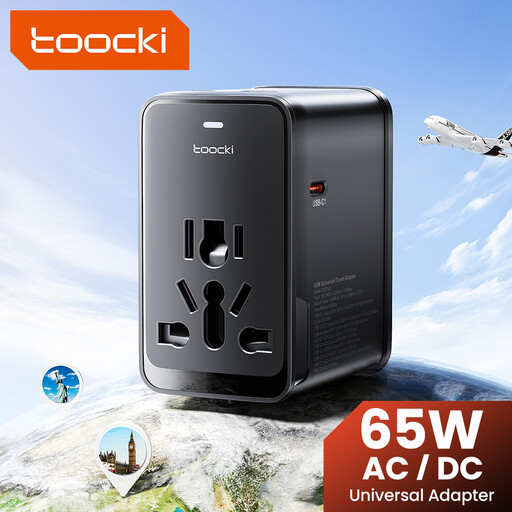
Why it's a good fit: This is the solution for anyone who travels globally. It's a **universal travel adapter** that covers outlets in the EU, UK, US, and Australia, while also functioning as a powerful 65W PD charger with four ports. It replaces a whole bag full of individual adapters and chargers.
Instead of combining multiple, potentially incompatible individual adapters, this device offers an integrated, tested solution. The 65W PD output is clearly specified and sufficient for most modern laptops and tablets.
Combines worldwide outlet compatibility with a powerful 65W PD charger and four USB ports in a single, compact device.
We have compiled a complete, real-time updated list of products that fully meet these strict selection criteria and safety standards.
When used correctly and with a quality product, the risk is minimal. Look for hubs with an aluminum casing, as it dissipates heat more effectively. Products from established brands typically include protection mechanisms against overcurrent and overvoltage. It is advisable to use your laptop's original power adapter to supply power through the hub's PD port.
This usually has one of two causes. First, your laptop, tablet, or smartphone's USB-C port must support DisplayPort Alternate Mode (DP Alt Mode). Not all USB-C ports are capable of this. Check your device's technical specifications. Second, the hub itself must also explicitly support video output. A simple Lightning to USB-C adapter, for example, typically only transfers data and power, but not a video signal.
The lines are often blurry. A USB-C Hub is typically smaller, more portable, and bus-powered (drawing power directly from the laptop). A Docking Station USB-C is usually larger, requires its own external power source, and often offers more ports and higher performance, for example, to run multiple 4K monitors. Products like the featured Mokin 9-in-1 hub act as a kind of compact docking station.